10
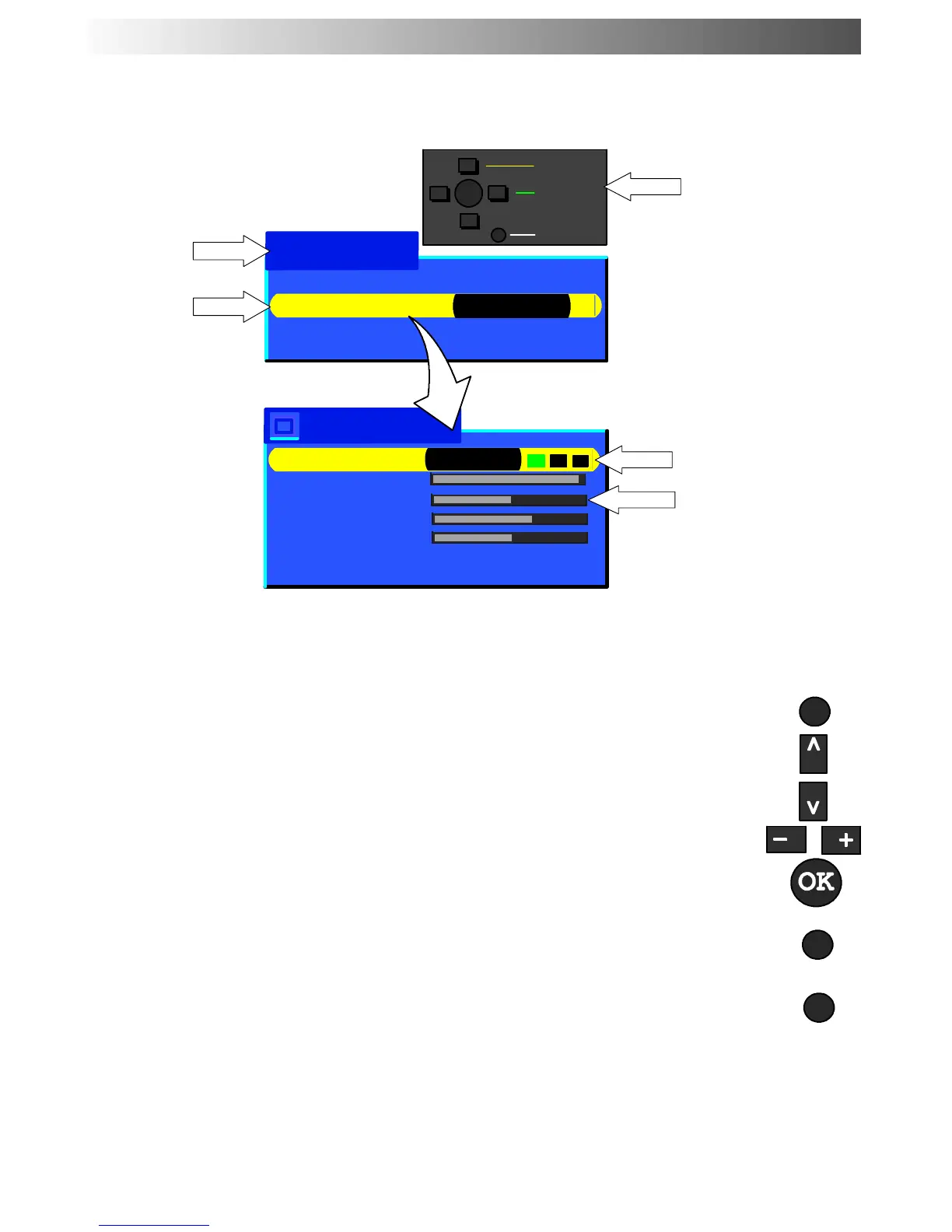
This TV has a comprehensive system of On Screen Display menu s to access
adjustments and options
Main Menu
−
∧
∨
+
OK
Select
Access
Exit
Picture Menu
Viewing Mode Dynamic
Contrast
Brightness
Colour
Sharpness
Colour Balance Normal
P-NR Off
Instructions
Menu Title
Sub-- menus
Indicator for options
Selection bar
Some selections, for example, Contrast, Brightness, Colour and Sharpness will allow you to
increase or decrease their level.
Some selections, for example, Off timer,allowachoicetobemade.
Some selections, for example Tuning menu, will lead to a further menu.
TheMENU buttonisusedtoopenthemainmenuandalsotoreturntotheprevious
menu.
MENU
The up and down cursor buttons are used to move the cursor up and down the menus.
The left and right cursor buttons are used to access menus, adjust levels or to select
from a range of options.
The OK button used to store and confirm tuning, OSD functions and other settings
The TV/AV button is used to exit the menu system and return to the normal viewing
screen.
TV/AV
Viewing Mode Dynamic
Picture Menu Access
Sound Menu
Setup Menu
N
N (Normalise) button --- resets all settings to their default levels
Last Position Memory
Certain functions have a last position memory, i.e. the setting at the time of switch-- off will b e the
setting used when the receiver is switched on again.
USING THE ON SCREEN DISPLAYS










 To Next Page