27
Q-- Link allows the television to communicate with your VCR (DVD/R)
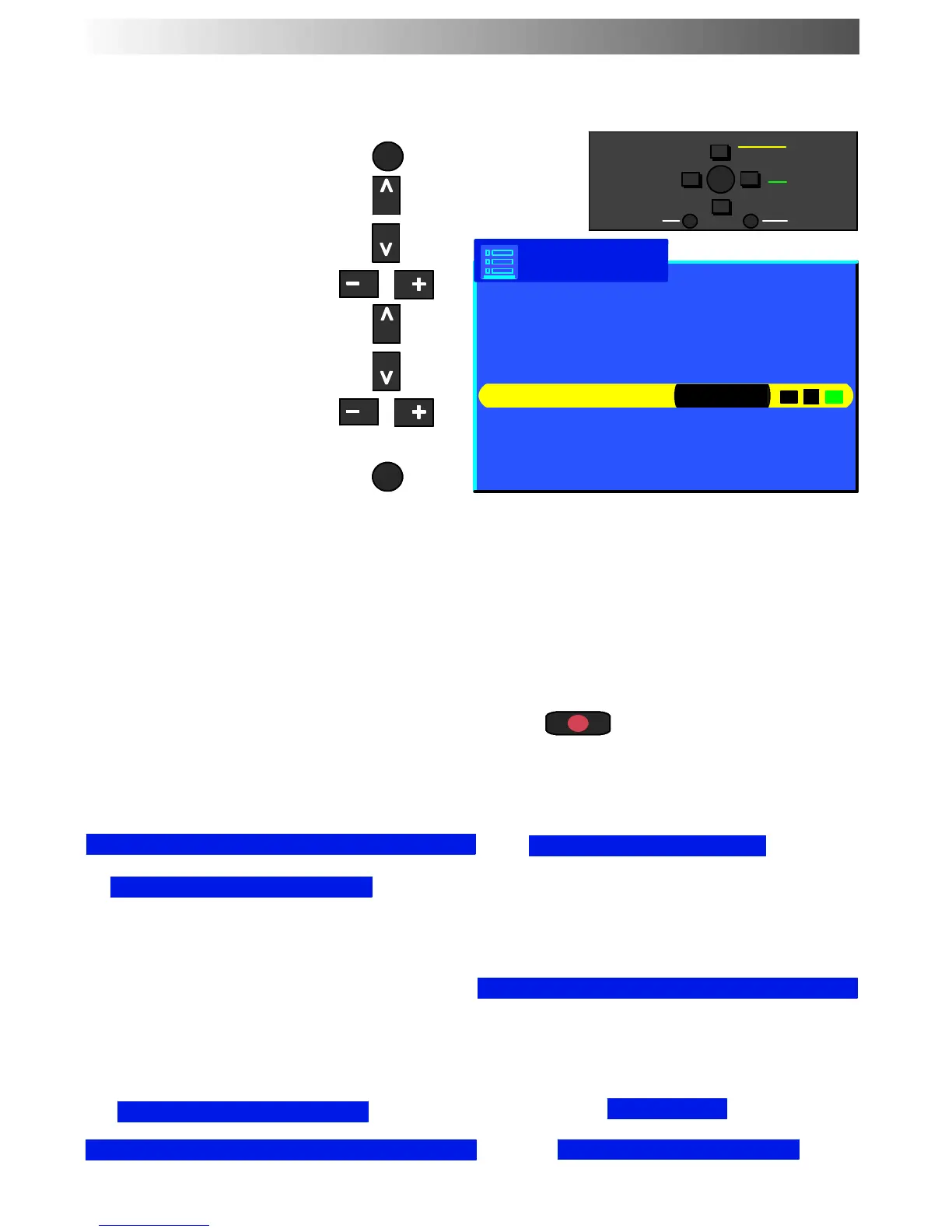
Open the Main menu
Move to Setup menu
Access Setup menu
Move to Q-- Link
Confirm the setiing is correct
for connected Q-- Link device
(AV1 or AV2)
Press the TV/AV button to exit
The V C R (DV D/R) mus t b e connected with a SCA RT lead (full function type) attached b etween the
AV1 or AV2 socket of the television and the a pp rop riate sock et on your VCR (DVD/R) . See the VCR
(DVD/R) handb ook for fur ther inform ation. Q-- Link, NEXTVIEWLINK or similar technology allows
the television to instruct a compatible VCR (DVD/R) to record the programme that is currently
being disp layed on screen, regard less of which p r ogr amm e position is VC R (DVD/R) curr ently set
to, thus simplifying the process of recording programmes.
To record the programme you are currently watching
Press the DIRECT TV REC button on the remote control
DIRECT T
REC
If the VCR (DVD/R) is off, it will automatically switch on when you press the DIRECT TV REC button.
A message, sent from the VCR ( DVD/R), will appear on scr een showing what is being recorded, or if it
is not possible to record:
DOWNLOAD IN PROGRESS
Recording TV source
Recording stopped - TV source changed
No recording - Check tape or disc
VCR (DVD/R) is recording the programme
signal from its own tuner. If you wish you
canswitchofftheTVandleavetheVCR
(DVD/R) recording in the normal way.
VCR (DVD/R) is recording the programme signal
from the television.
You must not change programme position or
switchofftheTV:ifyoudo,theVCR(DVD/R)will
automatically stop recording and switch off.
The write protection tab on the back of the
cassette has been removed.
Unable to download, - Check Equipment
Download
DOWNLOAD. Programme :
Examples of other messages that might be displayed are:
Recording in progress
Q-- LINK
Setup menu
−
∧
∨
+
OK
Select
Change
Exit
Return
AV1 Out Monitor
AV2 out TV
Teletext Flof
Off timer Off
Flicker reduction Normal
Q-Link Select AV2
Text Language West
Tuning Menu
OSD Language Access
Geomagnetic
MENU
TV/AV










 To Next Page