MENU
TV/AV
19
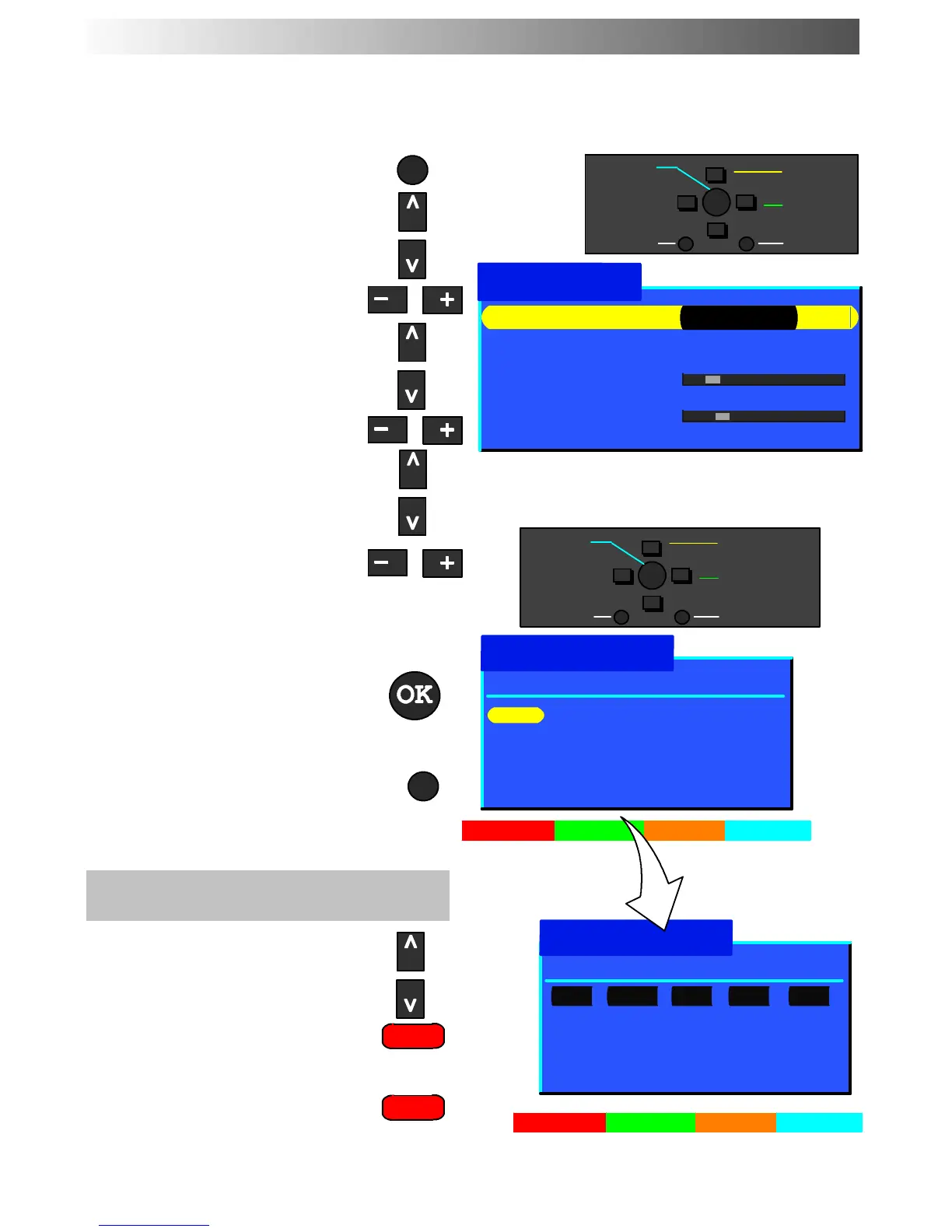
The Progr amme edit menu allows you to edit the pro gramme position settings
Open the Main menu
Move to Setup menu
Access Setup menu
Move to Tuning menu
Access Tuning menu
Move to Progr amme edit menu
Access Programme edit menu
Make required changes (see sections
below)
Press OK button to store changes
If you have finished in the Programme
edit menu, press the TV/AV button to
exit
To delete an unwanted programme
position
Choose the programme position
PresstheRedbuttononremote
control
Press the Red button again to
confirm
TUNING MENU -- PROGRAMME EDIT
Tuning menu
−
∧
∨
+
OK
Select
Access
Exit
Return
1: CH41 XYZ Off SC3
2: - Off SC3
3: - Off SC3
4: - Off SC3
5: - Off SC3
Prog. Chan. Name Lock Sys
Programme edit
−
∧
∨
+
OK
Change
programme
Select
option
Exit
Return
Prog. Chan. Name Lock Sys
Programme edit
Delete Add Move Download
Delete Cancel
Programme edit Access
Auto setup
Manual tuning
Fine tuning
Colour system Auto
Volume correc.
Decoder (AV2) Off
1: CH41 XYZ Off SC3
2: - Off SC3
3: - Off SC3
4: - Off SC3
5: - Off SC3
Store
Store










 To Next Page