21
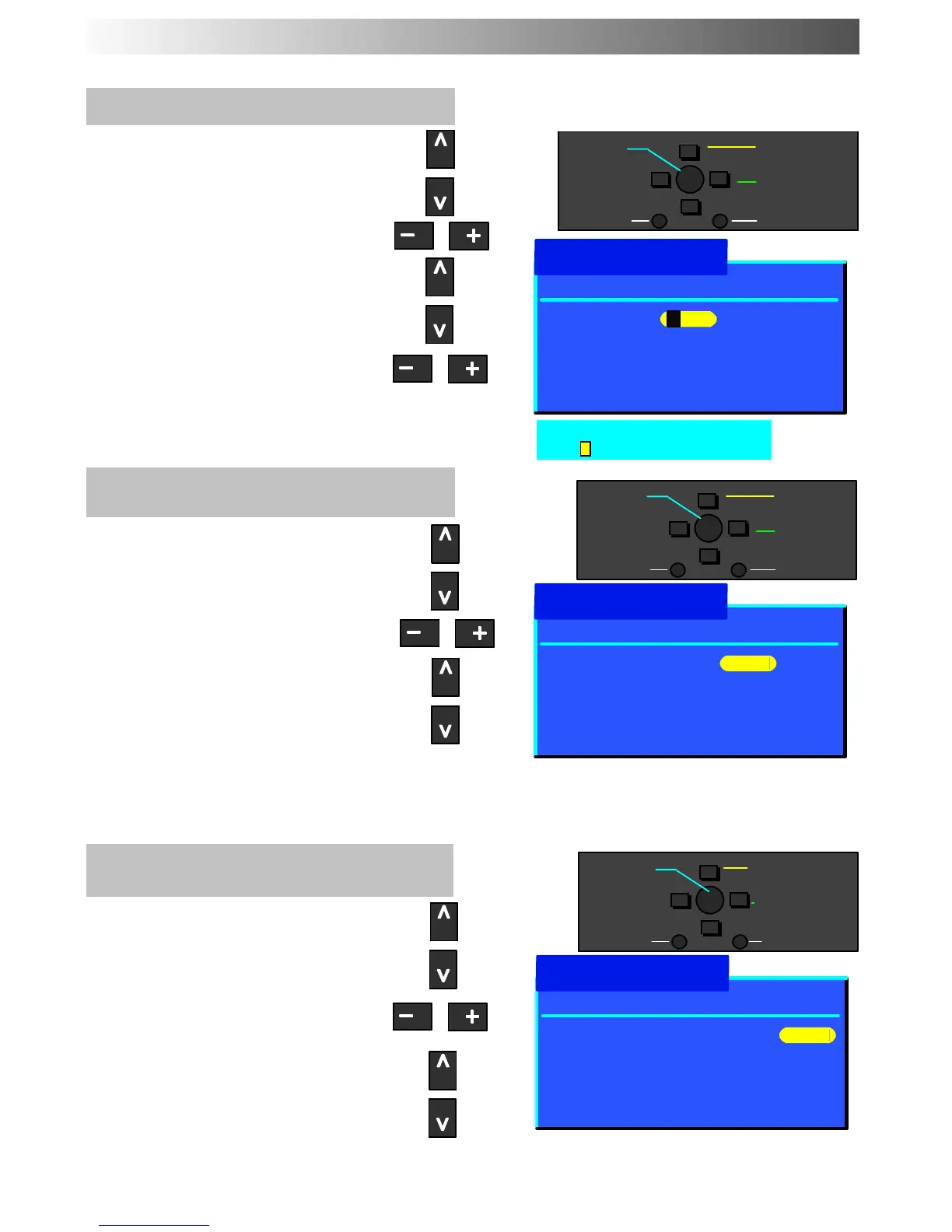
To rename a programme position
Choose the programme position
Move to the Name column
Choose the new character
Move to the next character position
Continue until renaming is done
To lock a programme position to
prevent access
Choose the programme position
Move to the lock column
Choose between lock on or lock off
Note :
When a programme position is locked,
Direct Channel Access u sing the ’C’ and
numeric keys on the remote control is
not available for.
To c h a n g e t h e T V -- system for a
programme position
Choose the programme position
Move to the Sys column
Choose the required sound system:
SC1 : PAL B/G, SECAM B/G
SC2 : PAL I
SC3 : PAL D/K / SECAM D/K
F:SECAML/L’
TUNING MENU -- PROGRAMME EDIT
Prog. Chan. Name Lock Sys
Programme edit
1: CH41 XYZ Off SC3
2: - Off SC3
3: - Off SC3
4: - Off SC3
5: - Off SC3
−
∧
∨
+
OK
Change
character
Select
option
Exit
Return
1: CH41 XYZ Off SC3
2: - Off SC3
3: - Off SC3
4: - Off SC3
5: - Off SC3
Prog. Chan. Name Lock Sys
Programme edit
−
∧
∨
+
OK
Lock
off/on
Select
option
Exit
Return
1: CH41 XYZ Off SC3
2: - Off SC3
3: - Off SC3
4: - Off SC3
5: - Off SC3
Prog. Chan. Name Lock Sys
Programme edit
−
∧
∨
+
OK
Change
TV system
Select
option
Exit
Return
ABCDEFGHIJKLMNOPQRST
UVWXYZ+-. 0123456789
Store
Store
Store










 To Next Page