7
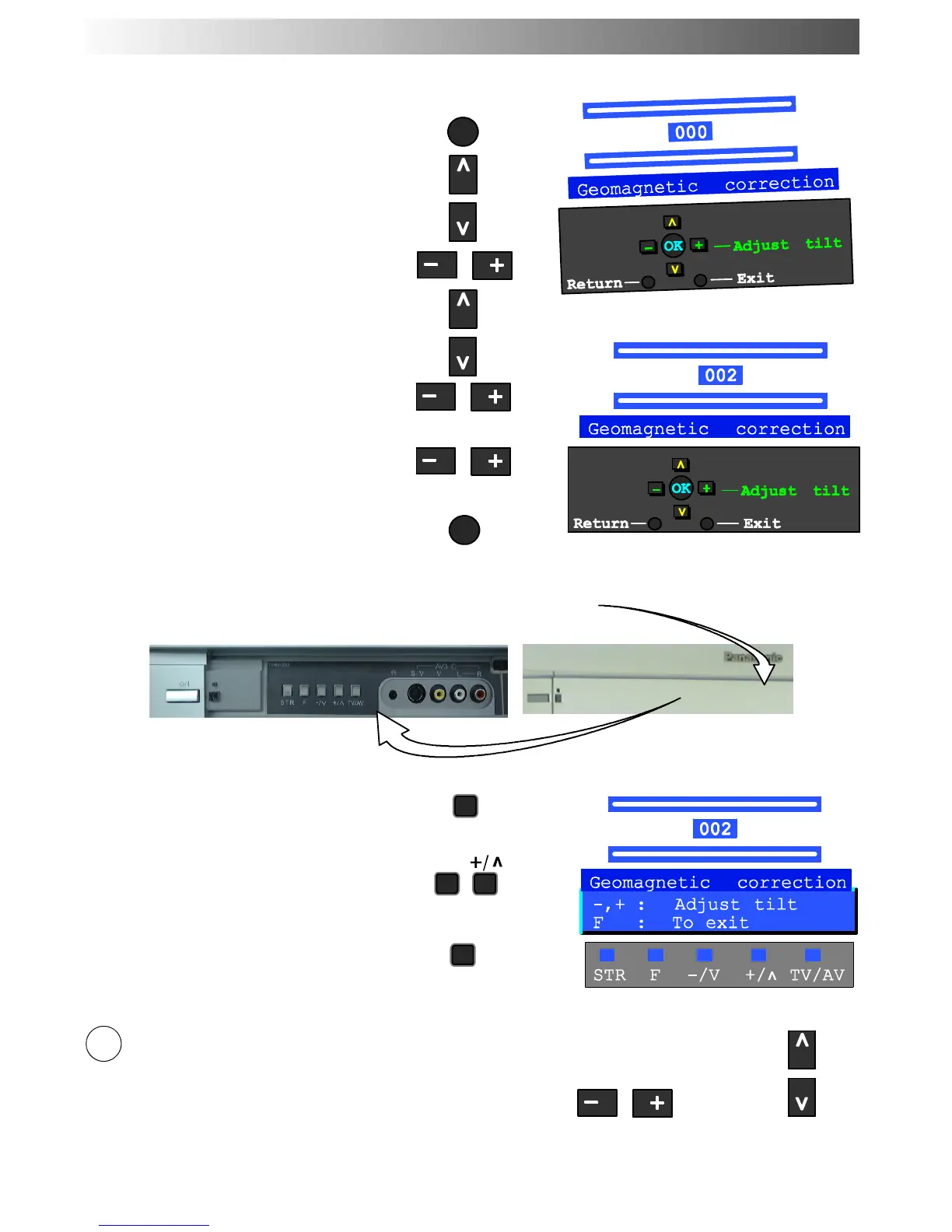
Press the MAIN menu button
Move to the SETUP menu option
Access the SETUP menu
Move to the Geomagnetic menu option
Access the Geomagnetic menu
Adjust the picture tilt as necessary
Press the TV/AV button to exit
MENU
TV/AV
Pressandreleaseheretoopenflap
Press the F button repeatedly until the
Geomagnetic Correction feature is
displayed.
Press the + or --- buttons repeatedly until
the p icture appears to be level.
Press the F button again to return to
normal viewing. Close the flap to prevent
damage.
The function ’geomagnetic correction’ is also accessible from the front panel.
F
F
--- / v
Adjust Volume
Change Programme
Youarenowreadytobeginviewingprogrammes
The cursor controls provide the two basic functions:
7
QUICK START GUIDE










 To Next Page