34
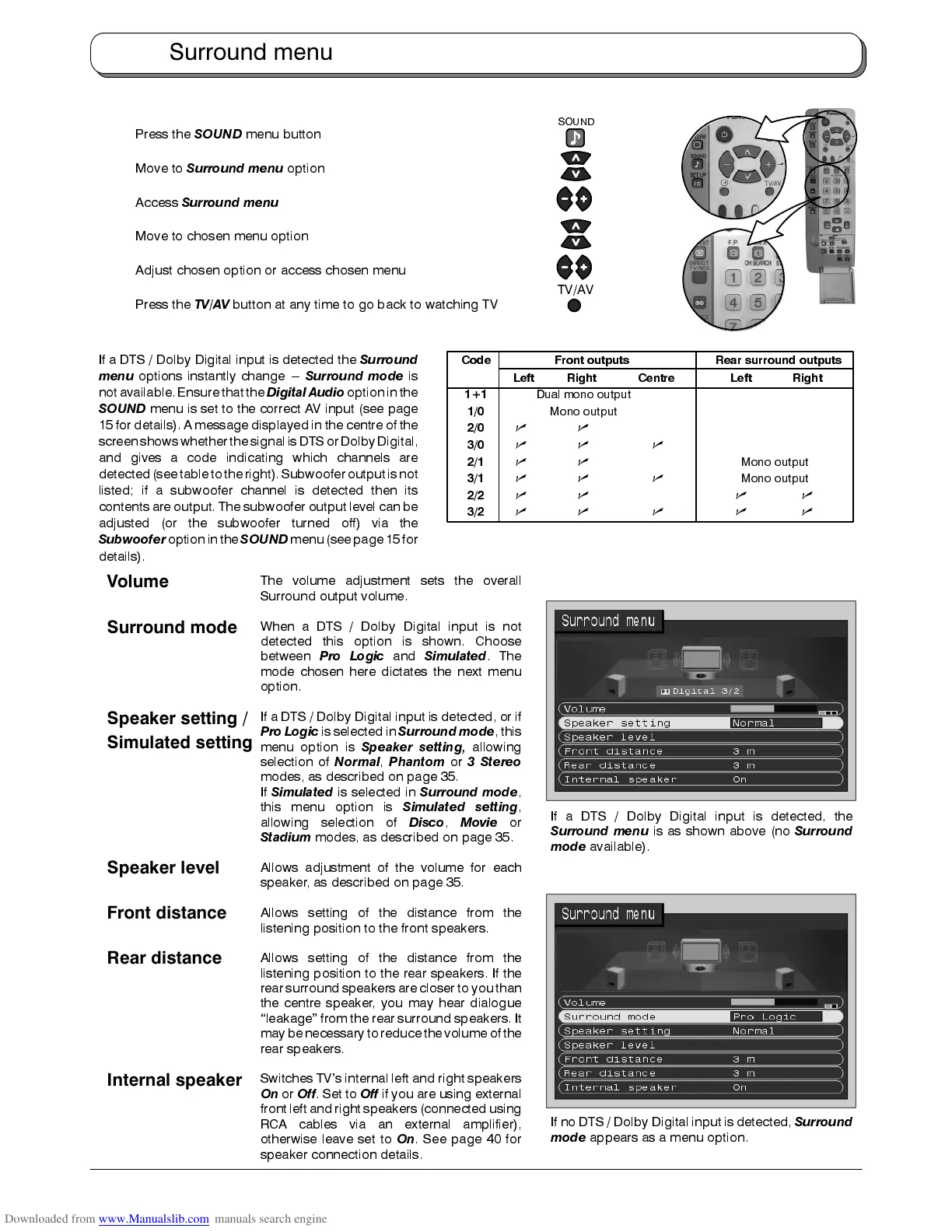
Press the
SOUND
menu button
Move to
Surround menu
option
Access
Surround menu
Move to chosen menu option
Adjust chosen option or access chosen menu
Press the
TV/AV
button at any time to go back to watching TV
If a DTS / Dolby Digital input is detected the
Surround
menu
options instantly change ---
Surround mode
is
not available.Ensure thatthe
Digital Audio
option inthe
SOUND
menu is set to the correct AV input (see page
15 for details). A message displayed in the centre of the
screenshows whetherthe signalisDTS orDolbyDigital,
and gives a code indicating which channels are
detected(see tableto theright).Subwooferoutput isnot
listed; if a subwoofer channel is detected then its
contents are output. The subwoofer output level can be
adjusted (or the subwoofer turned off) via the
Subwoofer
optionin the
SOUND
menu(see page15 for
details).
The volume adjustment sets the overall
Surround output volume.
When a DTS / Dolby Digital input is not
detected this option is shown. Choose
between
Pro Logic
and
Simulated
. The
mode chosen here dictates the next menu
option.
If a DTS / Dolby Digital input is detected, or if
Pro Logic
is selected in
Surround mode
, this
menu option is
Speaker setting,
allowing
selection of
Normal
,
Phantom
or
3 Stereo
modes, as described on page 35.
If
Simulated
is selected in
Surround mode
,
this menu option is
Simulated setting
,
allowing selection of
Disco
,
Movie
or
Stadium
modes, as described on page 35.
Allows adjustment of the volume for each
speaker, as described on page 35.
Allows setting of the distance from the
listening position to the front speakers.
Allows setting of the distance from the
listening position to the rear speakers. If the
rear surround speakersare closer to youthan
the centre speaker, you may hear dialogue
“leakage” from the rear surround speakers. It
maybe necessaryto reducethe volumeof the
rear speakers.
Switches TV’s internal left and right speakers
On
or
Off
. Set to
Off
if you are using external
front left andright speakers (connected using
RCA cables via an external amplifier),
otherwise leave set to
On
. See page 40 for
speaker connection details.
Surround menu
If no DTS / Dolby Digital input is detected,
Surround
mode
appears as a menu option.
If a DTS / Dolby Digital input is detected, the
Surround menu
is as shown above (no
Surround
mode
available).
TV/AV
SOUND
Code Front outputs Rear surround outputs
Left Right Centre Left Right
1+1
Dual mono output
1/0
Mono output
2/0
nn
3/0
nn n
2/1
nn
Mono output
3/1
nn n
Mono output
2/2
nn n n
3/2
nn n n n
Surround mode
Speaker setting /
Simulated setting
Volume
Speaker level
Rear distance
Front distance
Internal speaker










 To Next Page