5
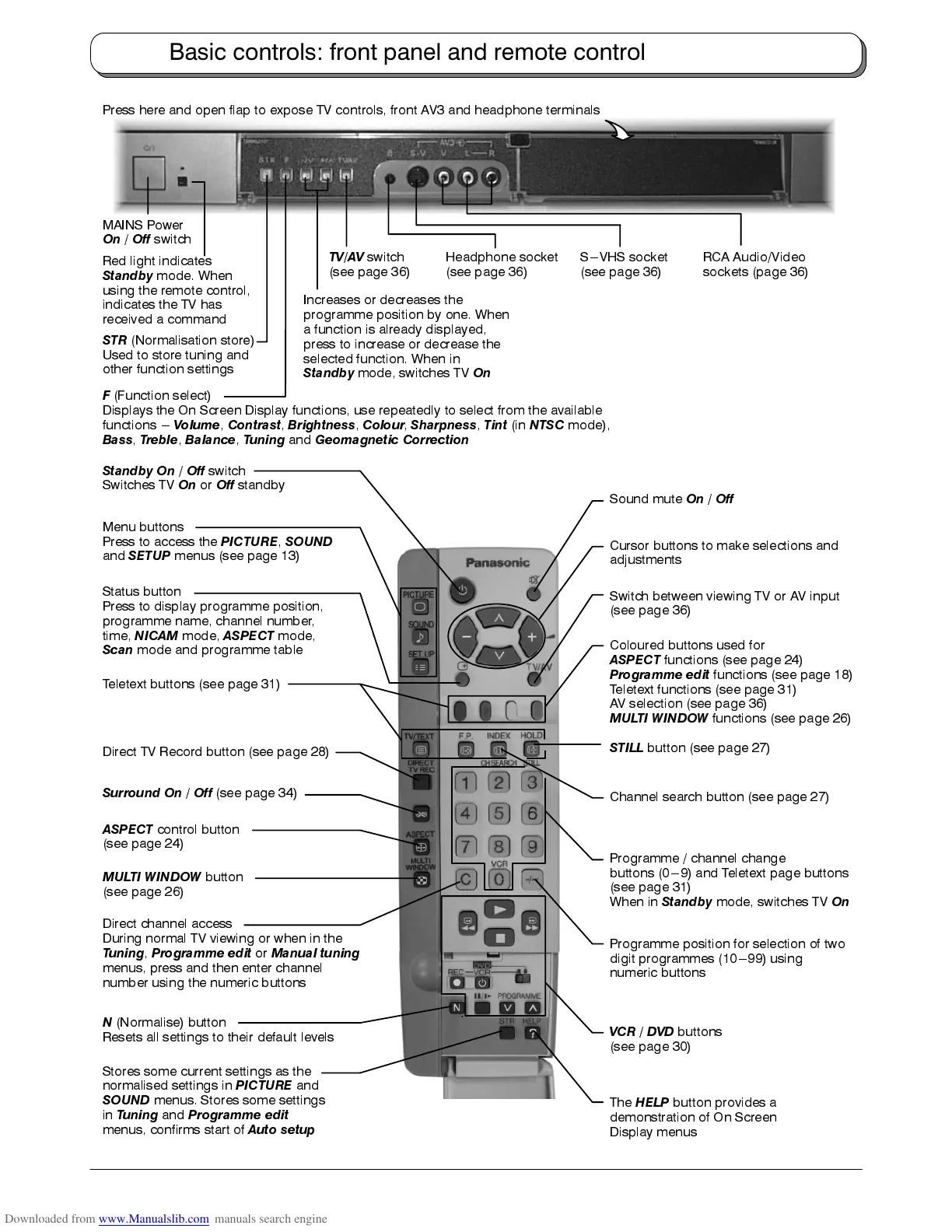
Switch between viewing TV or AV input
(see page 36)
Standby On
/
Off
switch
Switches TV
On
or
Off
standby
Programme position for selection of two
digit programmes (10---99) using
numeric buttons
Programme / channel change
buttons (0---9) and Teletext page buttons
(see page 31)
When in
Standby
mode, switches TV
On
Menu buttons
Press to access the
PICTURE
,
SOUND
and
SETUP
menus (see page 13)
Sound mute
On
/
Off
Direct channel access
During normal TV viewing or when in the
Tuning
,
Programme edit
or
Manual tuning
menus, press and then enter channel
number using the numeric buttons
Teletext buttons (see page 31)
Coloured buttons used for
ASPECT
functions (see page 24)
Programme edit
functions (see page 18)
Teletext functions (see page 31)
AV selection (see page 36)
MULTI WINDOW
functions (see page 26)
N
(Normalise) button
Resets all settings to their default levels
Stores some current settings as the
normalised settings in
PICTURE
and
SOUND
menus. Stores some settings
in
Tuning
and
Programme edit
menus, confirms start of
Auto setup
Cursor buttons to make selections and
adjustments
The
HELP
button provides a
demonstration of On Screen
Display menus
Surround On
/
Off
(see page 34)
Direct TV Record button (see page 28)
Status button
Press to display programme position,
programme name, channel number,
time,
NICAM
mode,
ASPECT
mode,
Scan
mode and programme table
VCR / DVD
buttons
(see page 30)
MAINS Power
On
/
Off
switch
STR
(Normalisation store)
Used to store tuning and
other function settings
F
(Function select)
Displays the On Screen Display functions, use repeatedly to select from the available
functions ---
Volume
,
Contrast
,
Brightness
,
Colour
,
Sharpness
,
Tint
(in
NTSC
mode),
Bass
,
Treble
,
Balance
,
Tuning
and
Geomagnetic Correction
Increases or decreases the
programme position by one. When
a function is already displayed,
press to increase or decrease the
selected function. When in
Standby
mode, switches TV
On
TV/AV
switch
(see page 36)
Headphone socket
(see page 36)
RCA Audio/Video
sockets (page 36)
Red light indicates
Standby
mode. When
using the remote control,
indicates the TV has
received a command
ASPECT
control button
(see page 24)
S---VHS socket
(see page 36)
MULTI WINDOW
button
(see page 26)
STILL
button (see page 27)
Channel search button (see page 27)
Press here and open flap to expose TV controls, front AV3 and headphone terminals
Basic controls: front panel and remote control











 To Next Page