29
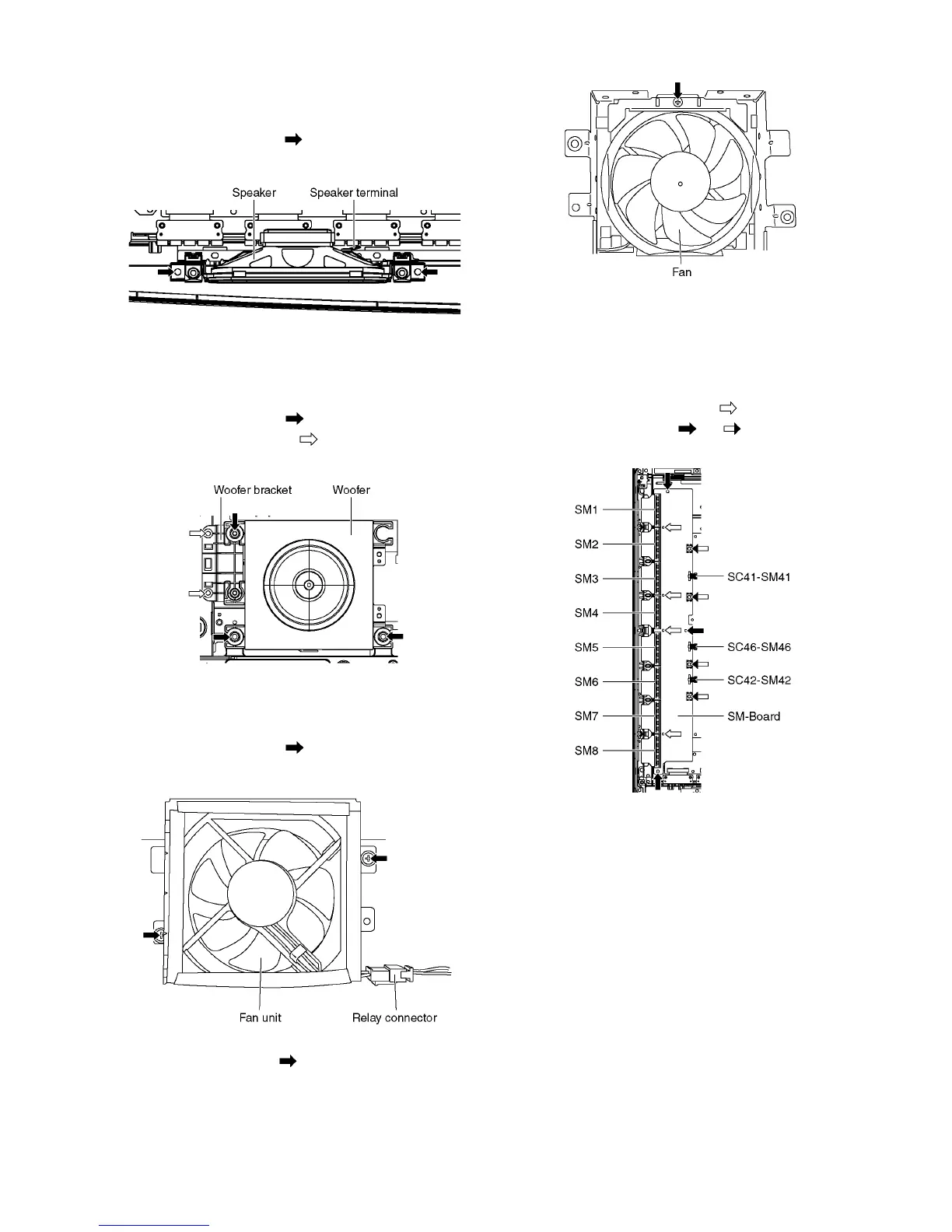
9.8. Remove the Speakers
1. Unlock the cable clampers to free the cable.
2. Disconnect the Speaker terminal.
3. Remove the screws (×2 each) and remove the Speak-
ers (L, R).
9.9. Remove the Woofer
1. Unlock the cable clampers to free the cable.
2. Disconnect the connector (A12). (See section 9.6.)
3. Remove the screws (×3 ) and remove the Woofer.
4. Remove the screws (×2 ) and remove the Woofer
bracket.
9.10. Remove the Fan
1. Unlock the cable clampers to free the cable.
2. Remove the screws (×2 ).
3. Remove the relay connectors and remove the Fan unit.
4. Remove the screw (×1 ) on the back side.
5. Remove the Fan.
9.11. Remove the SM-Board
1. Remove the flexible cables (SM1, SM2, SM3, SM4, SM5,
SM6, SM7 and SM8) connected to the SM-Board.
2. Remove the bridge connectors (SC41-SM41, SC42-
SM42 and SC46-SM46).
3. Remove the molding props (×4 ).
4. Remove the screws (×3 , ×4 ) and remove the SM-
Board.




 To Next Page