EasyManua.ls Logo

Panasonic VL-SWD501EX - User Manual

Panasonic VL-SWD501EX
56 pages
Print Icon
To Next Page IconTo Next Page
Loading...
English Français Deutsch Italiano
Español
Nederlands
VL-SWD501EX
VL-SWD501UEX
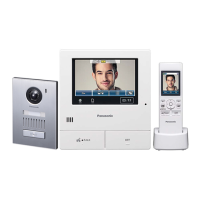
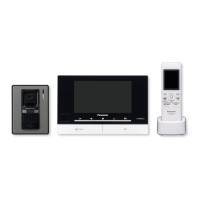
Wireless Video Intercom System
Operating Instructions
Thank you for purchasing a Panasonic product.
Please read this manual before using the product and save it for future reference.
Installation Guide is supplied separately.
Model No.

Table of Contents

Other manuals for Panasonic VL-SWD501EX

Questions and Answers

  • M
    mannmichelleSep 12, 2025
    Why do the images on my Panasonic VL-SWD501EX Intercom System have uneven color?
    • A
      allenbartonSep 12, 2025
      If images on your Panasonic Intercom System have uneven colour, AC lights such as fluorescent lights may be the cause. Setting 'Uneven colour prevention' to 'On' may reduce the uneven colour and flickering.
  • J
    Jeffrey WeaverAug 25, 2025
    Why doesn't the ringtone sound on my Panasonic VL-SWD501EX Intercom System?
    • D
      Diane RamosAug 25, 2025
      If the ringtone on your Panasonic Intercom System doorphone or camera isn't working, there could be a few reasons. First, check if the ringtone volume is muted and activate it. Second, if you're using a sub monitor, its batteries might be discharged, so try charging them.
  • B
    Brenda BrooksAug 25, 2025
    How to improve dark night images on Panasonic VL-SWD501EX?
    • A
      Angelica DuffyAug 26, 2025
      If the images on your Panasonic Intercom System are dark at night and faces are hard to see, the automatic illumination might be disabled. Try changing the setting to 'Enable'. Also, consider installing extra lights around the doorphone for better visibility.
  • S
    Stephen HuffSep 23, 2025
    Why are images flickering on my Panasonic VL-SWD501EX?
    • J
      Jennifer NunezSep 23, 2025
      If the images on your Panasonic Intercom System are flickering, and AC (alternating current) lights such as fluorescent lights are used near the doorphone, this is not a malfunction.
  • E
    Erica BrownSep 12, 2025
    How do I turn off Demo Mode on my Panasonic Intercom System?
    • M
      Morgan WhiteSep 12, 2025
      If 'Demo mode' is displayed on the screen of your Panasonic Intercom System, the 'Demo mode' function setting is configured on the main monitor. From 'Other' in the function settings, set 'Demo mode' to 'Off'.
  • T
    Tanya ObrienSep 17, 2025
    What to do if Panasonic Intercom System sub monitor won't charge?
    • S
      Sherri MorrisSep 17, 2025
      If the charge indicator doesn't light up when you place the sub monitor on the charger for your Panasonic Intercom System, ensure the AC adapter is firmly plugged into the power outlet. Also, make sure the sub monitor is correctly placed on the charger so that the charge indicator lights up in red. If the batteries are new or fully discharged, place the sub monitor on the charger and wait for a few minutes.
  • D
    Daniel BakerSep 5, 2025
    What to do if my Panasonic VL-SWD501EX Intercom System is not working properly?
    • J
      John RochaSep 5, 2025
      If your Panasonic Intercom System isn't working correctly, try pressing the RESET button on the bottom of the main monitor with a pointed object. Also, try removing and reinserting the battery.
  • M
    Megan VaughnSep 6, 2025
    Why can't I see people properly on my Panasonic VL-SWD501EX Intercom System?
    • D
      Douglas WilliamsSep 6, 2025
      You may not be able to correctly view people with the camera in your Panasonic Intercom System in the following cases: when people are moving near the edge of the sensor range, when people move slowly or quickly across the front of the camera, or when people move closely across the front of the camera (approx. 1 m).
  • S
    Stephen HammondSep 18, 2025
    Why are camera detection notifications not showing on Panasonic Intercom System sub monitor?
    • J
      James WebbSep 18, 2025
      If you are not receiving notifications for camera detections on the sub monitor of your Panasonic Intercom System, it might be because the sub monitor is too far from the main monitor or there is an obstruction like a concrete wall blocking the signal. Try moving the sub monitor closer to the main monitor or to an area without obstructions. Also, ensure that the sub monitor’s batteries are charged.
  • C
    christopher42Aug 30, 2025
    How to brighten faces on Panasonic VL-SWD501EX Intercom System images?
    • G
      George MathewsAug 30, 2025
      If the images of people's faces appear dark on your Panasonic Intercom System, try using the backlight compensation function.

Summary

Important Information

For Your Safety

Critical safety warnings to prevent severe injury, fire, and electric shock.

Important Safety Instructions

Essential safety precautions for product usage, including water and electrical safety.

Preparation

Using SD Cards (Sold Separately)

Details on using SD cards for recording images and calls, including cautions.

Talking and Monitoring

Answering Calls

Instructions on how to answer incoming calls from the doorphone.

Recording and Playing

Image and Audio Recording

Information on recording capacity for SD cards and internal memory.

Using a Camera

Connecting with a Camera

Information on connecting and registering a camera to the system.

Changing Camera Settings

How to adjust sensor, screen, and sound settings for the camera.

Using Electric Locks

Connecting with Electric Locks

How to connect and configure electric locks for door/gate access.

Configuring Electric Locks

Steps to set up electric locks, including unlocking time and buzzer sound.

Unlocking Electric Locks

How to operate electric locks from the main or sub monitor.

Incoming Call Operations

Handling Multiple Incoming Calls on Main Monitor

Describes how the main monitor handles multiple simultaneous incoming calls.

Handling Multiple Incoming Calls on Sub Monitor

Describes how the sub monitor handles multiple simultaneous incoming calls.

General Information

Registering Sub Monitors

Steps to register additional sub monitors to the main unit.

Using SD Cards (Formatting;Copying;Playing)

Managing SD cards, including formatting, copying data, and playing images.

Troubleshooting

Monitor Display (Doorphone Images)

Troubleshooting common issues with doorphone image display.

Monitor Display (Camera Images)

Troubleshooting common issues with camera image display.

Call Audio Troubleshooting

Troubleshooting sound issues like cutting out or feedback during calls.

Sub Monitor Charging Troubleshooting

Troubleshooting issues related to charging the sub monitor.

Camera Sensor Operations Troubleshooting

Troubleshooting problems with camera sensor detection not working.

Main Monitor Error Messages

Explains error messages that may appear on the main monitor.

Sub Monitor Error Messages

Explains error messages that may appear on the sub monitor.

Panasonic VL-SWD501EX Specifications

General IconGeneral
TypeVideo Intercom System
Monitor TypeLCD
Wireless HandsetYes
Expandable Wireless HandsetsUp to 6
Door Station CameraYes
Picture RecordingYes
SD Card RecordingYes
Night VisionYes
Electric Lock Release SupportYes
Intercom CallYes
Power Source (Main Monitor)AC Adapter
Wireless StandardDECT
Camera SensorCMOS
AudioTwo-way
Screen Size5 inches
Operating Temperature-10°C to +50°C
Power SupplyAC 100-240V, 50/60Hz
Weather ResistanceIP44 (Door Station)

Related product manuals