EasyManua.ls Logo

Panasonic WV-S2531LTN - User Manual

Panasonic WV-S2531LTN
32 pages
Print Icon
To Next Page IconTo Next Page
Loading...
Before attempting to connect or operate this product,
please read these instructions carefully and save this manual for future use.
The model number is abbreviated in some descriptions in this manual.
Important Information
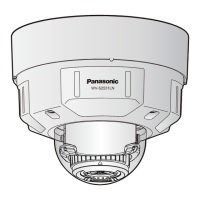
Network Camera
WV-S2531LN
WV-S2531LN
* For information about the installation tasks, refer to the provided Installation
Guide. For information about how to perform the settings and how to
operate the camera, refer to the Operating Instructions on the provided
CD-ROM.
Model No. WV-S2531LTN
WV-S2531LN
WV-S2511LN

Other manuals for Panasonic WV-S2531LTN

Questions and Answers

Summary

System Requirements and Manuals

PC System Requirements

Lists hardware and software needed for PC operation.

Security and Network Safety

Network Security Risks

Addresses potential risks when connecting the camera to a network.

Safety Precautions

General Safety Instructions

Covers a broad range of safety instructions for product handling and environment.

Use Precautions

Screw Tightening

Ensure screws are tightened to specified torque to prevent drops.

Internet Accessibility & Performance

Covers network access security and stable operation conditions.

Product Handling and Care

Guides on careful handling, avoiding shock, and proper storage.

Installation Precautions

Mounting and Area Selection

Covers secure mounting, power supply, and choosing the right installation area.

Location Restrictions and Materials

Details prohibited locations and interaction with rubber products.

Screw Tightening and Sunlight

Guidelines for screw tightening and avoiding direct sunlight.

Parts and Functions Overview

Cable Connections

Power and Audio Cable Connections

Network Connection via PoE Hub

Indicators and Buttons

Initial Set and Network Indicators

Describes the Initial Set button and network indicators (LINK, ACT).

SD Card Indicators and Buttons

SD Card Indicators and Buttons

Explains SD card indicators (MOUNT, ERROR) and control buttons (ON/OFF, AF, Zoom).

SD Memory Card Management

Troubleshooting Common Issues

Power and Network Issues

Solutions for power on problems and network link indicator issues.

SD Card Error Troubleshooting

Addresses the SD ERROR/AF indicator showing red and related issues.

Audio Input and Focus Issues

Specifications - Basic

Specifications - Camera

Image Enhancement and Processing

Specifications - Lens

Specifications - Network

Specifications - Coding and Security

Summary

System Requirements and Manuals

PC System Requirements

Lists hardware and software needed for PC operation.

Security and Network Safety

Network Security Risks

Addresses potential risks when connecting the camera to a network.

Safety Precautions

General Safety Instructions

Covers a broad range of safety instructions for product handling and environment.

Use Precautions

Screw Tightening

Ensure screws are tightened to specified torque to prevent drops.

Internet Accessibility & Performance

Covers network access security and stable operation conditions.

Product Handling and Care

Guides on careful handling, avoiding shock, and proper storage.

Installation Precautions

Mounting and Area Selection

Covers secure mounting, power supply, and choosing the right installation area.

Location Restrictions and Materials

Details prohibited locations and interaction with rubber products.

Screw Tightening and Sunlight

Guidelines for screw tightening and avoiding direct sunlight.

Parts and Functions Overview

Cable Connections

Power and Audio Cable Connections

Network Connection via PoE Hub

Indicators and Buttons

Initial Set and Network Indicators

Describes the Initial Set button and network indicators (LINK, ACT).

SD Card Indicators and Buttons

SD Card Indicators and Buttons

Explains SD card indicators (MOUNT, ERROR) and control buttons (ON/OFF, AF, Zoom).

SD Memory Card Management

Troubleshooting Common Issues

Power and Network Issues

Solutions for power on problems and network link indicator issues.

SD Card Error Troubleshooting

Addresses the SD ERROR/AF indicator showing red and related issues.

Audio Input and Focus Issues

Specifications - Basic

Specifications - Camera

Image Enhancement and Processing

Specifications - Lens

Specifications - Network

Specifications - Coding and Security

Panasonic WV-S2531LTN Specifications

General IconGeneral
BrandPanasonic
ModelWV-S2531LTN
CategorySecurity Camera
LanguageEnglish

Related product manuals