EasyManua.ls Logo

Panasonic WV-SFN310 - User Manual

Panasonic WV-SFN310
210 pages
Print Icon
To Next Page IconTo Next Page
Loading...
Operating Instructions
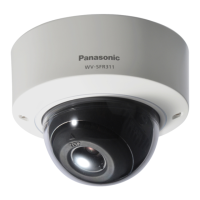
Network Camera
Model No. WV-SFV311/WV-SFV310
WV-SFR311/WV-SFR310
WV-SFN311/WV-SFN310
WV-SFV311
WV-SFN311
Before attempting to connect or operate this product, please read these instructions
carefully and save this manual for future use.
The model number is abbreviated in some descriptions in this manual.

Table of Contents

Other manuals for Panasonic WV-SFN310

Questions and Answers

  • N
    Nicole SpearsAug 13, 2025
    What to do if Panasonic Security Camera power is not turned on?
    • A
      Angela PadillaAug 13, 2025
      If your Panasonic Security Camera isn't powering on, there are a couple of things to check. If you're using a PoE (Power over Ethernet) device, make sure the connection is properly established. If you're using a DC power supply, double-check that the power plug is firmly connected.
  • E
    Elizabeth PalmerAug 17, 2025
    Why is the LINK indicator not lighting on my Panasonic WV-SFN310?
    • K
      Kimberly OlsonAug 17, 2025
      If the LINK indicator on your Panasonic Security Camera isn't lighting up orange even when the network cable is connected, try these steps: * Ensure the LAN cable is correctly connected. * Verify that your hub or router is working correctly. * Try replacing the network cable with a different one.
  • S
    smithmorganAug 21, 2025
    What to do if AF/SD ERROR indicator lights red on Panasonic WV-SFN310 Security Camera?
    • C
      cherylpierceAug 21, 2025
      If the AF/SD ERROR indicator on your Panasonic Security Camera is lit or blinking red, here's what you can do: * Unlock the write protect switch on your SD memory card. * Use an SD memory card that has been formatted on the camera itself. * Try replacing the SD card with a known good one.
  • H
    Heidi ToddAug 28, 2025
    How to fix audio input noise on Panasonic WV-SFN310?
    • B
      Bruce Hart DDSAug 28, 2025
      If you're experiencing noise in the audio input of your Panasonic Security Camera, try using a powered microphone or connecting an audio output device with low output impedance.
  • L
    Linda RodriguezSep 8, 2025
    Why Panasonic WV-SFN310 Security Camera cannot access from the web browser?
    • J
      Jessica GuzmanSep 8, 2025
      If you cannot access the Panasonic Security Camera from the web browser, it may be due to the LAN cable not being properly connected, the link indicator not being lit, the camera not being powered on, invalid IP addresses, or accessing the wrong IP address.
  • C
    Christopher SantiagoNov 23, 2025
    How to fix Panasonic Security Camera when cannot access from the web browser?
    • R
      Robert DiazNov 23, 2025
      If you cannot access the Panasonic Security Camera from the web browser, here are several things to check: * Ensure the LAN cable is firmly connected. * Verify the link indicator is lit, and check for cable or wiring issues. * Confirm the camera's power is on. * Validate the IP addresses and check for conflicts with other devices. * Ensure you're using the correct IP address by using the Windows command prompt to ping the camera's IP address. * If using HTTPS, access with “https://” and the correct port number. * Make sure the default gateway or DNS server address is correctly set in the network settings. * If the router doesn't support UPnP, enable port forwarding. * Log into “Viewnetcam.com” to check registered camera information. * Check the URL for correctness. * ...
  • A
    allenmonroeDec 1, 2025
    How to fix Panasonic Security Camera cannot access from the web browser?

    Summary

    Monitor Network Camera

    Monitor Single and Multiple Camera Feeds

    Guides for viewing live video from single or multiple cameras on PC.

    Configure Camera Settings

    Basic and Internet Settings

    Setup for essential camera parameters and internet connectivity.

    Configure Network and Security

    Network Settings and HTTPS Security

    Setup for network parameters and enabling secure HTTPS access.

    Troubleshoot Camera Issues

    Resolve Access and Display Problems

    Solutions for common access and image display issues.

    Panasonic WV-SFN310 Specifications

    General IconGeneral
    Type-
    PTZ controlYes
    Placement supportedIndoor
    Connectivity technologyWired
    Form factorDome
    Mounting typeCeiling
    Product colorWhite
    LED indicatorsLink
    Total megapixels1.3 MP
    Maximum resolution1280 x 960 pixels
    Supported video modes720p
    Video formats supportedH.264, M-JPEG
    Analog signal format systemNTSC, PAL
    Supported graphics resolutions1280 x 960, 1280 x 720 (HD 720)
    White balanceATW, Auto
    Tilt angle range-225 - 120 °
    Camera shutter typeElectronic
    Camera shutter speed1/10000 s
    Minimum illumination0.01 lx
    Sensor typeMOS
    Optical sensor size1/3 \
    Digital zoom4 x
    Optical zoom2 x
    Focal length range2.8 - 10 mm
    Normal focusing range0.3 m
    Security algorithmsHTTPS
    Compatible memory cardsSD, SDHC, SDXC
    Maximum memory card size32 GB
    Cabling technology10/100Base-T(X)
    Supported network protocolsTCP/IP, UDP/IP, HTTP, HTTPS, RTSP, RTP, RTP/RTCP, FTP, SMTP, DHCP, DNS, DDNS, NTP, SNMP, UPnP, IGMP, ICMP, ARP
    InterfaceRJ-45
    Headphone outputs1
    Ethernet LAN (RJ-45) ports4
    Audio formats supportedLC-AAC
    DC output voltage+12V
    Power consumption120 mA
    Power source typePoE
    AC input frequency50 - 60 Hz
    Power consumption (typical)5.8 W
    Operating temperature (T-T)-10 - 50 °C
    Operating relative humidity (H-H)20 - 90 %
    Mobile operating systems supportedAndroid
    Weight and Dimensions IconWeight and Dimensions
    Width129.5 mm
    Height101 mm
    Weight450 g

    Related product manuals