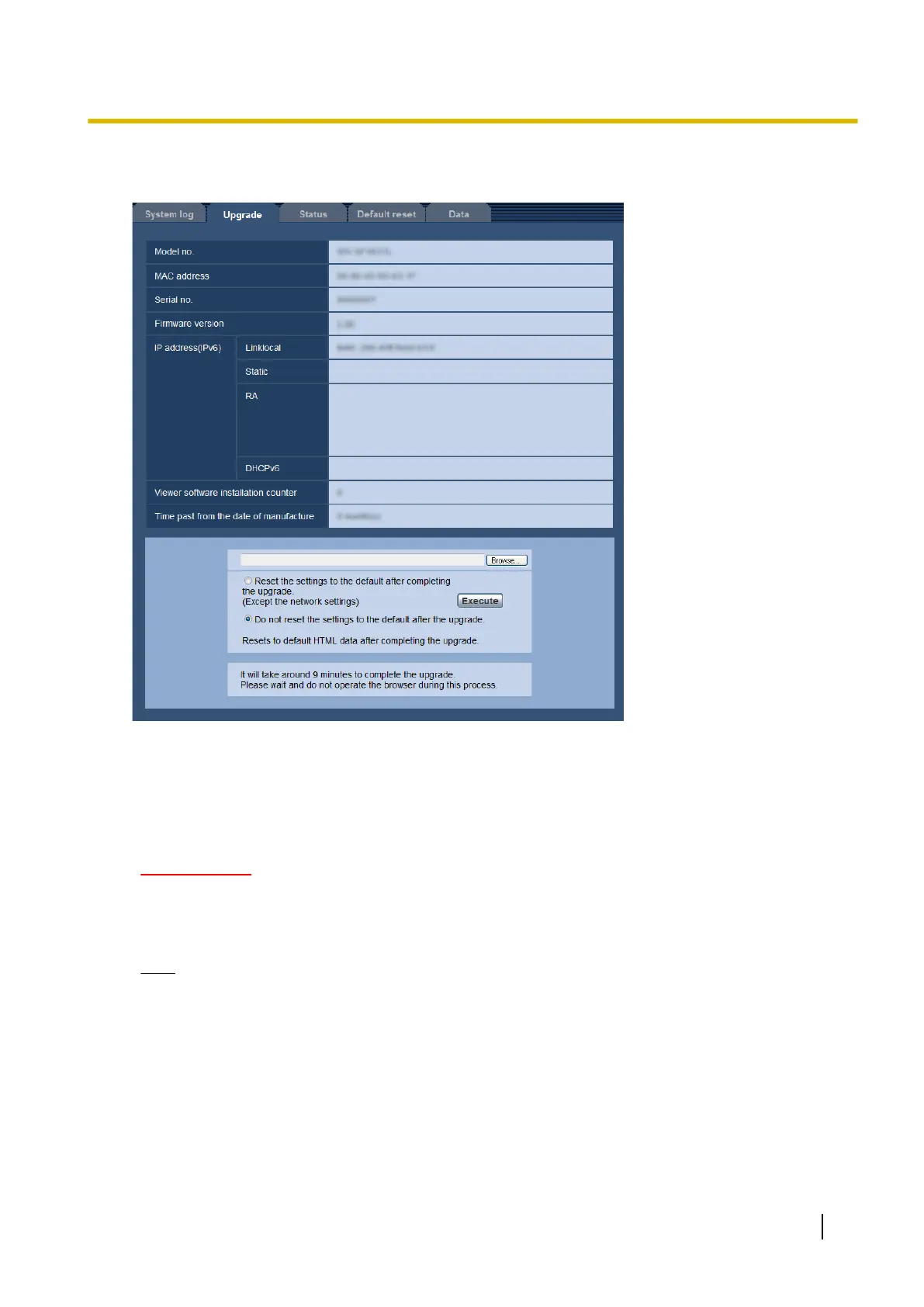
The current firmware can be checked and upgraded to the latest version on this page. Contact the dealer for
further information about the firmware upgrade.
[Model no.], [MAC address], [Serial no.], [Firmware version], [IP address(IPv6)], [Viewer
software installation counter], [Time past from the date of manufacture]
Information of each item will be displayed.
1. Contact the dealer and download the latest firmware onto a PC.
IMPORTANT
• A blank (space) cannot be used for the name of the directory where the downloaded firmware to
be saved.
2. Click the [Browse...] button and designate the downloaded firmware.
Note
• Most current version update software is posted on the Panasonic support Web site.
When using in Japan
http://panasonic.biz/security/support/
When using out of Japan
http://security.panasonic.com/pss/security/support/
• Internet connection is required to view the support Web site.
3. Click the radio button respective to the desired option to determine whether or not to initialize the settings
after completing the firmware upgrade.
Default: Initialization of setting data is not performed after completing the version update.
Operating Instructions 185
18 Maintenance of the camera [Maintenance]










 To Next Page