MACHINE BASICS
11
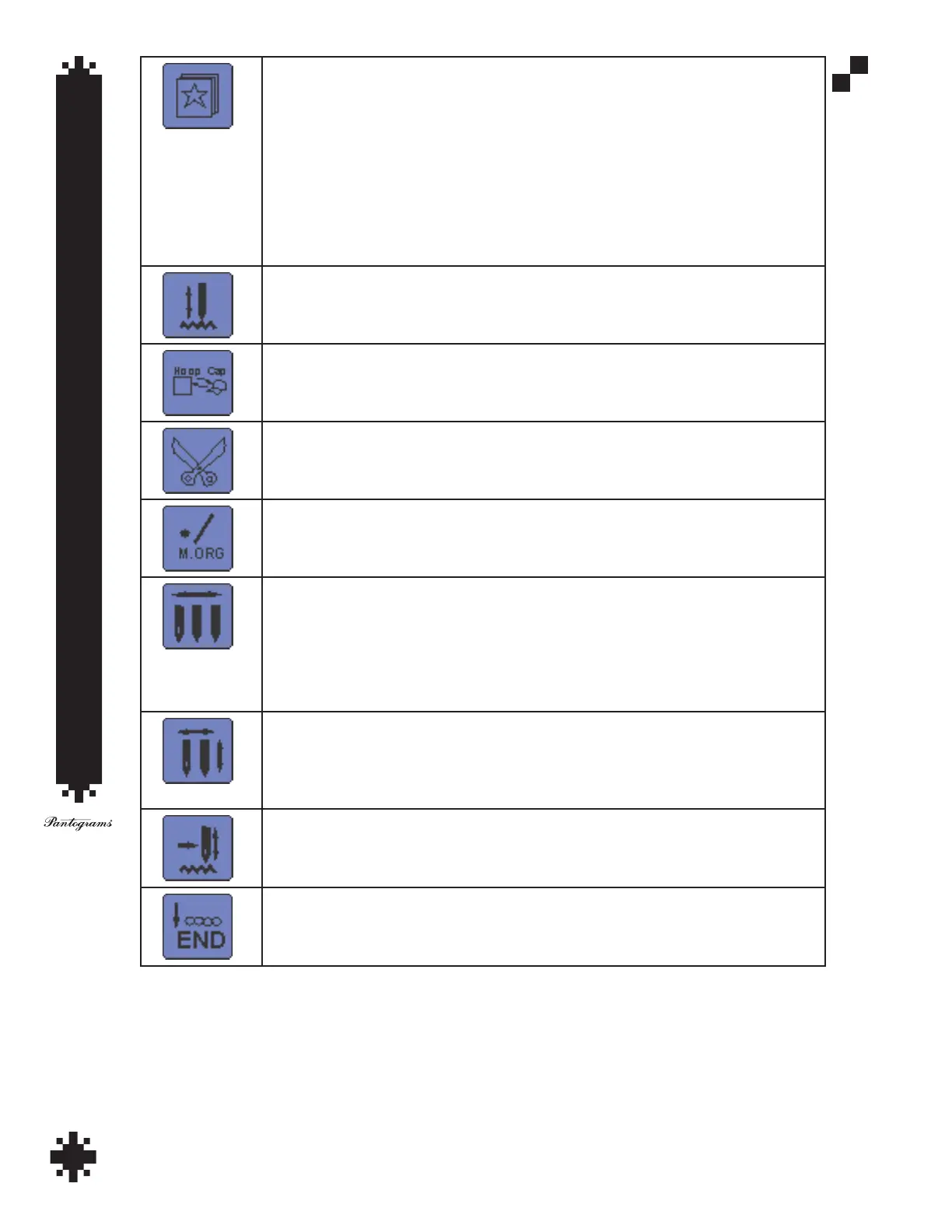
Design Management
1. Select design for embroidery
2. Input design into memory (for loading an embroidery design into the memory of the
embroidery machine via USB memory)
3. Output Memory Design
4. Copy Memory Design
5. Repair Memory Design
6. Delete Memory Design
7. Divide
8. Combine
9. Delete All Designs
Embroidery Status Key - Management Status
Enter embroidery status
Exit embroidery status
Hoop Mode
Set as Cap type
Set as Clothes type
Trim Key
Shaft Rotation Key
1. 100°
2. Any Degree
Set Stitch Color Order
1. Set Colors Order - In this setting you have to arrow up and over to needle change and
input the color order of the design
2. Replace Needle - ND A Replace ND B
3. Modify Needle - replace colors inutted with new colors on a design already in machine
memory
Auto/Manual Color Change Key
Fully Automatic (Yellow) - Changing to next color and starts embroidery
Semi Automatic (Blue) - Changes to next color. You will have to hit start for the machine
to start sewing at each color change.
Manual (Red) - Will not change colors. Will only sew in the color of the active needle.
Switch Working Method
Embroidery (sewing mode)
Fast Float - allows you to fast forward through design
Slow Float - allows you to slowly forward through design
Technician Key - no function


 To Next Page