50
insert a narrow slotted screwdriver at
the marked point.
Replace a defective dust protection
grille (Spare parts and accessories,
p.53).
Maintenance
The device is maintenance free.
Storage
Always store the device and accessories:
• clean
• dry
• protected against dust
• In the case provided (28)
• out of the reach of children
The storage temperature for the re-
chargeable battery and the device is
between 0°C and 45°C. Avoid extreme
cold or heat during storage to ensure the
battery output is not adversely affected.
Remove the rechargeable battery from the
device before storing the device (see the
separate operating instructions for the bat-
tery and charger).
Storing cutting/grinding discs
• dry
• upright
• unstacked
Troubleshooting
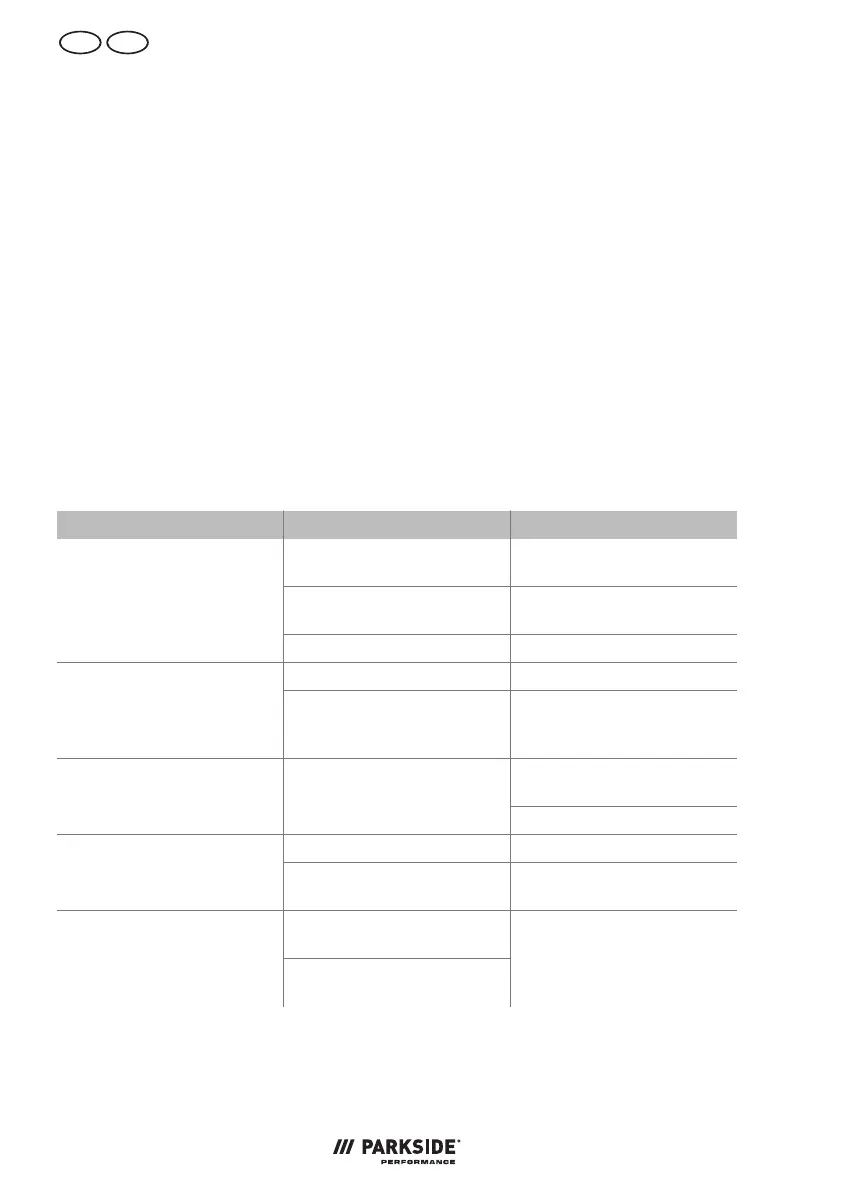
The following table will assist you in fixing faults:
Problem Possible cause Error correction
Rechargeable battery (22)
not inserted
Inserting the battery,
p.47
On/Off button (15) defect-
ive
contact the service centre.
Device does not start
Defective motor contact the service centre.
Clamping nut (25) loose Tightening the clamping nutAttachment tool does not
move although motor is run-
ning
Workpiece, workpiece rem-
nants or remnants of attach-
ment tools blocking the drive
Remove blockages
Reduce pressure on attach-
ment tool
Engine is slowing down and
stops
Device is overloaded through
workpiece
Workpiece unsuitable
Clamping nut (25) loose Tightening the clamping nutAttachment tool does not
rotate smoothly, abnormal
noises can be heard
Attachment tool defective Changing the attachment
tool
Device works with interrup-
tions
Internal loose contact
On/Off button (15) defect-
ive
contact the service centre.


 To Next Page
 Loading...