16 17
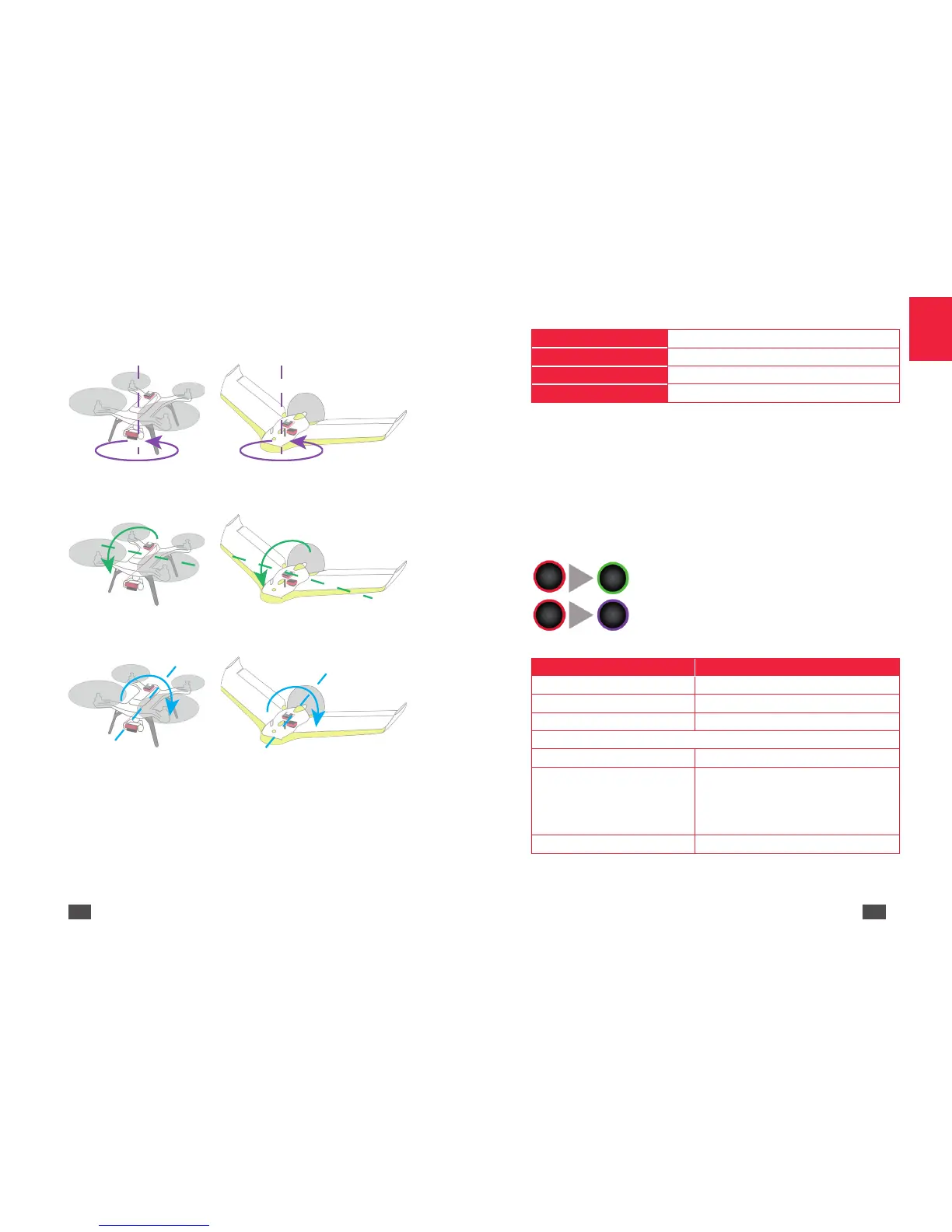
2. Turn the drone on the Z-axis (yaw axis) (Diagram E) until the
multispectral sensor indicator light flashes green.
Diagram E
3. Turn the drone on the Y-axis (pitch axis) (Diagram F) until the
multispectral sensor indicator light flashes blue.
Diagram F
4. Turn the drone on the X-axis (pitch axis) (Diagram G) until the
multispectral sensor indicator light changes colour.
Diagram G
Note: Once the calibration is complete the colour of the
multispectral sensor light varies depending on Sequoia's status.
For example, if the multispectral sensor memory is full, the indica-
tor light will flash yellow.
Functions of the multispectral sensor button
Use the button to enable/disable burst mode, take photos and enable/
disable Wi-Fi on Sequoia.
Note: Sequoia must be turned on to activate these features.
1 click
Take a photo
2 clicks Enable/disable shots
4 clicks Enable/disable Wi-Fi
Hold down (3 seconds)
Switch off Sequoia
Disconnect the multispectral
Press and hold the Sequoia button for 3 seconds to turn it off. The
indicator light goes out. If you disconnect Sequoia while the indicator is
still on the latest photos may be corrupted.
LED properties
Multispectral sensor
Start up
When you turn on Sequoia the LED has the following properties:
Other
LED properties Meaning
Quick flashing orange Shutting down
Slow flashing orange Update in progress
Flashing blue Enabling/Disabling Wi-Fi
Problem
Flashing red Hardware malfunction
Flashing red
Corrupted memory. Repair in progress.
Once the repair is complete the LED
reverts to green. This operation may take
several seconds depending on the space
available on your SD card.
Flashing yellow Memory full
The sensor is ready to take a
photo.
The sensor needs to be
calibrated.


 To Next Page
 Loading...