
 Need help?
Do you have a question about the Parrot SKYCONTROLLER 2 and is the answer not in the manual?
Details the Parrot Bluegrass drone and its primary controller, the Skycontroller 2.
Describes the Sequoia multispectral sensor and related Airinov First+ services.
Parrot Bluegrass is not a toy; not for children under 14.
Read documentation, understand regulations, and acknowledge risks.
Manufacturer not liable for misuse; professional use noted.
Identifies drone parts like sensors, cameras, ports, battery compartment, and base features.
Shows the base, antenna, and multispectral sensor location on the drone's underside.
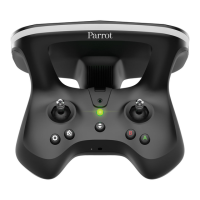
Presents the controller, its holder, antenna, USB port, and main buttons with functions.
Details specific controls for camera exposure, display mode, and camera orientation.
Purpose for farming, design criteria, and spectral bands (green, red, red-edge, NIR).
1.2 MP monochrome, 16 MP RGB sensors, inertial unit, memory, and data analysis.
Calibrates images based on sunlight; powered by multispectral sensor.
Ambient light sensors, indicator light, recommended SD card, and internal features.
Adherence to regulations and guidelines for weather, visibility, and safe takeoff space.
Checks for GPS, propellers, battery, lenses, memory, and calibration.
Instructions to download Pix4Dcapture and FreeFlight Pro apps.
Detailed procedures for charging both the Parrot Bluegrass and Skycontroller 2 batteries.
Step-by-step guide to screwing propellers onto drone motors.
Ensuring propellers are securely fitted before flight.
Attaching the mobile device holder to the Skycontroller 2.
Positioning, tightening the device, and connecting via USB.
Steps to power on and connect the Parrot Bluegrass to the Skycontroller 2.
Recommended calibration steps using the FreeFlight Pro app for optimal flight.
Guide to setting up Wi-Fi by country selection.
Detailed steps for calibrating the Sequoia's magnetometer via drone movements.
How Sequoia saves photos to SD card or internal memory.
Overview of creating Grid and Polygon flight plans in Pix4Dcapture.
Steps to launch, fly, and manage flight plans, including manual control and abort.
How to take manual control during automated flights.
Illustrates stick controls for ascent, descent, turning, and directional movement.
Function to bring the drone back to its takeoff location.
Instructions for landing the drone safely on a clear surface.
Interprets status and error lights for the Sequoia sensor (general, problem, calibration).
Explains indicator lights for Sunshine Sensor problems and calibration.
Steps for updating Sequoia using a computer and SD card.
Instructions for updating Sequoia using the drone's Wi-Fi network and web interface.
Methods to retrieve photos via SD card or Wi-Fi connection.
Guidance on using Airinov First+ for data analysis.
Software for analyzing drone imagery, including MicaSense ATLAS and Pix4Dmapper.
Information on Airinov's service for crop fertilisation advice.
Strict warning against touching moving propellers.
Remove propellers before connecting the drone to a computer.
Interprets flashing red light for connection, battery, or drone errors.
Continuous green light signifies a stable connection for flight.
Meaning of blue (GPS ready), green (in flight), yellow (update status).
Interprets red/blue flashing (battery) and solid red flashing (error).
Details of sensors, inertial system, and autopilot.
Wi-Fi, battery specs (life, voltage, charge), and dimensions.
Engine specifications and video capabilities.
Instructions for cleaning lenses and sensors.
Guidance on purchasing replacement parts from the manufacturer.
Guidelines for drone operation, weather, environmental safety, and accessories.
Warnings regarding Skycontroller 2 handling, environmental exposure, and liquids.
Precautions for Sequoia regarding weather, liquids, altitude, and sun exposure.
Critical advice on obtaining permission for recording individuals and property.
Information on potential restrictions for Wi-Fi frequencies.
Details EU compliance for the drone and controller.
Statements on compliance with Canadian and FCC regulations.
Extensive warnings on battery handling, charging, storage, and potential hazards.
Warning about explosion risk from incompatible battery replacements.
Lists product trademarks and manufacturer details.
 General
| Weight | 500 g |
|---|---|
| Battery Life | 240 minutes |
| Range | Up to 2 km |
| Type | Remote Controller |
| Wireless Technology | Wi-Fi |
| Battery Capacity | 2700 mAh |
| Dimensions | 200 x 180 x 110 mm |
| USB Port | Yes |
| Smartphone Holder | Yes |
| Joysticks | 2 |
| FPV Goggle Compatibility | Yes |
| Connectivity | USB |
| Compatibility | Parrot Bebop 2 |
| Operating Frequency | 2.4 GHz - 5 GHz |
| Frequency Band | 2.4 GHz |

 To Next Page












