Need help?
Do you have a question about the Parrot Zikmu and is the answer not in the manual?
Guides the user through the initial setup, including speaker positioning and power connections.
Details the process for connecting the Zikmu to a Wi-Fi network, including software installation.
Explains how to pair the Zikmu with a Bluetooth-enabled phone or PDA for audio streaming.
Guides on connecting the Zikmu to a PC or Mac via Bluetooth, depending on the software used.
Provides instructions for updating the Zikmu's firmware using a Wi-Fi connection.
Details the process for updating the Zikmu's firmware via Bluetooth on Windows or Mac.
 General
| Frequency range | 50 - 20000 Hz |
|---|---|
| RMS rated power | 100 W |
| Audio output channels | 2.0 channels |
| Bluetooth | Yes |
| Bluetooth range | 15 m |
| Wi-Fi standards | 802.11b, 802.11g |
| Bluetooth version | 2.1+EDR |
| Bluetooth profiles | A2DP, AVRCP |
| Headphone connectivity | - |
| Apple docking compatibility | iPhone, iPod |
| Depth (imperial) | 12.5 \ |
| Width (imperial) | 11.3 \ |
| Height (imperial) | 29.2 \ |
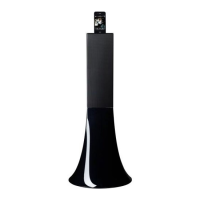
| Dimensions (WxDxH) | 290 x 320 x 750 mm |
| Product color | Black |
 Weight and Dimensions
| Weight | 3500 g |
|---|

 To Next Page