Revision 25 of DOCU225, © Copyright
Connecting a WITS Device via a Pason DHC, SideKick, or UJB
When connecting a WITS device in potentially hazardous areas, use the Hazardous
Area WITS Interface Assembly (COMM087) instead of COMM022. COMM087 is
certified for Class 1 Division 2 areas. Follow these steps to connect COMM087 to the
EDR via a Pason DHC, SideKick, or UJB:
1. Ensure that the DHC, SideKick, or UJB is powered on.
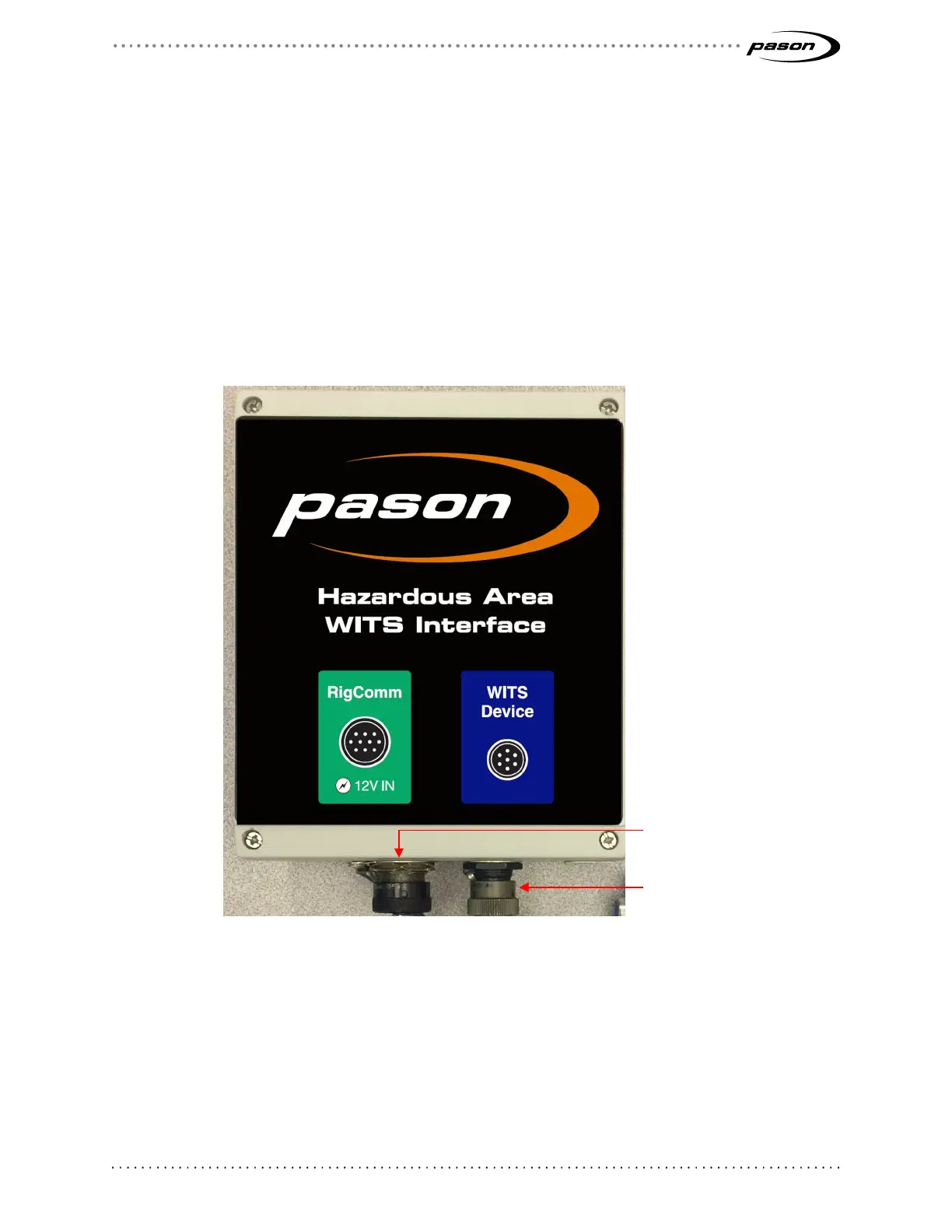
2. Secure the WITS to RS232, 6 ft. cable (CBLASS390) to the WITS Device port on
the Hazardous Area WITS Interface Assembly (COMM087). Secure the female
DB-9 end to the WITS device.
Figure 5: COMM087 comm box and components
3. Connect a RigComm RS-422 cable to the RigComm port on COMM087. Connect
the other end to any available powered RS-422 port on the DHC, SideKick, or
UJB, as shown in Figure 6. If connecting to a SideKick, use the 2.5ft Power
Rignet Y-Adapter cable (CBLASS360) to create the powered port.
RigComm port (to DHC,
Sidekick, UJB)



 To Next Page