SeeGull CW Transmitter User Guide
Rev. D PCTEL 12
4.2.3 New Channel:
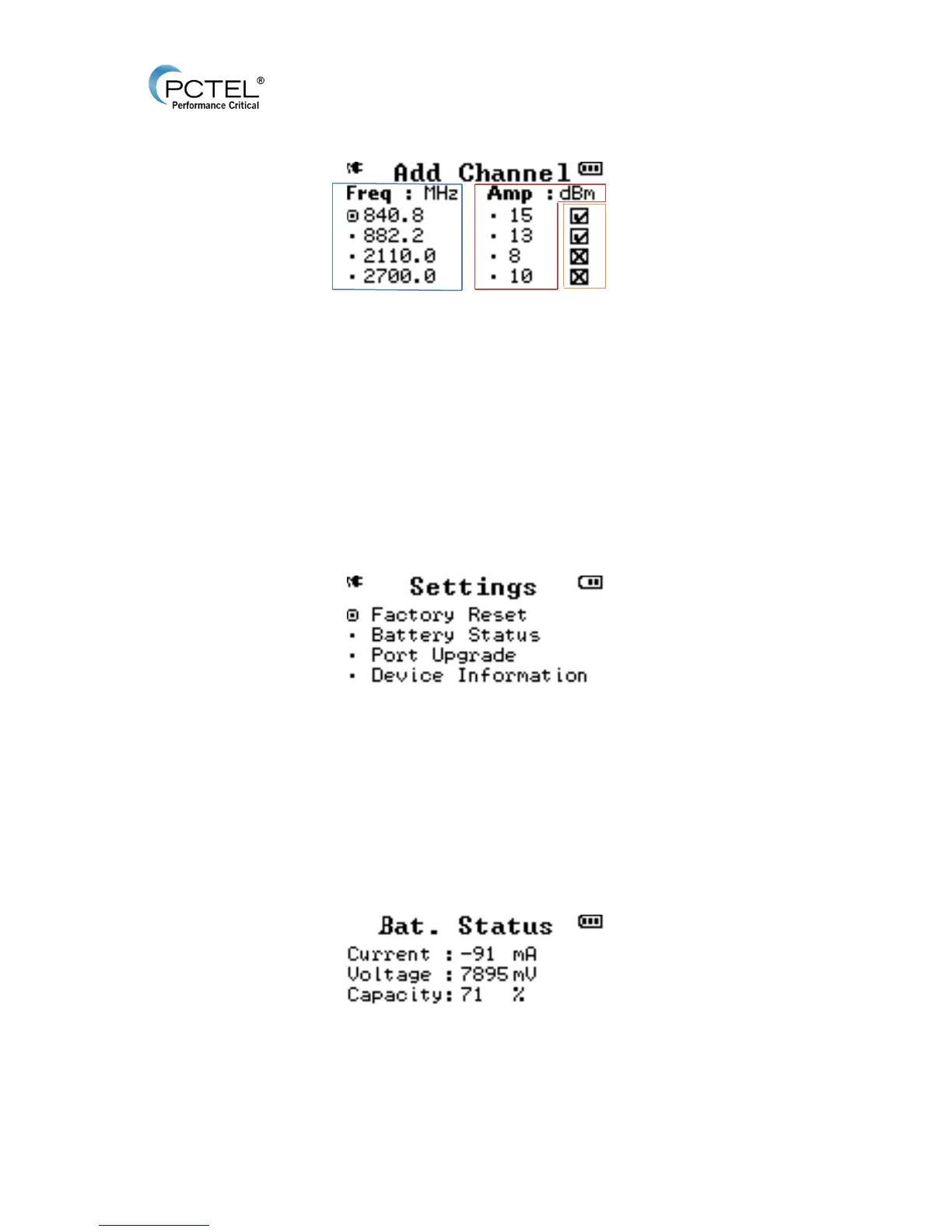
Figure 7 - Add Channel
To add a new channel for transmission or to be saved for future use:
• Freq: Enters the required channel frequency from 400 MHz to 2.7 GHz in the relevant
band, with a standard frequency step of 100 KHz.
• Amp: Enters the desired channel amplitude from -10 dBm to10, 12, or 15 dBm
depending on frequency selected, with a standard frequency step of 1 dBm.
• Port On/Off: Use the number pad keys 1-4 to check or uncheck the corresponding
antenna ports 1-4. A box with an check depicts the port will be active when the RF ON
button begins RF transmission. A box with an X is inactive.
4.2.4 Settings:
Figure 8 - Settings Menu
• Factory Reset: Option to restore device to original factory settings. It will delete all saved
channel configurations, and will erase activated key-code license.
o Press Enter on this option, and Enter again on the “Are you sure?” prompt.
o Press Escape on the “Are you sure?” prompt to cancel.
• Battery Status: Provides battery information, including capacity percentage of battery life
remaining.
Figure 9 - Battery Status


 To Next Page