SeeGull CW Transmitter User Guide
Rev. D PCTEL 9
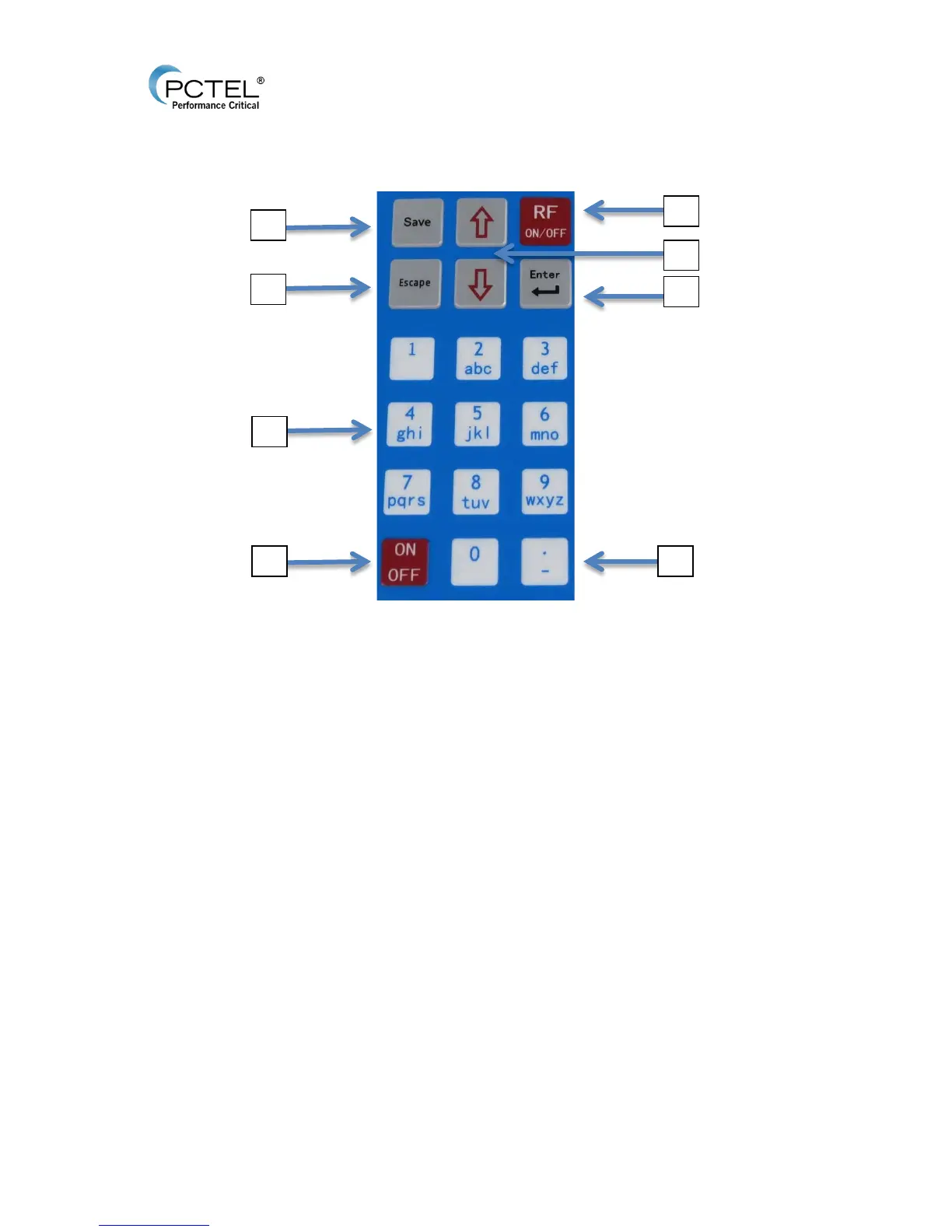
3.3 CW Transmitter Keypad
Figure 3 - Keypad
1. ON/OFF: Power on and off the device by holding for one second.
2. Up/Down Arrows:
• Navigate through each menu screen.
• Adjust Freq MHz edit field in steps of 100 KHz.
• Adjust Amp dBm edit field in steps of 1 dBm.
• Space (Up Arrow) and backspace (Down Arrow) when naming saved channels.
3. Enter:
• Enters to selected submenus.
• Accepts choice or edit.
4. Escape:
a. Revert back to previous menu.
b. Cancel entered data.
5. Number Keypad:
• Inputs numbers and characters in selected field.
• Numbers 1-4 toggle corresponding antenna ports between active or inactive prior
to RF transmission.
• Number 1 key enters a space when naming a saved Channel.


 To Next Page