PAGE 28
Class 1 Medical
Rev. 2
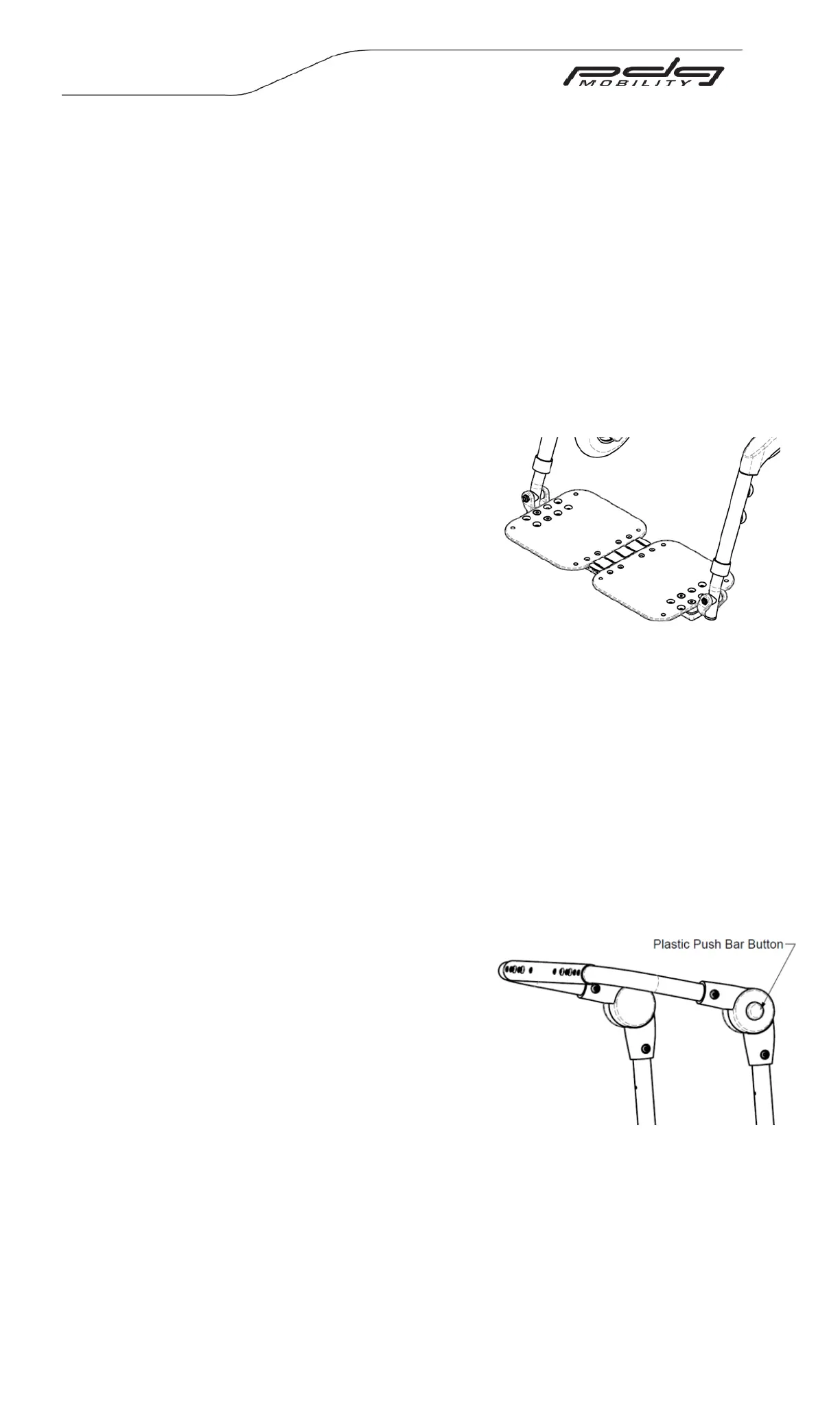
Figure 14.24: Interlocking
Adjustable Angle Footplates
Figure 14.25: Adjustable push bar handle
One Piece Footplate (Optional)
One piece footplates are available in two types: fixed and flip-up (See Figures 14.22 and
14.23). To flip up the one piece flip-up footplate, simply pull upwards on the footplate.
Interlocking Adjustable Angle Footplates (Optional)
Angle adjustable interlocking foot plates allow the depth and the angle of the footplate
to be adjusted. Additionally, these footplates have flip-up functionality. To flip up the
footplate simply pull upwards on the footplate. When these footplates are not flipped up
they are interlocked together. (See Figure 14.24)
NOTE- When adjusting interlocking footplates, ensure they are locked together.
Adjusting the Footplate Angle
1. Loosen the angle adjustable footplate
adjustment bolts (See Figure 14.21).
2. Rotate the footplates until they are at the
desired angle.
3. Reinstall and tighten the bolts.
Adjusting the Depth
1. Remove the angle adjustable footplate
adjustment bolts shown (See Figure 14.21).
2. Align the footplates with the preferred holes.
3. Reinstall and tighten the nuts and bolts.
14.8 Backrest Adjustments and Options
WARNING – After making adjustments, always make sure that parts are properly
tightened BEFORE using the wheelchair.
14.8.1 Angle/Height Adjustable Push Bar Handle
The wheelchair may be purchased with an adjustable angle push bar handle. This handle
allows an attendant to change the position of the push bar handle grip and even the
tilting lever position, depending on the wheelchair’s original configuration.
Adjusting Push Bar Angle
1. To adjust the push bar angle,
simultaneously press both plastic push bar
buttons located on the top of both backrest
posts (see Figure 14.25).
2. While the plastic push bar buttons are
depressed, adjust the position of the push
bar.
3. When the push bar is positioned to
satisfaction, release the plastic push bar
buttons and rotate to a locked position.
Adjusting the Seat to Back Angle
WARNING - Ensure the chair is not occupied before adjusting the seat to back angle.
1. The seat-to-back angle may be set at a range of 90° to 120°. Remove the forward
button head cap screws and loosen the rearward from each side in order to
change the angle.


 To Next Page