PAGE 32
Class 1 Medical
Rev. 2
Anti-tipper
Wheel
Position
14.11 Front Casters
WARNING – After making adjustments, always make sure that
parts are properly replaced and tightened BEFORE using the
wheelchair.
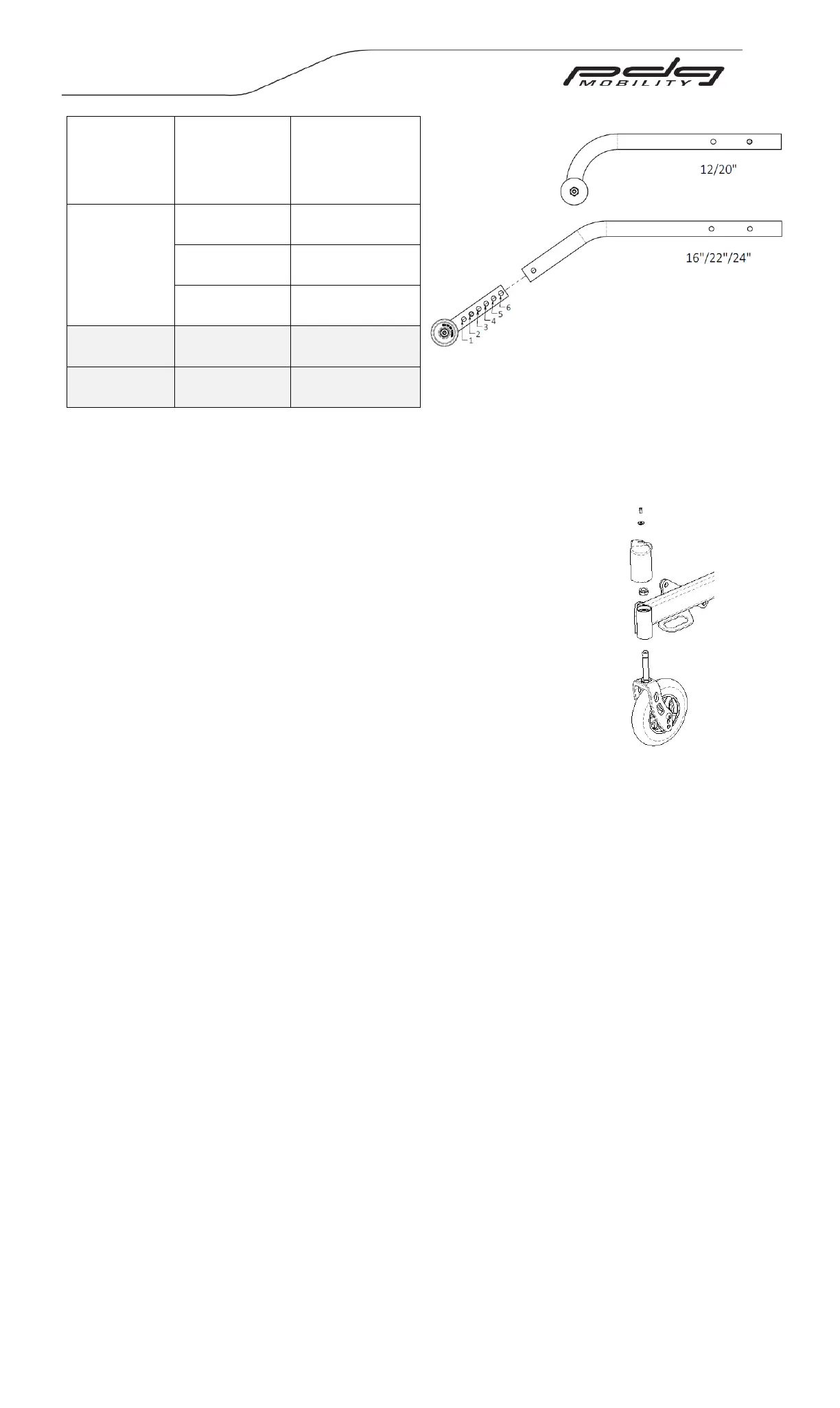
Installing/Replacing Caster Forks
1. Remove the cap on top of caster housing.
2. Loosen nut on caster stem using a ¾” socket wrench.
3. Slide out caster fork assembly.
4. Reassemble by reversing steps 1-3 (Be sure bearings
are replaced if removed).
5. Test the wheelchair for maneuverability.
6. Ensure that the lower frame of the wheelchair is level
after performing caster adjustments and that the
casters do not interfere with the front rigging.
14.12 Wheel-Locks
WARNING – Never attempt to engage wheel locks while the chair is in motion as it could
cause you to lose control.
Wheel locks lock the rear wheels and prevent any undesirable movement of the
wheelchair.
1. To engage the push to lock wheel lock (see Figure 14.35), push the lever forward,
away from the wheel, until it locks into place.
2. To engage the pull to lock wheel lock (see Figure 14.36), pull the lever towards the
wheel until it locks into place.
3. To engage the attendant wheel lock (see Figure 14.37), pull the lever towards the
wheel until it locks into place.
4. To engage the attendant wheel lock in the User and Attendant Wheel Lock option
(see Figure 14.38), follow the step 3 instructions. To engage the user wheel lock in
the User and Attendant Wheel Lock option (see Figure 14.38), follow the
instructions corresponding to the user wheel lock type (ie. Push to Lock or Pull to
Lock).
5. To engage the wheel locks with the anti-rollback device, follow the instructions
corresponding to the wheel lock type (ie. Push to Lock or Pull to Lock).
6. To engage the anti-rollback device (Figure 14.39), push the anti-rollback cam into
the down position.
Figure 14.34: Installing/Replace
Caster Forks
Figure 14.33: Anti-tipper positioning



 To Next Page