132
8
Settings
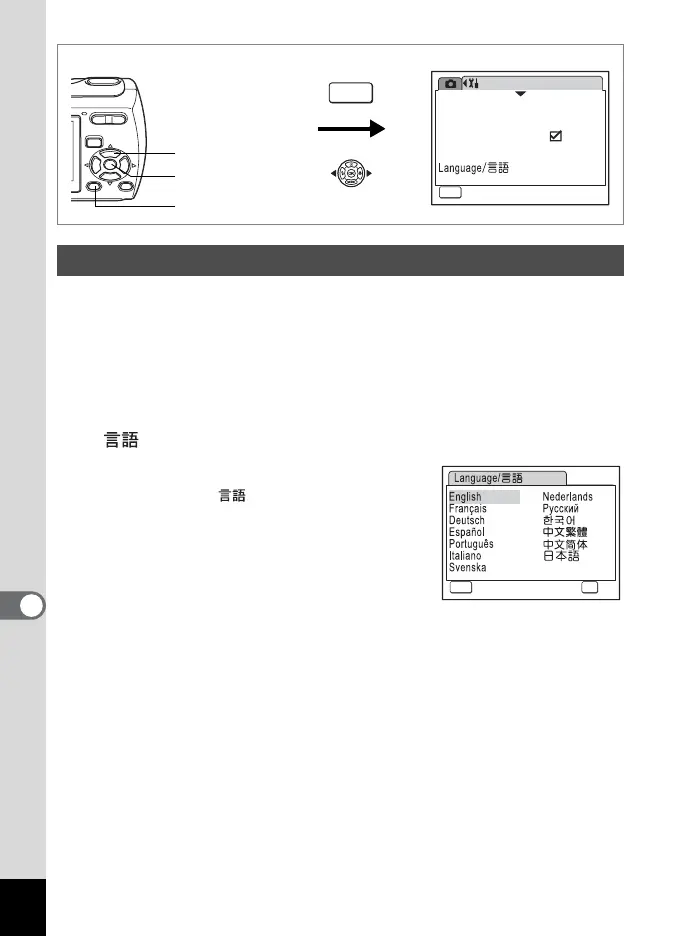
You can change the language in which the menus, error messages, etc.
are displayed.
You can choose from English, French, German, Spanish, Portuguese,
Italian, Swedish, Dutch, Russian, Korean, Chinese (traditional and
simplified) and Japanese.
1 Use the four-way controller (23) to select [Language/
] on the [u Setting] menu.
2 Press the four-way controller (5).
The Language/ screen appears.
3 Use the four-way controller
(2345) to select the language.
4 Press the 4 button.
The selected language is set to be
displayed.
Changing the Display Language
3 button
4 button
Four-way controller
Setting
Format
Sound
03/03/2007
English
Start-up Screen
Date Adjust
MENU
Exit
1/3
How to display the [u Setting] menu
MENU
MENU
Cancel OK
OK



 To Next Page