66
4
Taking Pictures
R A C Y q < I i \ E P D >
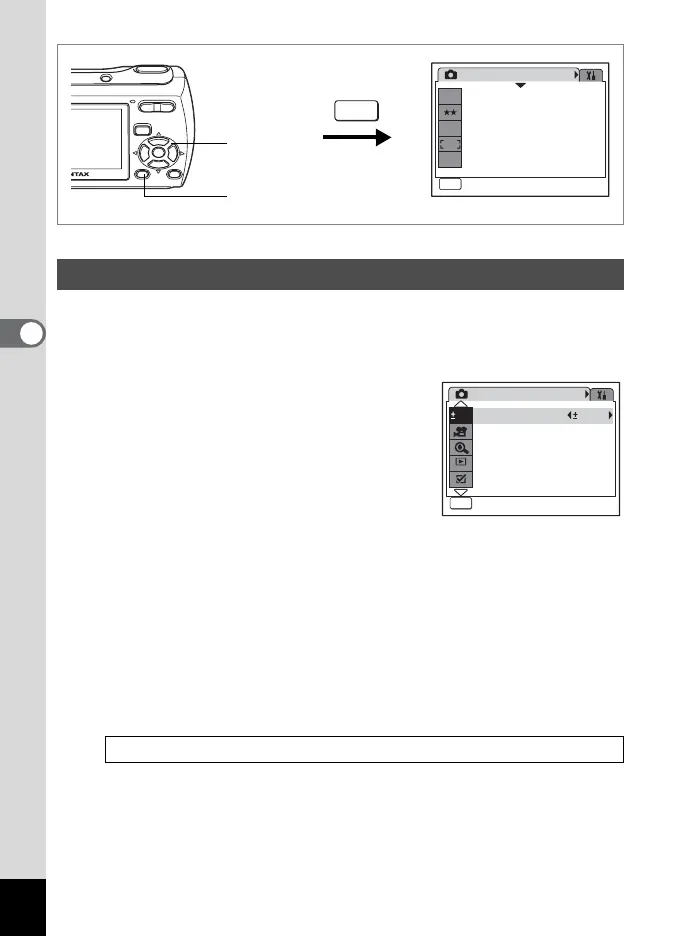
You can adjust the overall brightness of the picture.
Use this function to take pictures that are intentionally overexposed or
underexposed.
1 Press the 3 button in A
mode.
The [A Rec. Mode] menu appears.
2 Use the four-way controller (23)
to select [EV Compensation].
3 Use the four-way controller (45)
to select the EV value.
The selected EV value is saved.
To brighten, select a positive (+) value. To darken, select a negative
(–) value.
You can choose the EV setting in the range of –2.0 EV to +2.0 EV in
1/3 EV steps.
4 Press the 3 button.
The setting is complete and the camera returns to capture status.
Setting the Exposure (EV Compensation)
Saving the EV Compensation Value 1p.84
Rec. Mode
MENU
Exit
Exit
1/3
7
M
Recorded Pixels
Quality Level
White Balance
Focusing Area
Sensitivity
AWB
ISO
AUTO
2, 3
1, 4
MENU
EV Compensation
Movie
Rec. Mode
Exit
Exit
0.0
MENU
2/3
0.0
Digital Zoom
Instant Review
Memory
QUICK



 To Next Page