EasyManua.ls Logo

Pentax Optio E30 - Getting Started

Pentax Optio E30
164 pages
Print Icon
To Next Page IconTo Next Page
To Previous Page IconTo Previous Page
Loading...
17
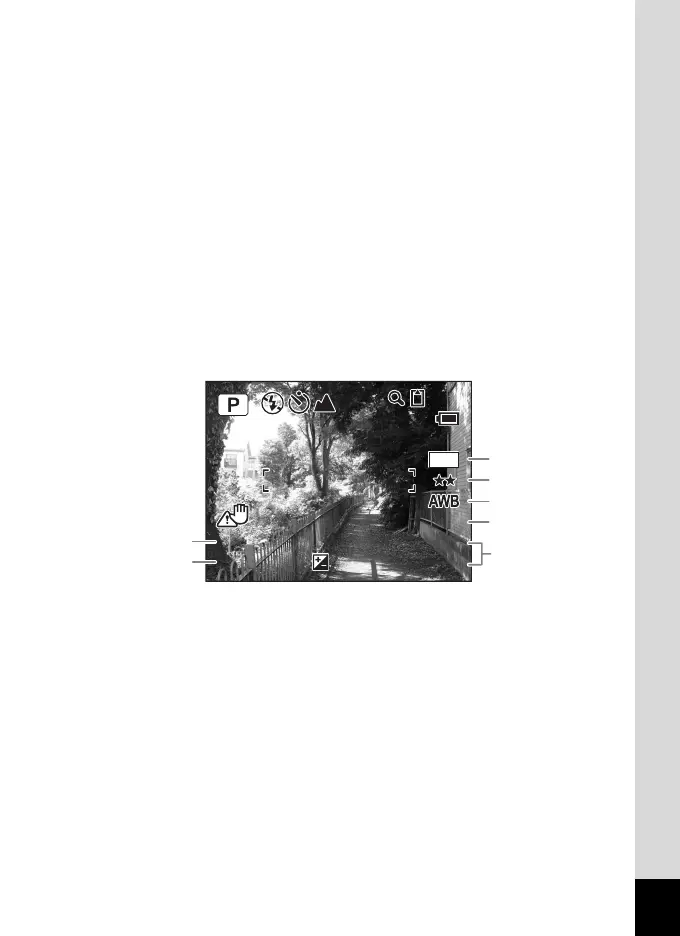
Full Display in Still Picture Capture Mode
(All of the indications are displayed here for explanatory purposes.)
* 1 and 2 appear when the shutter release button is pressed halfway.
1
Shooting mode (p.49)
8
Remaining image storage
capacity
2
Flash mode (p.70)
3
Drive mode (p.62, p.63)
9
Battery indicator (p.22)
4
Focus mode (p.68)
10
Focus frame (p.36)
5
Camera shake icon (p.67)
11
EV compensation (p.66)
6
Digital zoom icon (p.64)
12
Date and time (p.34)
7
Memory status (p.30)
+ : Built-in memory
(without card)
a : SD Memory Card
r : Card is write-protected
1
Shutter speed
5
White balance (p.75)
2
Aperture
6
Sensitivity (p.78)
3
Recorded pixels (p.72)
7
Date and time (p.34)
4
Quality (p.74)
F3.3
F3.3
1/250
1/250
+1.0
+1.0
38
38
7
M
400
400
ISO
ISO
03/03/2007
03/03/2007
14:25
14:25
3
1
2
4
5
6
7

Table of Contents

Other manuals for Pentax Optio E30

Related product manuals