113
3
Taking Pictures
6
Press the 3 button.
The camera returns to capture status.
Use this setting to specify whether or not an Instant Review is displayed
immediately after images are shot. The default setting is [1sec.] (displays
the image for 1 second).
1
Press the 3 button in A mode.
The [A Rec. Mode] menu appears.
2
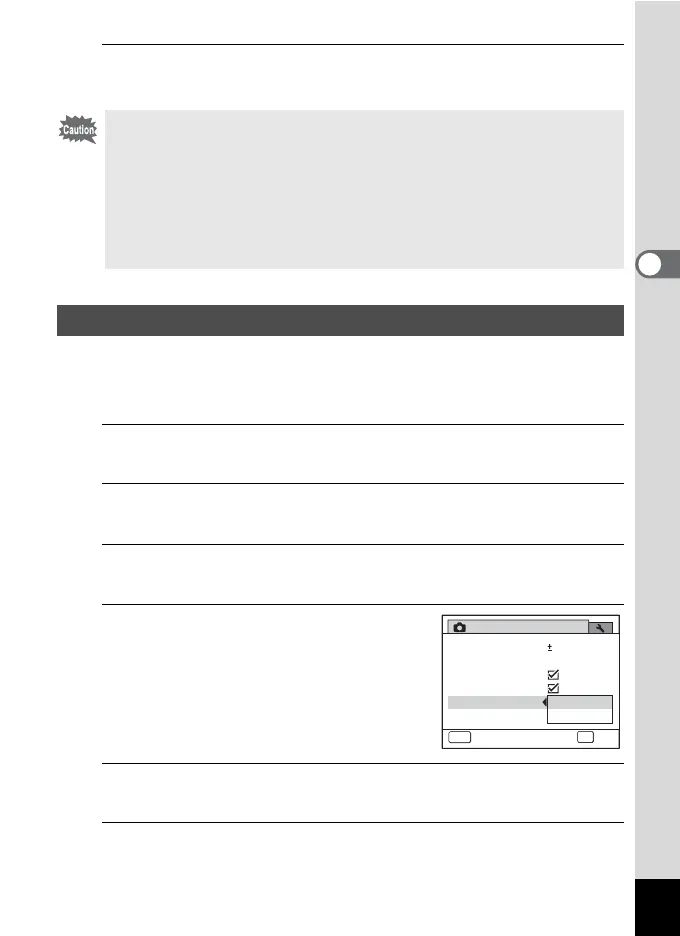
Use the four-way controller (23) to select [Instant
Review].
3
Press the four-way controller (5).
A pull-down menu appears.
4
Use the four-way controller (23)
to select [1sec.] or [Off].
1sec. Instant Review is displayed for
1 second.
Off Instant Review is not displayed.
5
Press the 4 button.
The setting is saved.
6
Press the 3 button.
The camera returns to capture status.
Pixel Track SR does not function in the following situations:
- When C (Half-length Portrait), N (Frame Composite), X (Digital
Wide) or F (Digital Panorama) is selected as the shooting mode
- When g (Self-timer), j (Continuous Shooting) or K (Burst
Shooting) is selected as the drive mode
- When the flash discharges
- When the sensitivity is set to 1600 or higher
- During Movie or Voice Recording
Setting the Instant Review
Rec. Mode
MENU
Cancel
2/3
Instant Review
Memory
Movie
Blink Detection
Digital Zoom
EV Compensation
0.0
OK
OK
1sec.
Off



 To Next Page