78
3
Taking Pictures
3
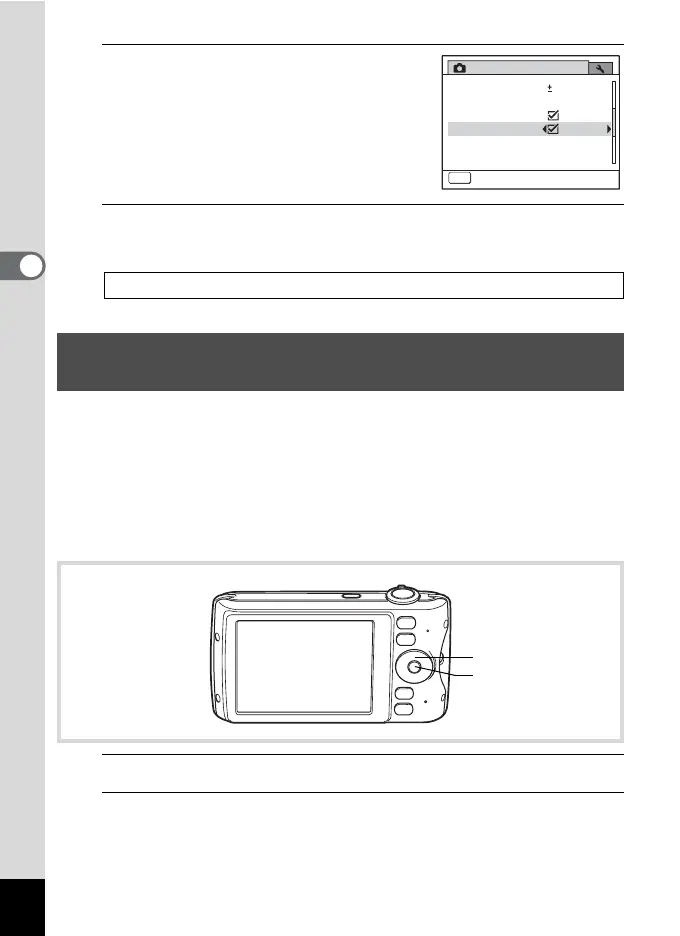
Use the four-way controller (45)
to select O (On) or P (Off).
O(On) Uses Digital Zoom
P (Off) Uses only optical zoom and
Intelligent Zoom
The setting is saved.
4
Press the 3 button.
The camera returns to capture status.
Vertical Snap lets you hold the camera vertically like a cellphone and
take pictures using the 4 button and four-way controller.
If you selected [On] in “Vertical Snap Setting” (p.46) for Initial Setting,
you can enjoy cellphone-style picture taking immediately by following the
procedure below. If you selected [Cancel], you can set the camera for
cellphone-style picture taking later using menu operations. For setting
instructions, see “To Select Vertical Snap Setting” (p.80).
1
Make sure the power is turned off.
2
Press and hold the 4 button.
The camera starts up in Vertical Snap mode.
Saving the Digital Zoom Function setting 1p.123
Simple Cellphone-style Picture Taking (Vertical
Snap)
Rec. Mode
Instant Review 1sec.
Memory
MENU
Exit
2/3
Movie
Blink Detection
Digital Zoom
EV Compensation
0.0
Four-way controller
4 button



 To Next Page