196
7
Settings
You can set the camera to turn off automatically when no operation is
performed for a fixed time.
1
Press the 3 button in Q mode.
The [W Setting] menu appears.
When you press the 3 button in A mode, press the four-way
controller (5) once.
2
Use the four-way controller (23) to select [Auto Power
Off].
3
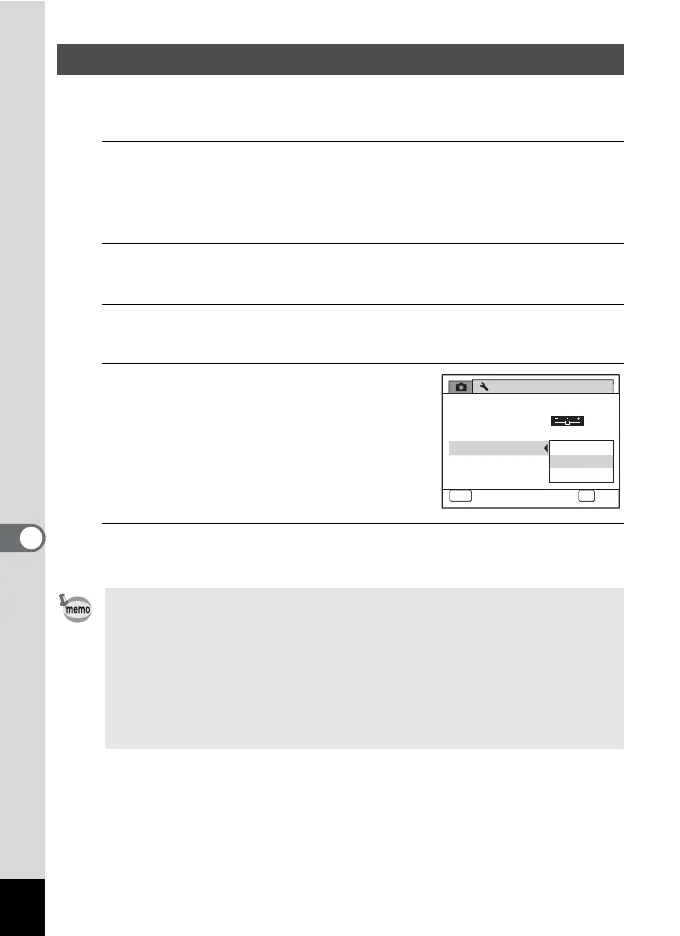
Press the four-way controller (5).
A pull-down menu appears.
4
Use the four-way controller (23)
to select the time until the camera
turns off automatically.
Choose from [5min.], [3min.] or [Off].
5
Press the 4 button.
The setting is saved.
Setting Auto Power Off
• Auto Power Off does not function in the following situations:
- while recording sound in Voice Recording mode
- while taking pictures in Continuous Shooting mode
- while recording a movie
- during a slideshow or movie/sound playback
- while the camera is connected to a computer or printer
• In Vertical Snap mode, the camera turns off after 5 minutes regardless
of the Auto Power Off setting.
Off
3
min.
5
min.
5
sec.
2/3
NTSC
Setting
Power Saving
Auto Power Off
Reset
Video Out
Brightness Level
MENU
Cancel
OK
OK
Delete all images



 To Next Page