124
3
Taking Pictures
1
Press the 3 button in A mode.
The [A Rec. Mode] menu appears.
2
Use the four-way controller (23) to select [Memory].
3
Press the four-way controller (5).
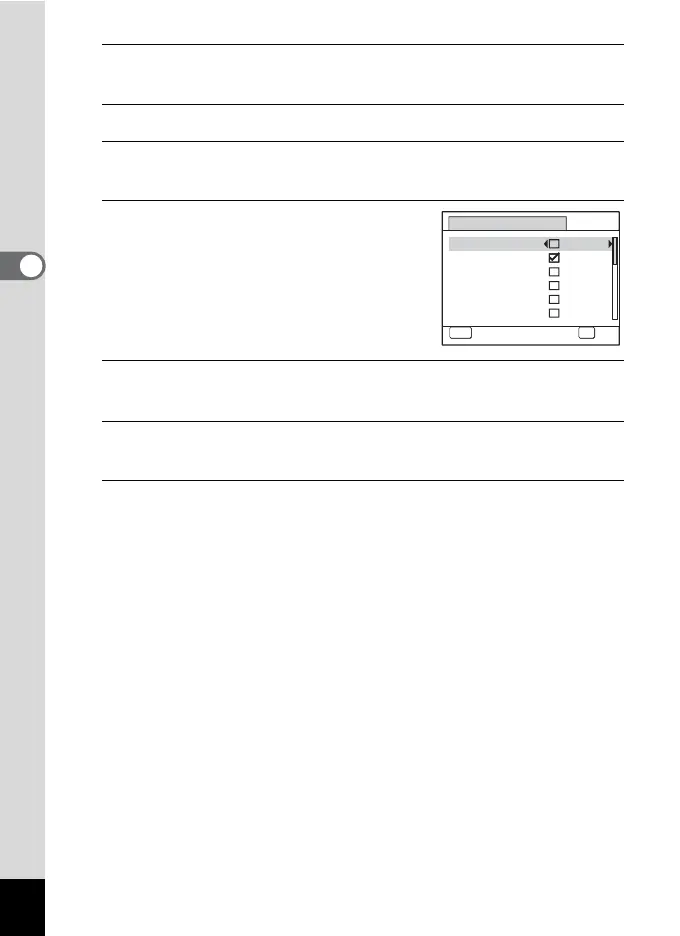
The [Memory] screen appears.
4
Use the four-way controller (23)
to choose an item.
5
Use the four-way controller (45) to select O (On) or P
(Off).
6
Press the 4 button.
The setting is saved.
7
Press the 3 button.
The camera returns to capture status.
Memory
MENU
Cancel
Face Priority
Flash Mode
Drive Mode
Focus Mode
Zoom Position
MF Position
OK
OK
1/3



 To Next Page