136
4
Playing Back and Deleting Images
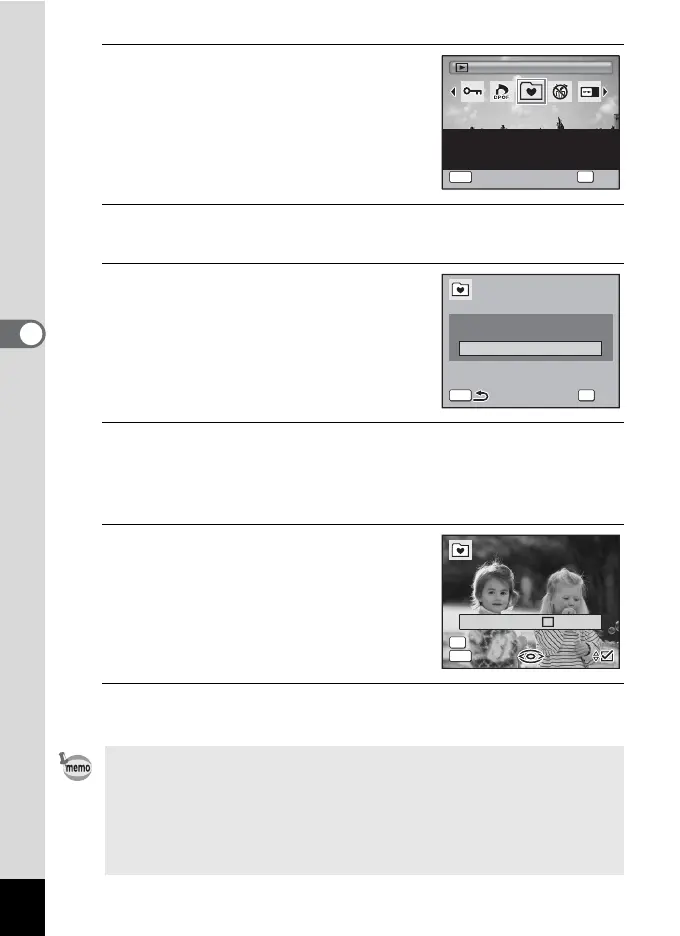
3
Use the four-way controller
(2345) to select A (Favorites).
4
Press the 4 button.
The screen for selecting [Playback Favorites] or [Register as Favorite] appears.
5
Use the four-way controller (23)
to select [Register as Favorite].
6
Press the 4 button.
The message [Register this image as a Favorite] appears.
To register another image, use the four-way controller (45) to select
the image.
7
Use the four-way controller (23)
to select O (On) or P (Off).
O(On) Register as favorite.
P (Off) Do not register as favorite.
To register other images, repeat Steps 6
and 7.
8
Press the 4 button.
The image is registered as a Favorite.
• Images registered as Favorites are copied at the m (640×480) size
and saved to the FAVORITE folder in the built-in memory. (The source
images are left at their original size.)
• Images can be registered as Favorites until the built-in memory
becomes full.
• All of the images registered in the FAVORITE folder are deleted if the
built-in memory is formatted when an error occurs.
Favorites
Sets images as favorites.
Copies to internal memory
and resizes to 640x480
2/2
OK
OK
MENU
Cancel
Playback Favorites
Register as Favorite
MENU OK
OK
Exit
Register as Favorite
Register this image as a
Favorite
Register this image as a
Favorite
Favorites
MENU
100
-
0017
100
-
0017
000/100
OK



 To Next Page