26
1
Getting Started
Opening and Closing the Terminal Cover
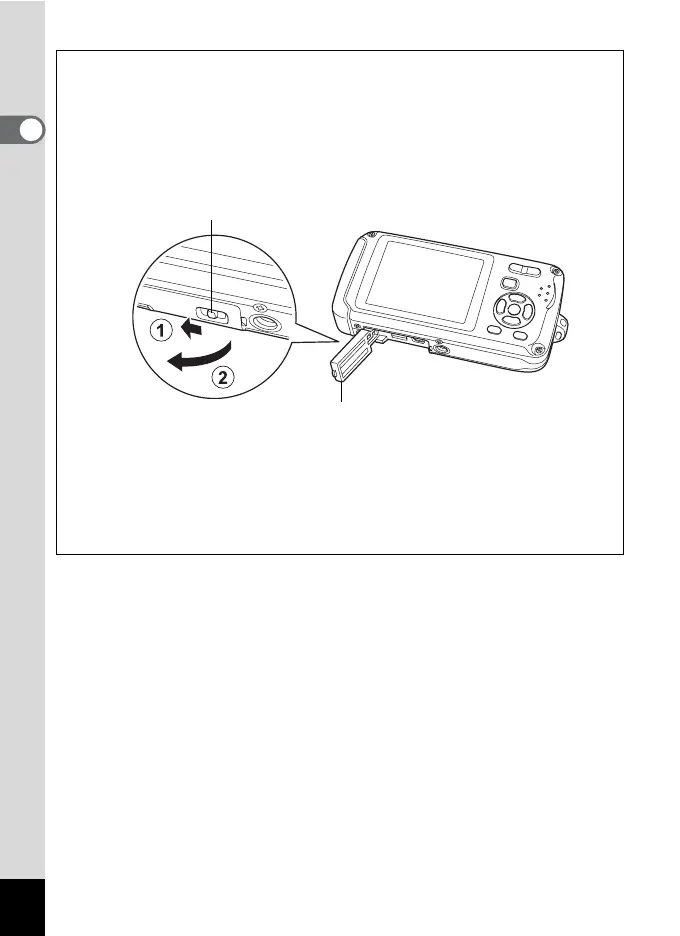
To open the terminal cover, press the terminal cover lock lever in the
direction of 1 to unlock the terminal cover (the terminal cover lifts up
slightly), and then lift the terminal cover up in the direction of 2. To
close the terminal cover, press it in until it clicks, to ensure it is securely
locked.
• Do not apply excessive pressure to the front or back of the camera when
opening and closing the terminal cover as this may dislodge the waterproof
packing. If the packing is not in the correct position, the waterproof
performance of the camera will be compromised.
• If the terminal cover is not locked securely when you close it, water, sand, or
dirt may enter the camera.
Terminal cover lock lever
Terminal cover












 To Next Page