Use of the optional AC adapter kit (K-AC117) is recommended if you
intend to use the camera for a long time or connect it to a computer.
6
DC
_pler
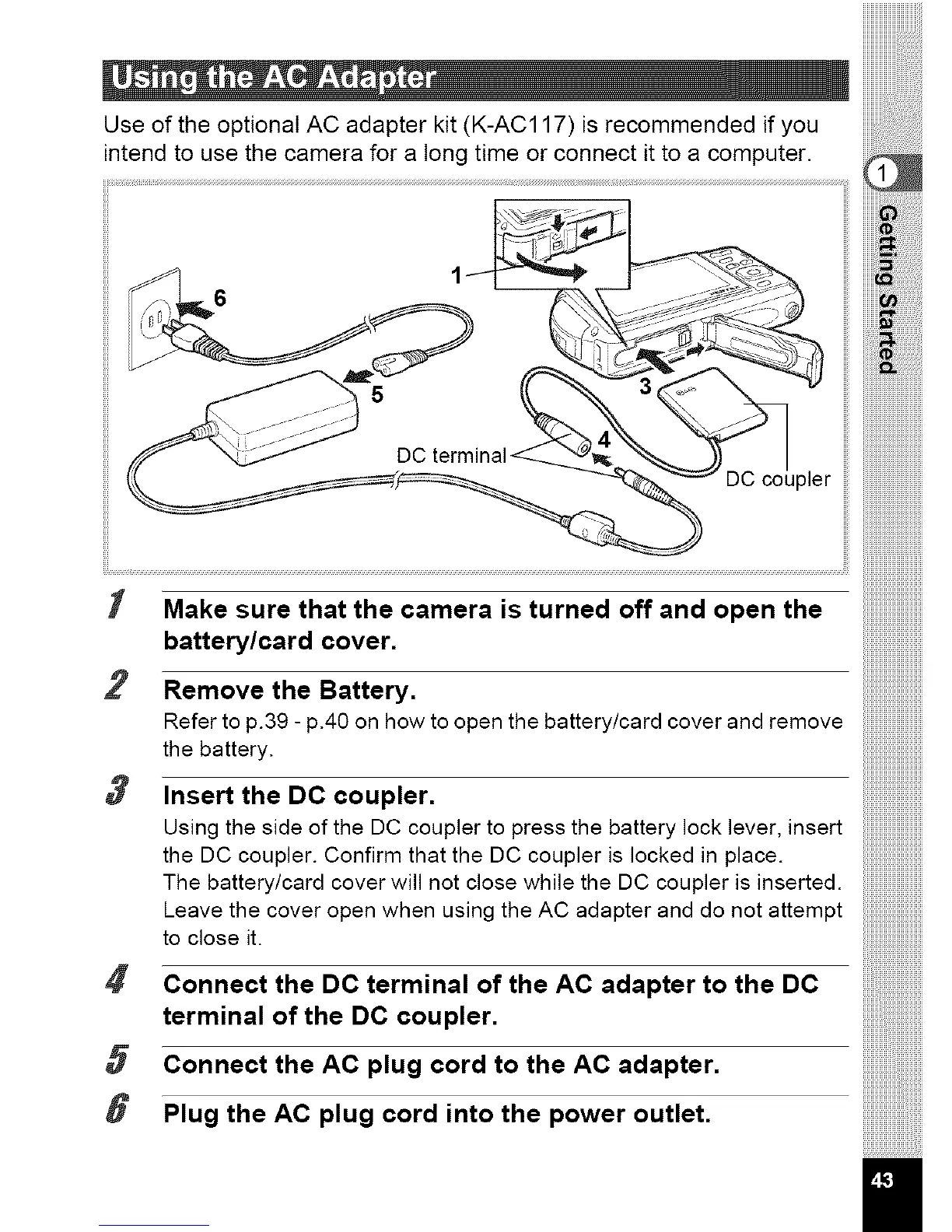
I Make sure that the camera is turned off and open the
battery/card cover.
2 Remove the Battery.
Refer to p.39 - p.40 on how to open the battery/card cover and remove
the battery.
3 Insert the DC coupler.
Using the side of the DC coupler to press the battery lock lever, insert
the DC coupler. Confirm that the DC coupler is locked in place.
The battery/card cover will not close while the DC coupler is inserted.
Leave the cover open when using the AC adapter and do not attempt
to close it.
Connect the DC terminal of the AC adapter to the DC
terminal of the DC coupler.
5 Connect the AC plug cord to the AC adapter.
8 Plug the AC plug cord into the power outlet.



 To Next Page
 Loading...







