09931286E
36
FAN LED is lit on with an alarm sound
1. Fan needs to be replaced.
Low Water Level’ LED blinks with an alarm sound
1. Check the coolant level and if it is lower than L (low) mark, add more coolant.
2. Restart the Peltier Controller.
Flow Sensor LED is lit on with an alarm sound
1. Check whether the tubing is bent or whether it is connected correctly, and then restart the Peltier
Controller.
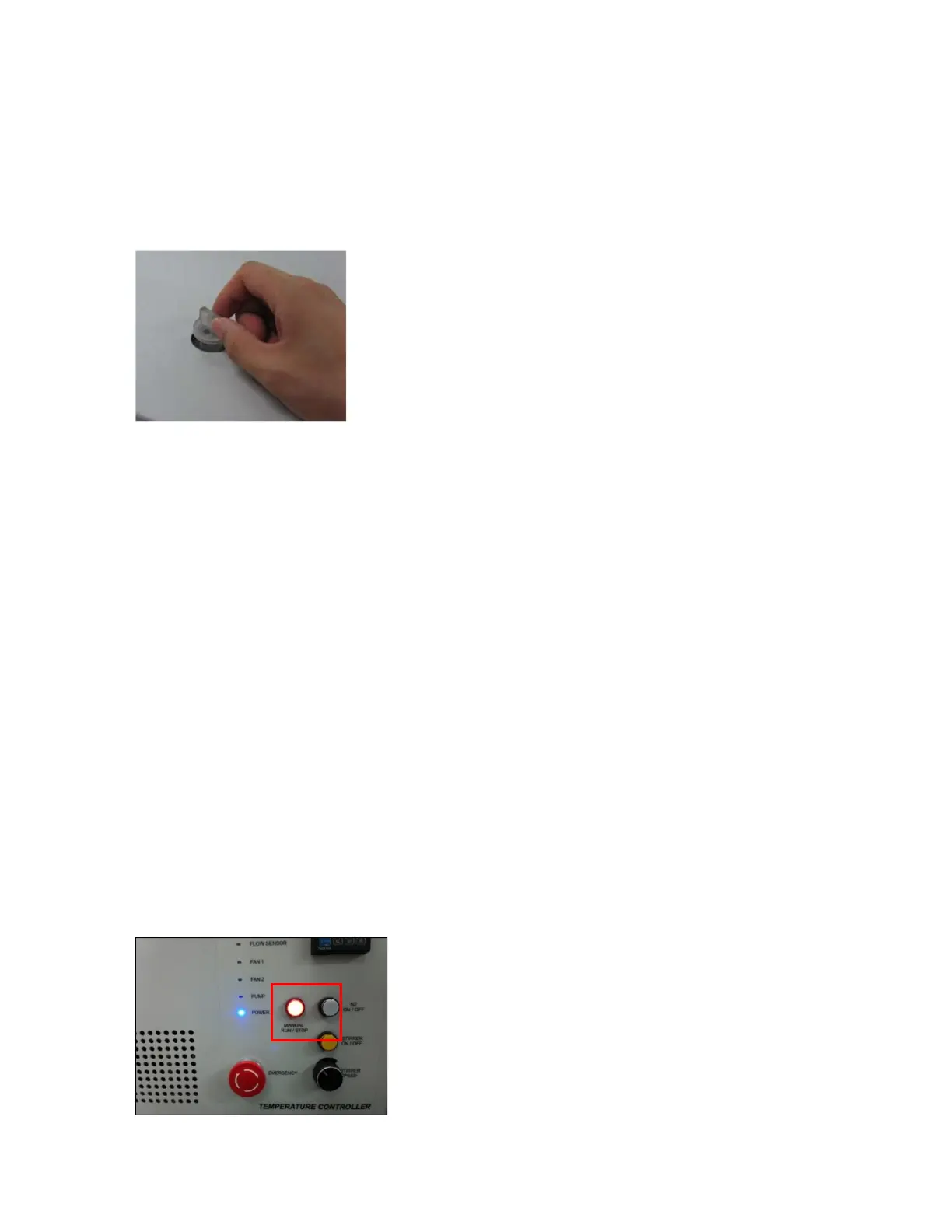
2. Push the Air Vent Manual button on and check if coolant flows properly for about one minute after
the error occurs. If the Flow Sensor LED is continuously on with the alarm sounding, contact your
PerkinElmer service representative.
Pump LED is lit on with an alarm sound
1. Check whether the tubing is bent or whether it is connected correctly, and then restart the Peltier
Controller.
2. Push the Air Vent Manual button to be switched on and check if coolant flows properly for about
one minute after the error occurs. If the Pump LED is continuously on with the alarm sounding,
contact your PerkinElmer Service representative.
Connection is failed
1. Check the Interface connector is lined properly.
2. Check whether the MANUAL RUN/STOP button is pushed on. If yes, turn off the Manual button.






 To Next Page