SEBU8121 75
Maintenance Section
Fuel Tank Water and Sediment - Drain
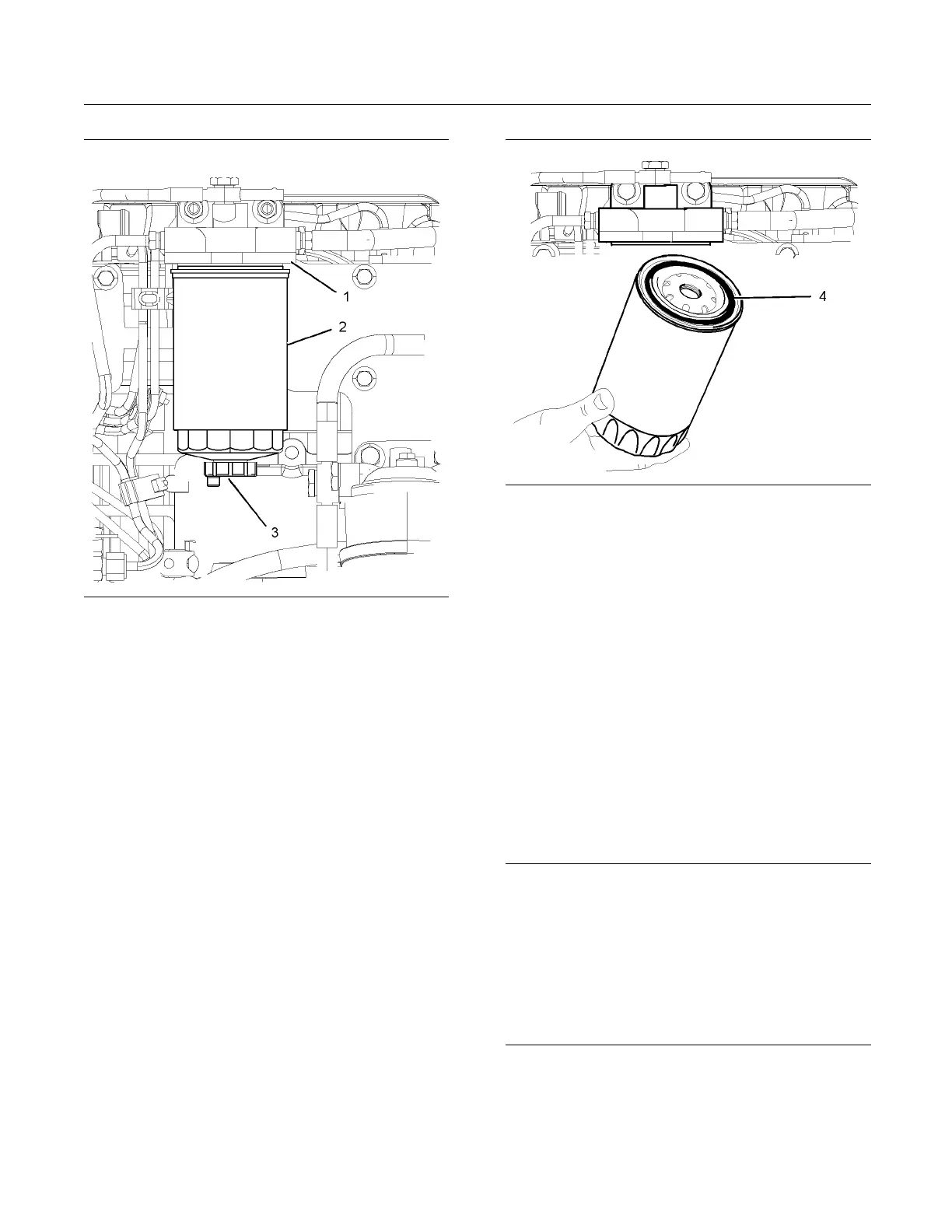
g01121396
Illustration 44
(1) Spin-
on filter
(2) Drain
1. Clean the outside of the fuel filter assembly. Open
the fuel dr
ain (3) and drain the fuel into a suitable
container.
2. Useasuit
able tool in order to remove the spin-on
filter (2) from the filter head (1).
3. Ensure th
at the fuel drain (3) on the new spin-on
filter is closed.
g01121723
Illustration 45
4. Lubricate the sealing ring (4) with clean fuel oil.
5. Install the spin-on filter (2) into the top of the filter
head (1).
6. Tighten the spin-on filter by hand until the sealing
ring contacts the filter head. Rotate the spin-on
filter through 90 degrees.
7. Prime the fuel system. Refer to Operation and
Maintenance Manual, “Fuel System - Prime”.
i01938468
Fuel Tank Water and Sed im e nt
-Drain
NOTICE
Care must be taken to ensure that fluids are contained
during performance of inspection, maintenance, test-
ing, adjusting, and repair of the product. Be prepared
to collect the fluid with suitable containers before
opening any compartment or disassembling any com-
ponent containing fluids.
Dispose of all fluids according to local regulations and
mandates.



 To Next Page