Cab, Instruments and Controls
65
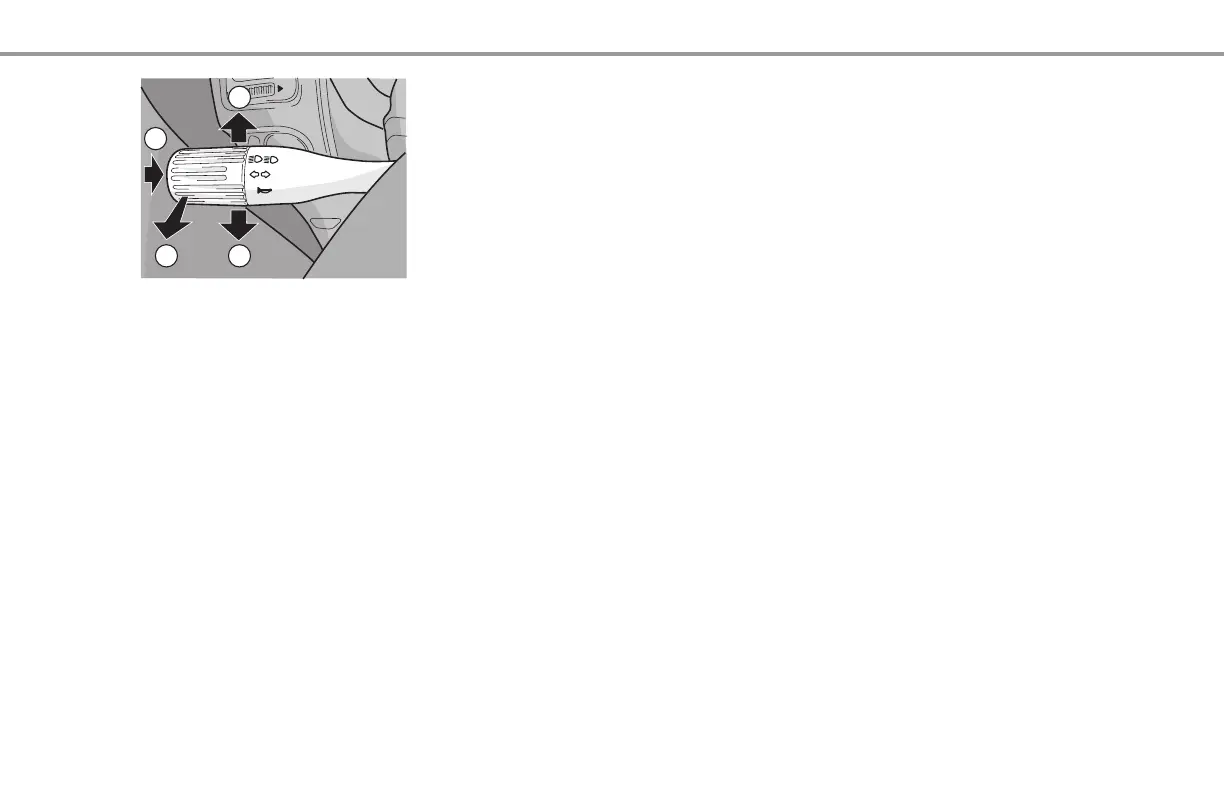
LEFT-HAND STEERING COLUMN SWITCH
A. HORN
The horn is operated with button A.
B. MAIN BEAM
Position B: The main beam is activated when the lights are on. The main beam
indicator on the instrument panel will also light up. To switch off the main beam, the
switch must be turned back through the "click" position towards the steering wheel.
If the lights are off, or if the switch has not been pushed through the "click" position,
it can be used to give signals.
C. DIRECTION INDICATOR, RIGHT
Position C: Right turn signal: on the instrument panel, the right direction indicator
will flash and there will also be an audible signal. To briefly operate the direction
indicators (changing lanes, etc.), the switch can be pushed slightly against the
spring pressure. It will spring back when released.
D. DIRECTION INDICATOR, LEFT
Position D: Left turn signal: on the instrument panel, the left direction indicator will
flash and there will also be an audible signal. To briefly operate the direction
indicators (changing lanes, etc.), the switch can be pushed slightly against the
spring pressure. It will spring back when released.
AHorn
B Main beam
C Direction indicator, right
D Direction indicator, left



 To Next Page