10 www.petsafe.net
ENES FRIT NLDE
OPERATING GUIDE
STEP 1
Prepare the Handheld Remote
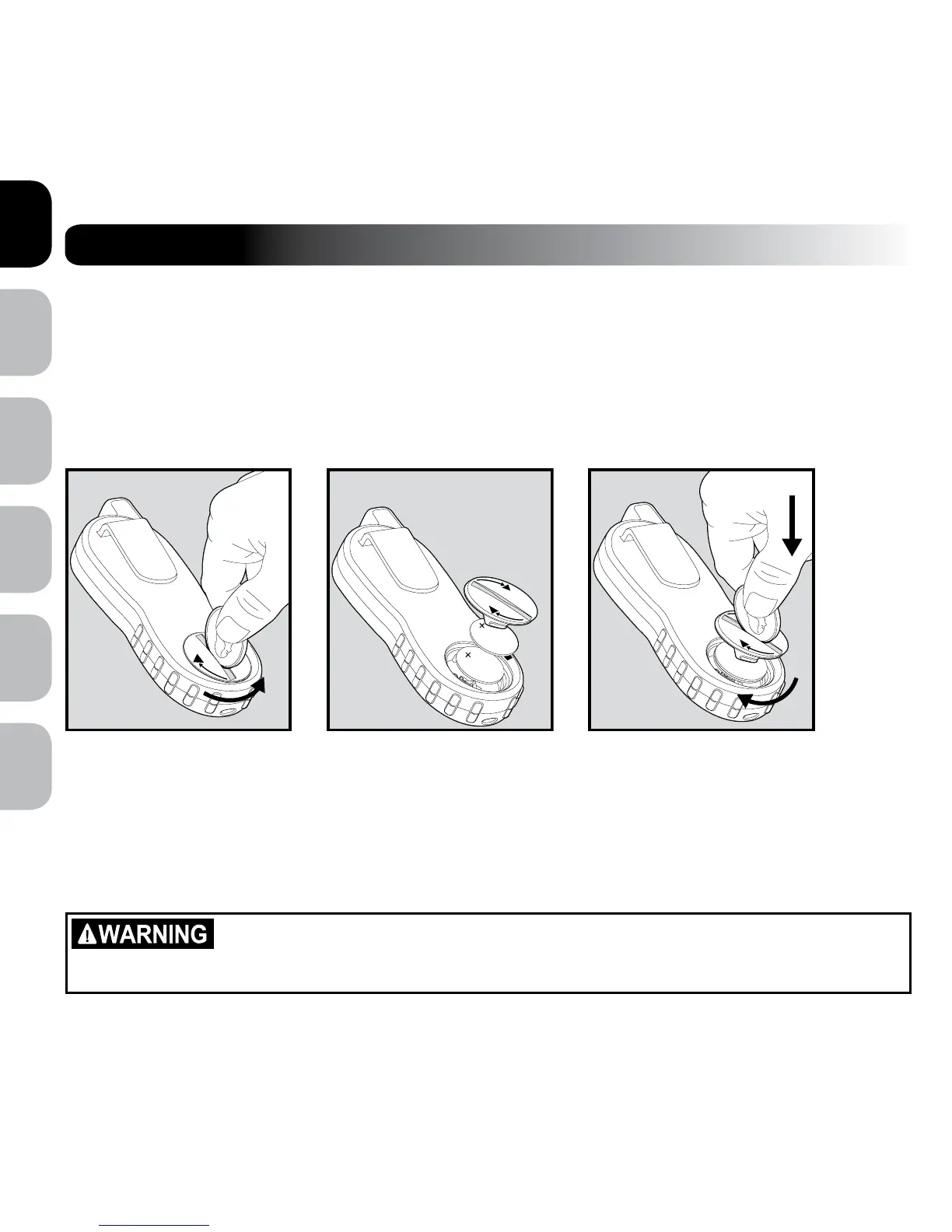
To Insert and Remove the Battery
1. To remove, use a coin and turn the Battery Cover counter-clockwise until the right triangle aligns with the
unlock symbol on the Handheld Remote housing (1A).
2. Install two (2), 3-volt (CR2032) batteries positive (+) side up (1B).
3. To replace the Battery Cover, align the right triangle with the unlock symbol, press down and turn clockwise
(1C) so that the right triangle aligns with the lock symbol on the Handheld Remote housing.
To verify the batteries are inserted correctly
1. Press any button on the Handheld Remote.
2. The Digital Display should activate showing the current stimulation level.
3. If the Digital Display doesn’t activate, you may have inserted the batteries backwards. Try taking them
out and turning them over, ensuring that the (+) side is up.
4. If the Digital Display still does not activate, contact the Customer Care Centre.
Risk of explosion if battery is replaced by an incorrect type. Do not short circuit, mix old
and new batteries, dispose of in fire, or expose to water. When batteries are stored or
disposed, they must be protected from shorting. Dispose of used batteries properly.
1C
1A
1B



 To Next Page