15
EVOLV SHIFT XTINSTALLING MOTHERBOARD CABLES
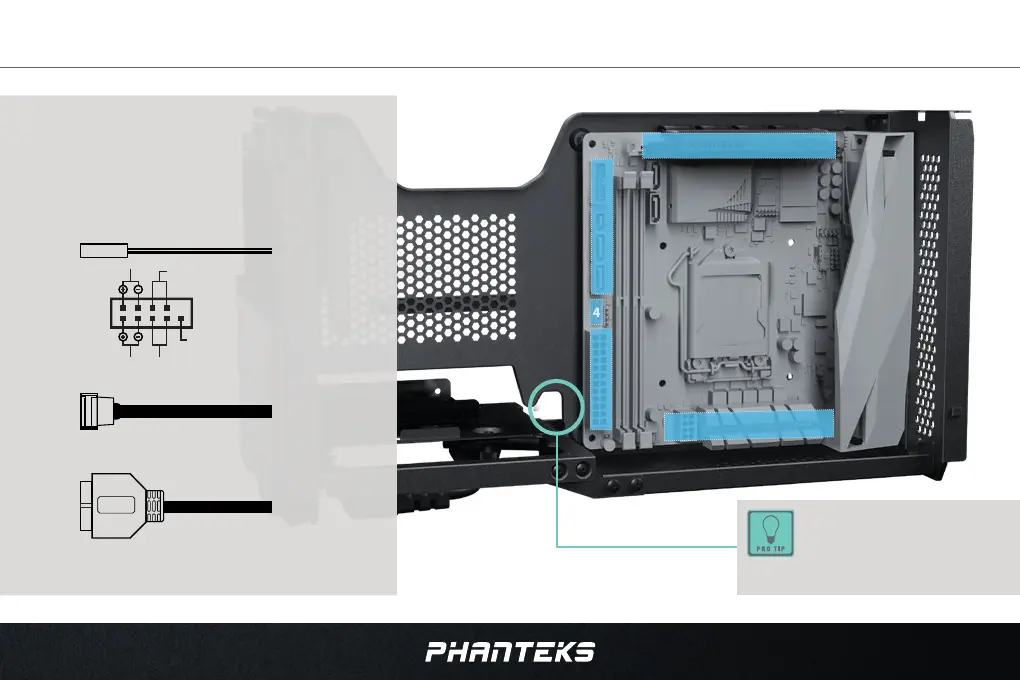
It is recommended to connect all motherboard
cables at this stage:
1. Connect the 8-pin CPU connector
2. Connect the CPU Fan/Pump connector(s)
3. Connect the 24-pin Motherboard connector
4. Connect the Power Button connector
5. Connect the Front USB-C connector
6. Connect the Front USB 3.0 connector
7. Connect the Riser Cable to the PCI-e slot. Secure
the riser cable with the riser lock (see page 25)
1 & 2
3
7
5
&
6
The Front USB cables can be
guided through this hook for
the best cable management.
motherboard front
I/O header diagram
Power SW
USB 3.0
USB 3.1 GEN 2 TYPE-C
Power LED
Power switch
not used
hdd led
reset switch




 To Next Page