- 32 -
8. Test programming run
㻌
㻌
㻌
㻌
㻌
㻌
㻌
㻌
㻌
㻌
㻌
㻌
㻌
㻌
㻌
㻌
㻌
㻌
㻌
㻌
㻌
㻌
㻌
㻌
㻌
㻌
㻌
㻌
㻌
㻌
㻌
㻌
㻌
㻌
㻌
㻌
㻌
㻌
Operation
1
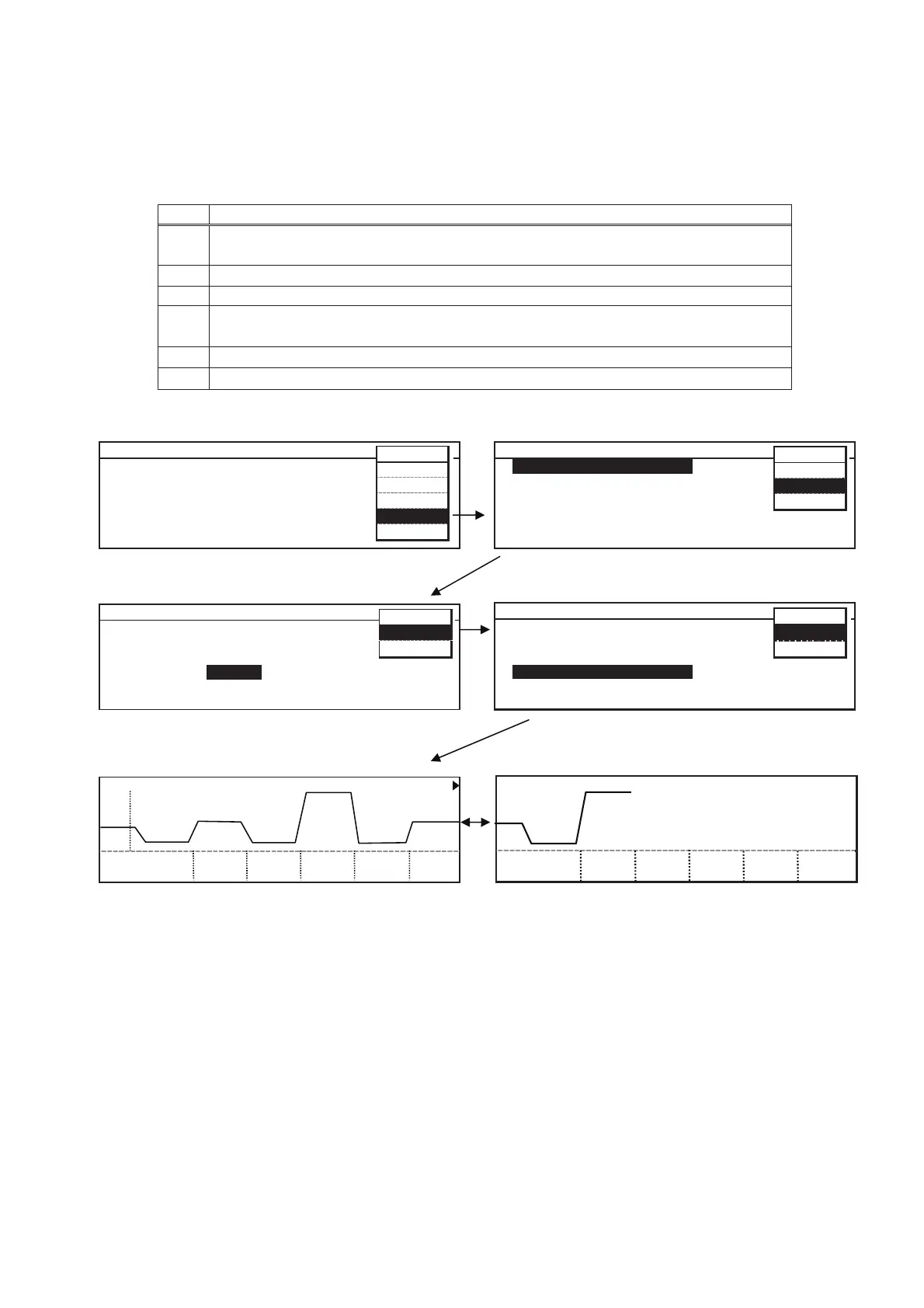
In Stand-by Top screen, select 䇾Tools䇿 on MENU bar to display Select Tools
screen.
2
Select 䇾Svc䇿 on MENU bar to display Password screen.
3 Input Service code “384” and select “OK” on MENU bar.
4
In Select Tools Svc screen, select 䇾Test Pro g ram 䇿 with reversal characters.
Select 䇾OK䇿 on MENU bar.
5
Select 䇾OK䇿 on MENU bar to start programmed run.
6 Top screen will appear after completing programmed run.
3
7
3
8
3
9
4
0
1
P a s s w o r d
2
3
F o r S e r
v i c e T o o l s
4
5
P a s s w o r
d
6
MENU
O K
Ca n c e l
1.Top screen 2. Select Tools
3. Password 4. Select Tools Svc
5. Test program
S t a n d - b y T o p Sc r e e n
T e m p 3 0 . 0
o
C Li g h t 3 L S RH 85%
2 0 1 1 / 0 3 / 2 0 1 2 : 0 0 : 0 0
㸱㸮㸬㸮Υ 㸱LS 㸶㸳㸣
ME NU
Run
St d- by
Edit
T o o l s
M. D e f
Input service code “384”.
Select Tools M L R - 3 5 2 H
L o g
Date Time
Alarm Setting
Key Lock PW Sett i n g
Default Setting
Delete User Data
MENU
OK
S v c
Ca nc e l
Select Tools Sv c V e r . 1 . 0 0 A
Send All Data to P C
Calibration 1
Calibration 2
T e s t P r o g r a m
Delete All User d a t a
Hardware Status
ME N U
O K
Ca n c e l
T e s t P r o g r a m C yc 1 / 2 C l o ck
o
C
T i m e 1 : 0 0 4 : 0 0 7 : 0 0 1 0 : 0 0 1 3 : 0 0 1 6 : 0 0
T e m p 5 . 0 2 5 . 0 5. 0 5 0 . 0 5.0 25.0
Test Program C y c 1 / 2 C l ock
o
C
Time19:00 22:00
Temp 5.0 50.0


 To Next Page