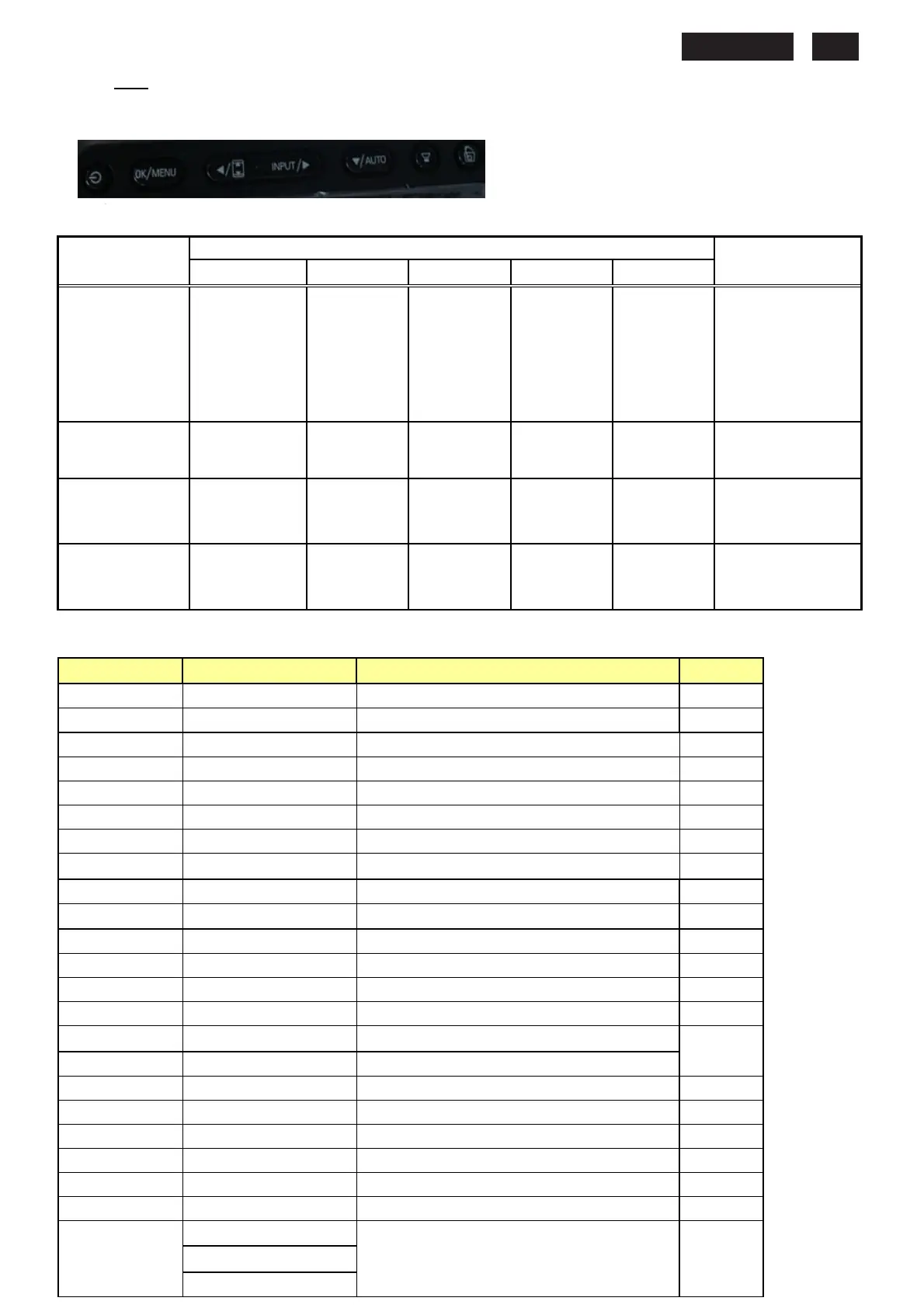
6. OSD
(FW)
6.1 control of OSD
The positions and functions of the buttons are defined as below.
6.2 Adjustment parameters
Hot-key definition
HOT KEY OPERATION
FUNCTION
Smart Image Auto/Back
Input
Input Input
Input \
\\
\▼
▼▼
▼
MENU\OK POWER
DESCRIPTION
FACTORY MODE
●
● ●
Press
at the same time, and
then press [POWER]
for DC power on. OSD
menu will be shown
with “Factory” on the
sub –menu of picture.
Demo mode
●
To enter Demo
mode(3 seconds
ON/OFF)
Monitor Controls
Lock
●
control when press
Menu (6 seconds).
DDC/CI On/OFF
● ●
DDC/CI On/OFF
when press Menu+▼
▼▼
▼
(6 seconds).
OSD Tree
Level 1 Level 2 Level 3 Default
Input VGA
DVI
Picture Picture Format (Wide screen, 4:3) Wide
Brightness (0~100) 100
Contrast (0~100) 50
SmartResponse (On, Off) Off
SmartContrast (On, Off) Off
Gamma (1.8, 2.0, 2.2, 2.4, 2.6) 2.2
Audio Stand Alone (On, Off) Off
Mute (On, Off) Off
Color Color Temp. (5000K,6500K,7500K,8200K,9300K,11500K)
6500K
sRGB
User Define (Red:0~100) 100
(Green:0~100) 100
(Blue:0~100) 100
Language English English
Español
Français
Deutsch
Italiano
Português
Русский
简体中文
Türkçe (only for 231E1)
OSD Setting Horizontal (0~100) 50










 To Next Page