EasyManua.ls Logo

Philips 241P3EB/00 - Page 14

Philips 241P3EB/00
91 pages
Print Icon
To Next Page IconTo Next Page
To Previous Page IconTo Previous Page
Loading...
14 241P3 LCD
Mechanical Instruction
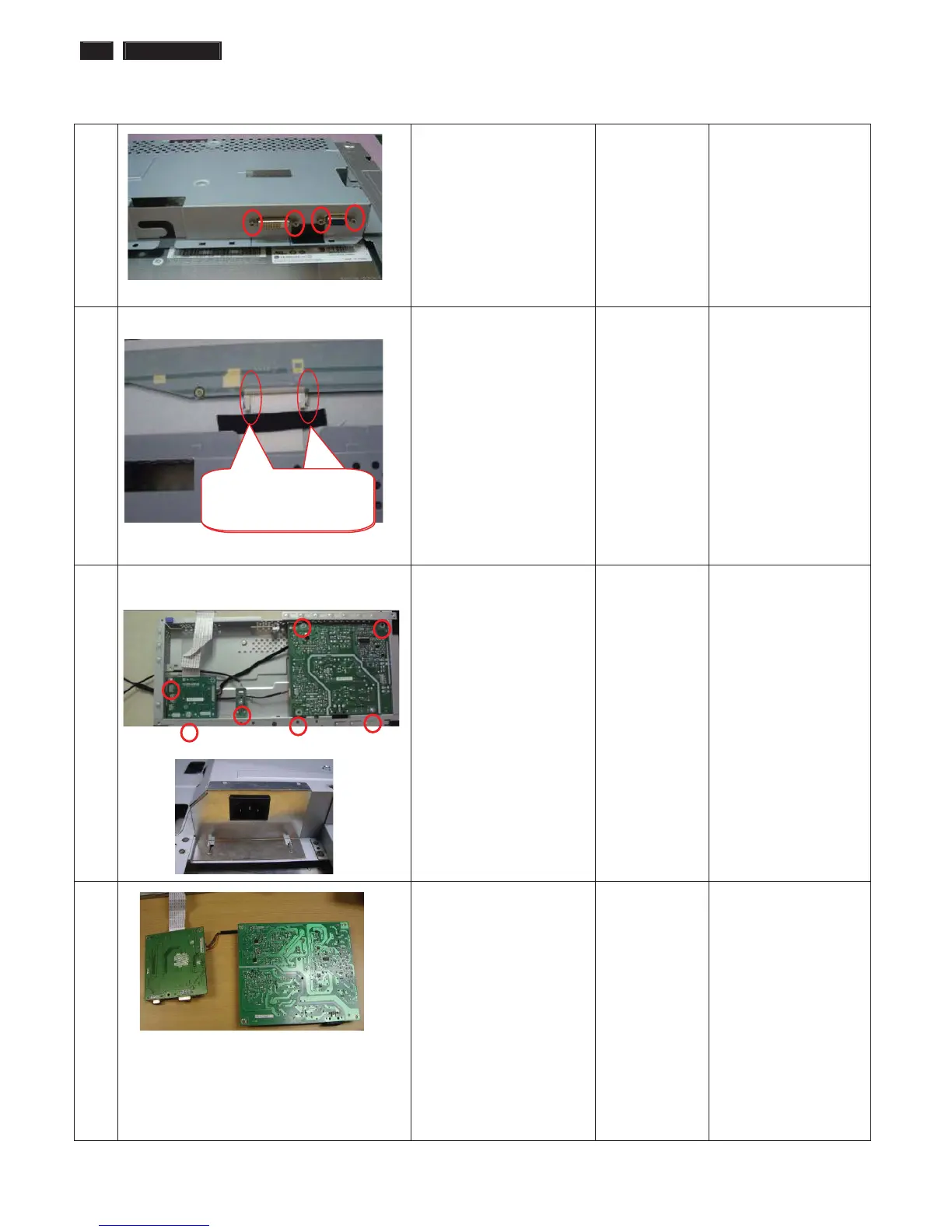
8 Disassembled the
Main-BKT : hexagonal
screw *4
Screw-driver
9 Tear off the acetic tape on
LVDS
Unlock the LVDS by using
two hands (see note).
Please carefully use
two hands (one hand
presses the
locking-latch of LVDS
cable’s housing, and
at the same time
another hand pulls out
the LVDS cable.) for
this step to avoid from
deforming the
terminals of
positive-locking type
LVDS cable.
10 Tear off the iron sheet
which cover the
AC-SOCKET
Disassemble the Power
boardΕUSB boardΕ
ITF-board
Æ 7 screws
Plus driver
11 Take the PCBA from
Main-BKT and then put
it on the cushion
The locking-latch
of LVDS cable’s
The locking-latch
of FFC cable’s

Table of Contents

Related product manuals