EasyManua.ls Logo

Philips 26PW9100D - Automatic Program

Philips 26PW9100D
43 pages
Print Icon
To Next Page IconTo Next Page
To Previous Page IconTo Previous Page
Loading...
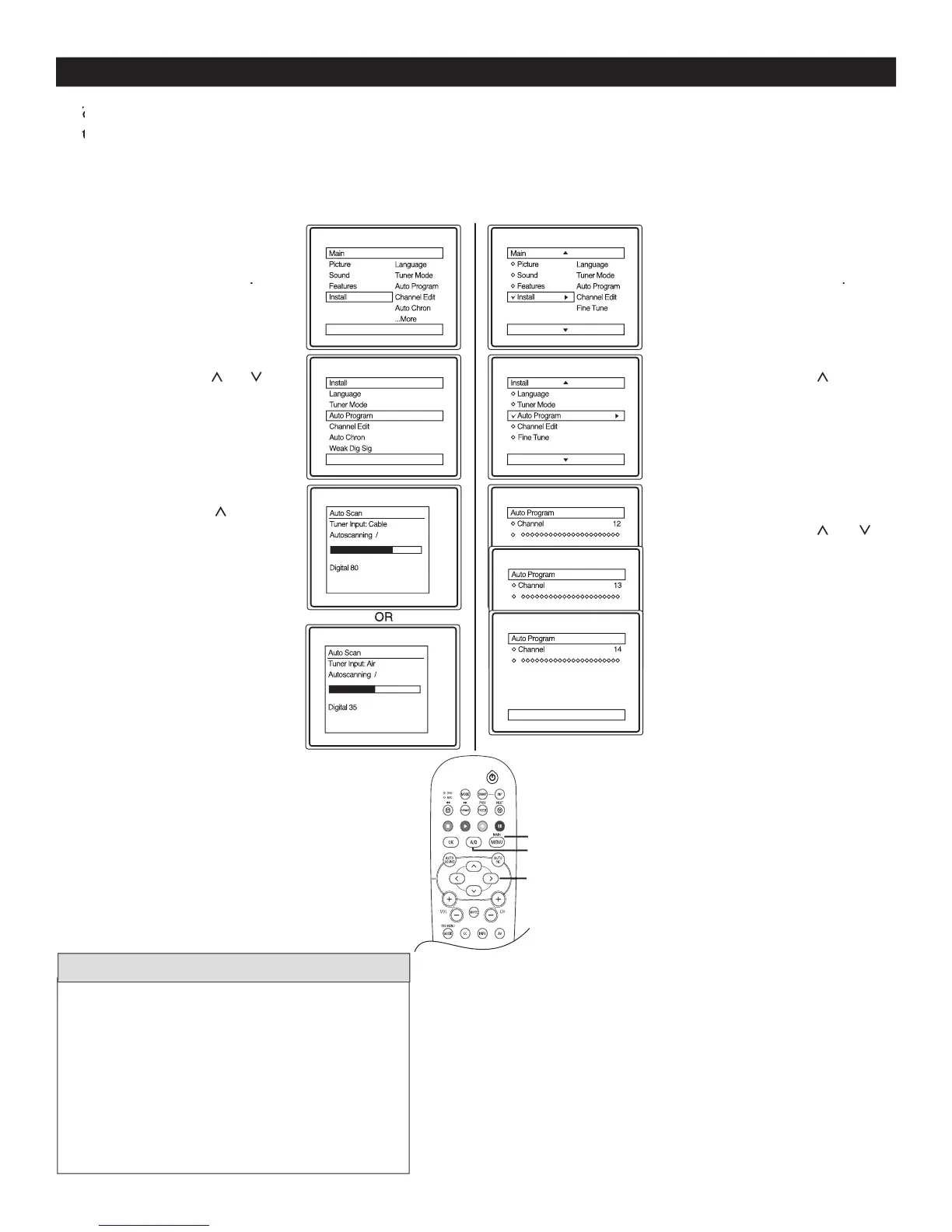
AUTOMATIC PROGRAM
10
1
Complete the antenna
or cable signal connection
before activating
AUTO PROGRAM
.
2
Press
MENU
on the remote
control to display the
onscreen menu.
3
Press
CURSOR
<
or
>
to
scroll though the onscreen
menu until you see
Install
highlighted.
4
Press
CURSOR
>
to display
the Install menu features.
5
Press
CURSOR
<
or
>
to scroll through the
Install features until you see
Auto Program
highlighted.
6
Press
CURSOR
>
to start
the select
antenna
or
cable
mode.
7
Autosc
an
will begin. This m
ay
take
20
to
40
min
utes
depending on the number of
channels available.
When
finished, press
MENU
twice
to exit the menu display from
the TV screen.
8
Press
A/D
to switch between
Digital and Analog channels to
view your programs.
Y
ou can program the TV to automatically set itself for local area (or Cable TV) channels. This makes it easy for you
Y
ou can program the TV to automatically set itself for local area (or Cable TV) channels. This makes it easy for you
Y
to select only the TV stations in your area when the CHANNEL (+), (–) buttons are pressed.
Yto select only the TV stations in your area when the CHANNEL (+), (–) buttons are pressed.Y
1
Complete the antenna or
cable signal connection
before activating
A
UTO PROGRAM
.
2
Press
MENU
on the remote
control to display the
onscreen menu.
3
Press
CURSOR
<
or
>
to
scroll though the onscreen
menu until you see
Install
highlighted.
4
Press
CURSOR
>
to
display the Install menu
features.
5
Press
CURSOR
<
or
>
to scroll through the Install
features until you see
Auto
Program
highlighted.
6
Press
CURSOR
>
to select
antenna
or
cable
mode.
7
When finished, press
MENU
twice to exit the menu from
the TV screen.
8
Press
A/D
to switch
between Digital and
Analog channels to view your
programs.
Follow these steps for Digital Mode
Follow these steps for Analog Mode
MENU
>
>
<
>
A/D
Digital Mode
Analog
Mode
When CABLE is selected, channels 1-135 are
available in Digital Mode and Channels 1-125 are
available in Analog Mode.
When ANTENNA is selected, channels 2-69 are
available for both Digital and Analog Modes.
When you install in
Digital mode, it will
install both Digital and Analog channels

HELPFUL HINTS