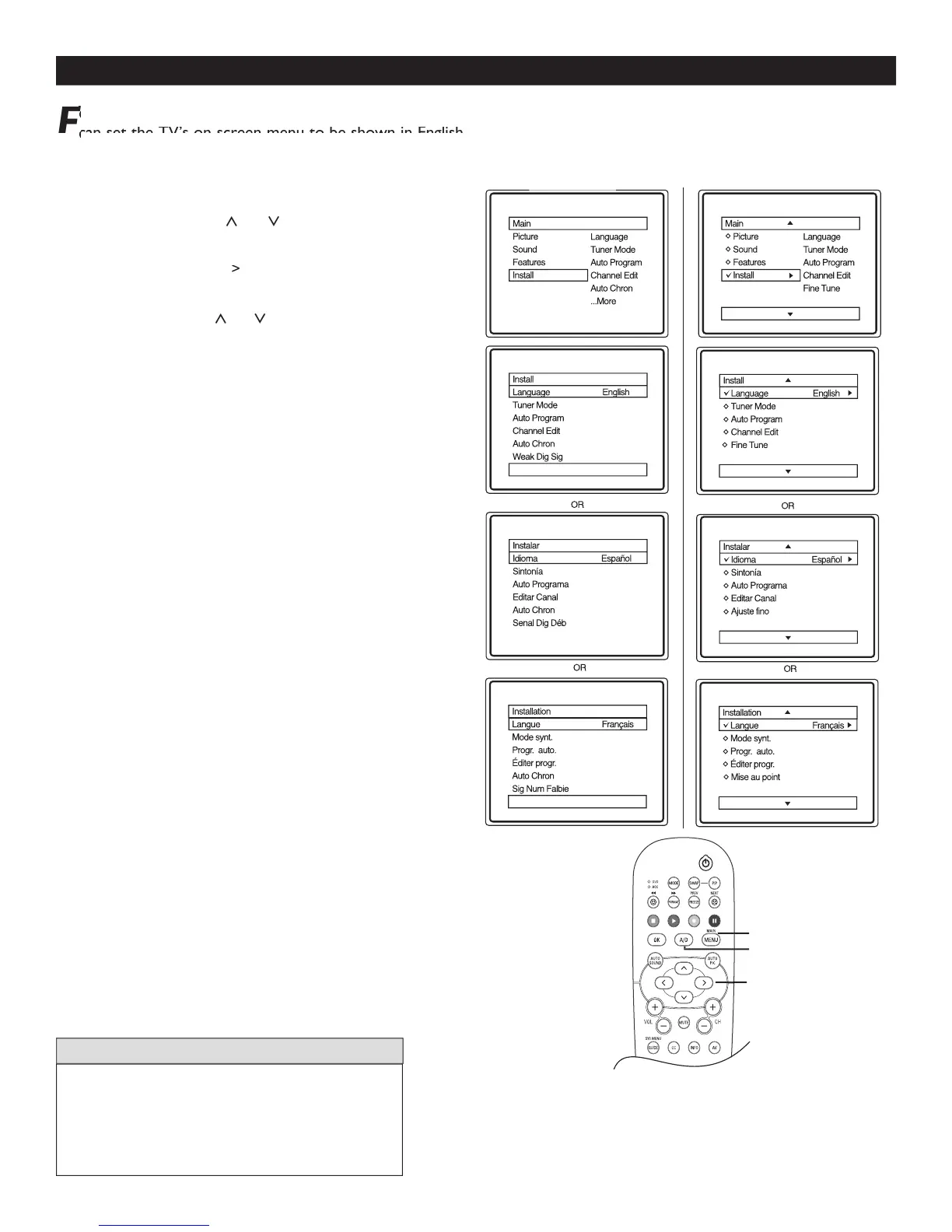
HOW TO USE THE LANGUAGE CONTROL
1
on the remote control to display the
2
onscreen menu until you see
3
to display the Install menu
4
to scroll through the Install
5
to select English, Français (French)
6
7
to switch between Digital and Analog
The Language control only makes the TV on-screen
Menu items appear in English, Spanish, or French
It does not change the other on-screen text features
or French and Spanish speaking TV owners an onscreen Language option is present. With the Language control you
F
or French and Spanish speaking TV owners an onscreen Language option is present. With the Language control you
F
can set the TV’s on-screen menu to be shown in English, French, or Spanish.
can set the TV’s on-screen menu to be shown in English, French, or Spanish.
Fcan set the TV’s on-screen menu to be shown in English, French, or Spanish.F
Fcan set the TV’s on-screen menu to be shown in English, French, or Spanish.F



 To Next Page