EasyManua.ls Logo

Philips 26PW9100D - How to Use the Format Control

Philips 26PW9100D
43 pages
Print Icon
To Next Page IconTo Next Page
To Previous Page IconTo Previous Page
Loading...
27
HOW TO USE THE FORMAT CONTROL
FORMAT
>
>
<
>
1
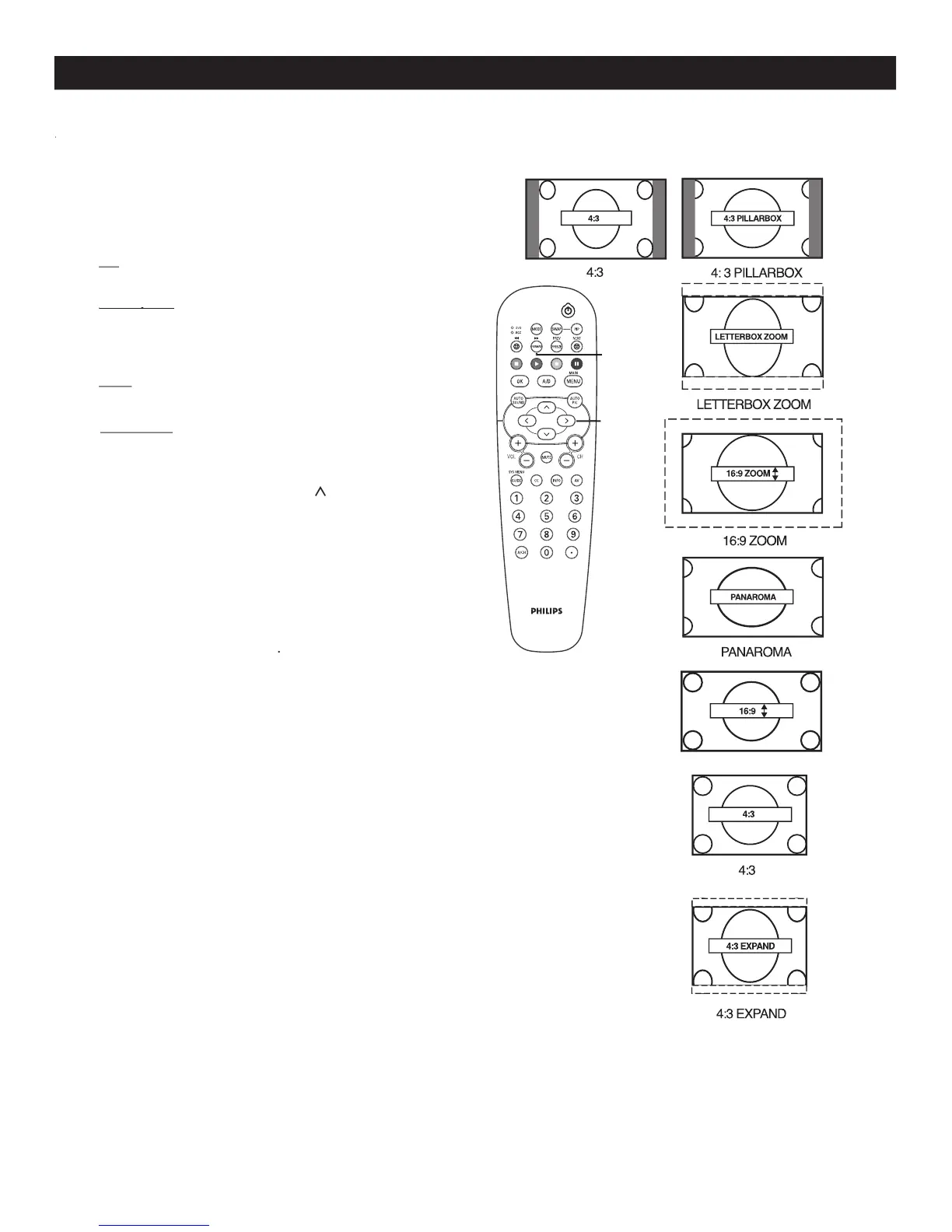
Press
FORMAT
on the remote control
to
select one of the
scr
een format options.
4:3
-
Stand
ard format for the TV.
4:3 Expand
4:3 Expand
-
4:3 Expand - 4:3 Expand
Enlarges the picture to fill out the
entire screen area, eliminating the “letter box”
effect.
16:9
-
until the lightest parts of the
picture show good detail.
16:9 Zoom
-
to improve sharpness in the
picture.
While in the
16:9 Zoom
and
16:9
format
options you can press
CURSOR
<
or
>
to
"nudge" the picture up or down.
Note :
4:3 and 4:3 Expand
format options are only
available for model 32PT9100D.
16:9 and 16:9 Zoom
format options are only
available for widescreen models
26PW9100D,
30PW9100D and 30PW9110D
.
M
M
any times while watching movies from a DVD player the image is shown in “letter box” format. This is the
format that is shown in movie theaters. when shown on a TV screen, the image will have areas of black bars on
the top and bottom of the screen.