EasyManua.ls Logo

Philips 26PW9100D - Caption Option and Size - Digital

Philips 26PW9100D
43 pages
Print Icon
To Next Page IconTo Next Page
To Previous Page IconTo Previous Page
Loading...
29
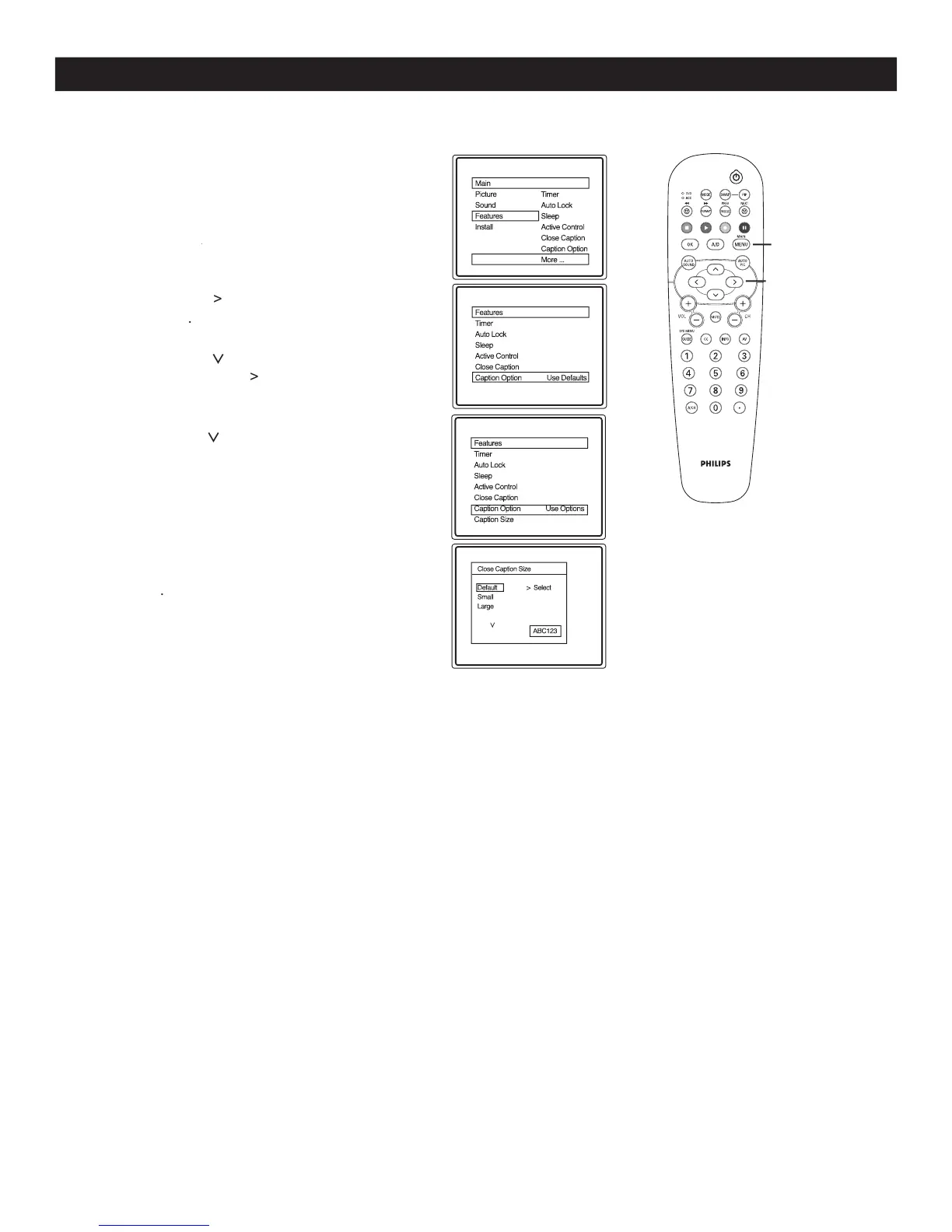
CAPTION OPTION AND SIZE - DIGITAL
1
Press
MENU
on the remote control to display the
onscreen menu.
2
Press
CURSOR
>
CURSOR
>CURSOR
until you see
Features
highlighted.
3
Press
CURSOR
>
to select
Use Options
or
Use Defaults
.
4
Press
CURSOR
>
to highlight
Caption Size
followed by
CURSOR
>
to enter Caption
Size options menu.
5
Press
CURSOR
>
to highlight
Close Caption
display size options
Default, Small or
Large
. The text size will be displayed at the right
hand corner of the menu to help you make your
choice.
6
When finished, press
MENU
on the remote
control
three times to exit the menu from the
TV screen
.
MENU
>
>
<
>
C
aption Option lets you select the default option or options that you have assigned to your Close captioning
service