EasyManua.ls Logo

Philips 26PW9100D - How to Use the Tuner Mode Control

Philips 26PW9100D
43 pages
Print Icon
To Next Page IconTo Next Page
To Previous Page IconTo Previous Page
Loading...
9
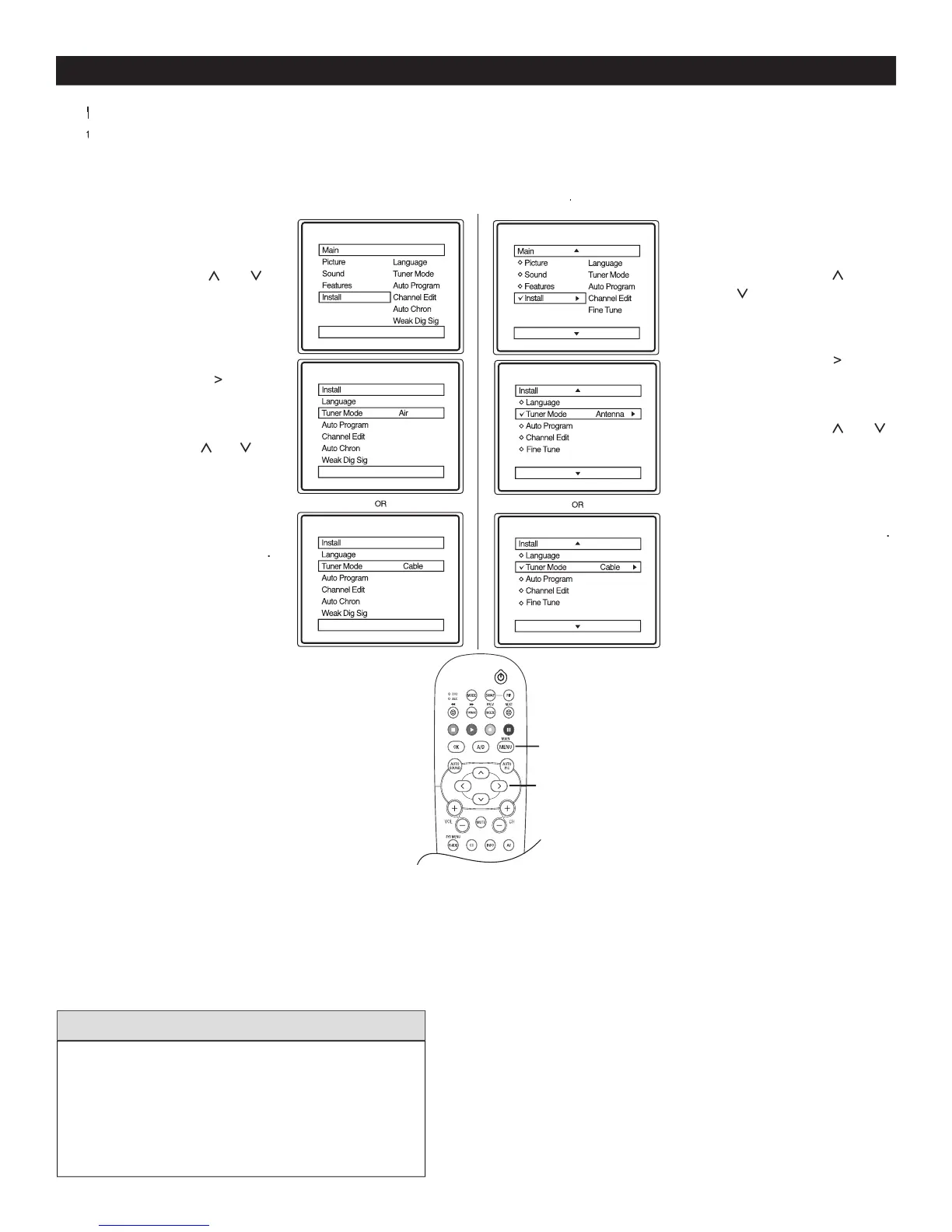
HOW TO USE THE TUNER MODE CONTROL
When
CABLE
is selected, channels 1-125 are
available.
When
ANTENNA
is selected, channels 2-69 are
available.
Use the
A/D
button on the Remote Control to switch
between Digital and Analog channels.
HELPFUL HINTS
T
he TUNER MODE control lets you change the TV input signal to ANTENNA or CABLE mode. It is important
T
he TUNER MODE control lets you change the TV input signal to ANTENNA or CABLE mode. It is important
T
that you know which type of signal to look for (Cable TV or Antenna).
Tthat you know which type of signal to look for (Cable TV or Antenna).T
1
Press
MENU
on the remote
control to display the
onscreen menu.
2
Press
CURSOR
<
or
>
to scroll though the
onscreen menu until you see
Install
highlighted.
3
Press
CURSOR
>
to
display the Install menu
features.
4
Press
CURSOR
<
or
>
to scroll through the Install
features until you see
Tuner
Mode
highlighted.
5
Press
CURSOR
>
to
select
Antenna
or
Cable
.
6
When finished, press
MENU
twice to exit the
menu from the TV screen.
1
Press
MENU
on the
remote control to display
the onscreen menu.
2
Press
CURSOR
<
or
>
to scroll though
the onscreen
menu until you see
Install
highlighted.
3
Press
CURSOR
>
to
display the Install menu
features.
4
Press
CURSOR
<
or
>
to
scroll through the Install
features until you
see
Tuner
Mode
highlighted.
5
Press
CURSOR
>
to
select
Antenna
or
Cable
.
6
When finished, press
MENU
twice to exit the
menu from the TV screen.
Follow these steps for Digital Mode
Follow these steps for Analog Mode

MENU
>
>
<
>
Digital Mode
Analog
Mode
Analog ModeAnalog

Other manuals for Philips 26PW9100D

Related product manuals