Alignments
EN 25TPM7.1E LA 6.
2011-Aug-19
6. Alignments
Index of this chapter:
6.1 General Alignment Conditions
6.2 Hardware Alignments
6.3 Software Alignments
6.4 Option Settings
6.5 Reset of Repaired SSB
6.1 General Alignment Conditions
Perform all electrical adjustments under the following
conditions:
• Power supply voltage: 90 - 264 V
AC
, 50/ 60 ± 3 Hz.
• Connect the set to the mains via an isolation transformer
with low internal resistance.
• Allow the set to warm up for approximately 15 minutes.
• Measure voltages and waveforms in relation to correct
ground (e.g. measure audio signals in relation to
AUDIO_GND).
Caution: It is not allowed to use heat sinks as ground.
• Test probe: R
i
> 10 MΩ, C
i
< 20 pF.
• Use an isolated trimmer/screwdriver to perform
alignments.
6.2 Hardware Alignments
Not applicable.
6.3 Software Alignments
Put the set in SAM mode (see Chapter 5. Service Modes, Error
Codes, and Fault Finding). The SAM menu will now appear on
the screen. Select ALIGNMENTS and go to one of the sub
menus. The alignments are explained below.
The following items can be aligned:
• White point
To store the data:
• Press OK on the RC before the cursor is moved to the
left
• Select “Store” and press OK on the RC
• Switch the set to stand-by mode.
For the next alignments, supply the following test signals via a
video generator to the RF input:
• EU/AP-PAL models: a PAL B/G TV-signal with a signal
strength of at least 1 mV and a frequency of 475.25 MHz
• US/AP-NTSC models: an NTSC M/N TV-signal with a
signal strength of at least 1 mV and a frequency of
61.25 MHz (channel 3).
• LATAM models: an NTSC M TV-signal with a signal
strength of at least 1 mV and a frequency of 61.25 MHz
(channel 3).
6.3.1 Display adjustment
You can use the default values. The default values are average
values coming from production.
• Enter SAM mode.
• Select a colour temperature (e.g. COOL, NORMAL, or
WARM).
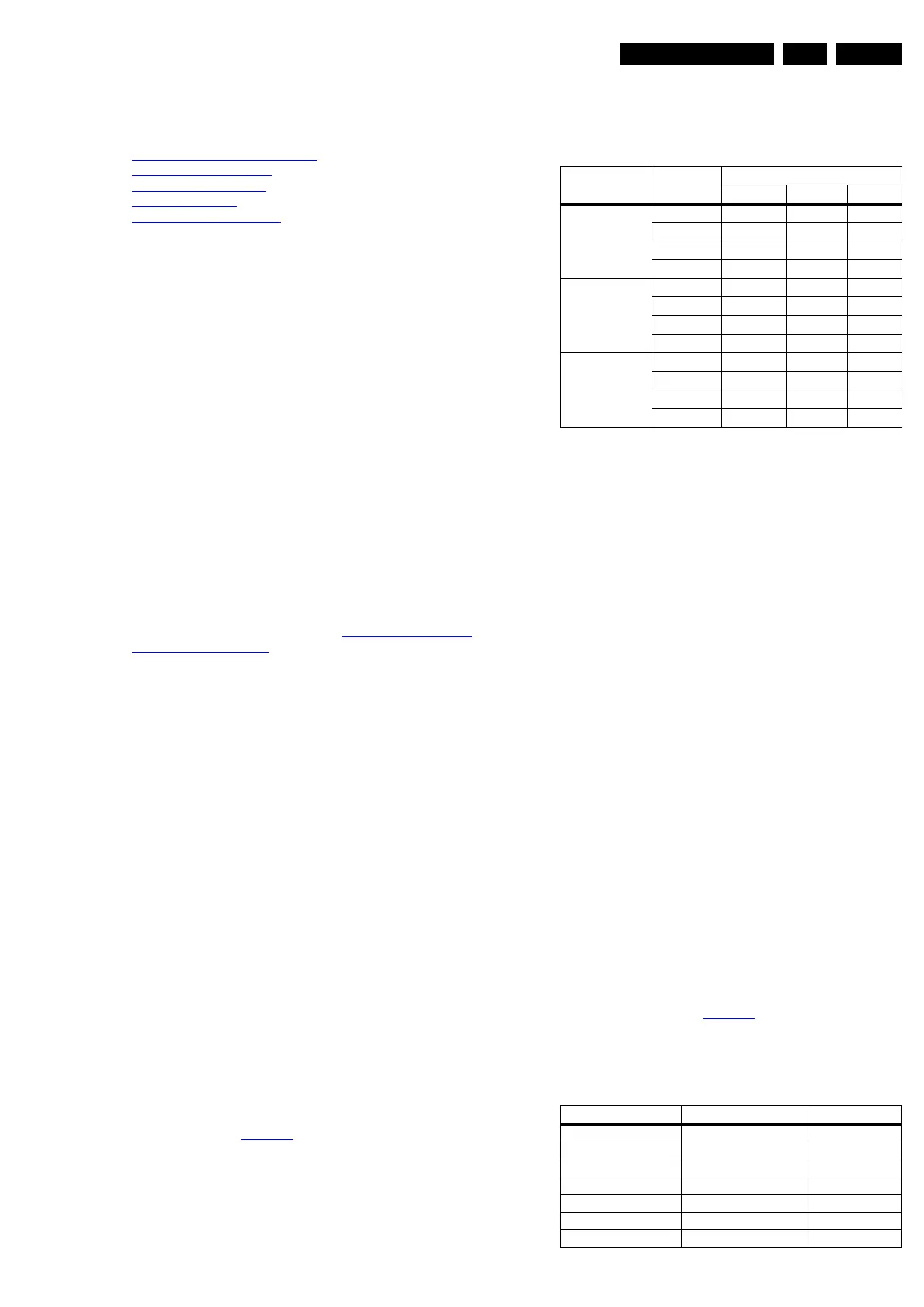
• Set the RED, GREEN and BLUE default values according
to the values in Table 6-1
.
• When finished press OK on the RC, then press STORE to
store the aligned values to the NVM.
• Restore the initial picture settings after the alignments.
Table 6-1 White tone default settings
This group setting of colour temperature will be applied
automatically to the TV, VGA, HDMI and AV sources.
6.4 Option Settings
6.4.1 Introduction
The microprocessor communicates with a large number of I
2
C
ICs in the set. To ensure good communication and to make
digital diagnosis possible, the microprocessor has to know
which ICs to address. The presence / absence of these
MT5395 ICs (back-end advanced video picture improvement
IC which offers motion estimation and compensation features
(commercially called HDNM) plus integrated Ambilight control)
is made known by the option codes.
Notes:
• After changing the option(s), save them by pressing the OK
button on the RC before the cursor is moved to the left,
select STORE and press OK on the RC.
• The new option setting is only active after the TV is
switched “off” / “stand-by” and “on” again with the mains
switch (the NVM is then read again).
6.4.2 Option Code Overview
Enter SAM mode to check the option codes. they could not be
edited in the NVM.
6.4.3 Display Code Overview
Press the following key sequence on a standard RC
transmitter: “062598” directly followed by MENU and “xxx”,
where “xxx” is a 3 digit decimal value of the panel type: see
column “Display Code” in Table 6-2
. When the value is
accepted and stored in NVM, the set will switch to Stand-by, to
indicate that the process has been completed.
Table 6-2 Display code overview
Picture mode
Screen
size
Colour temperature
Red Green Blue
Normal
(9000K)
32" 128 116 98
37" 128 103 95
42" 128 113 107
47" 128 110 96
Cool (11000K) 32" 128 120 116
37" 128 107 113
42" 128 115 125
47" 128 113 115
Warm (6500K) 32" 128 107 59
37" 128 96 58
42" 128 107 68
47" 128 103 56
CTN_ALT BOM# Panel Type Display Code
32PFL4606H/12 LGD LC320WUY-SCA1 124
32PFL4606H/58 LGD LC320WUY-SCA1 124
32PFL4606H/60 LGD LC320WUY-SCA1 124
37PFL4606H/12 LGD LC370WUY-SCA1 125
37PFL4606H/58 LGD LC370WUY-SCA1 125
37PFL4606H/60 LGD LC370WUY-SCA1 125
42PFL4506H/12 LGD LC420WUY-SCA1 126





 To Next Page