49BDL5057P
33
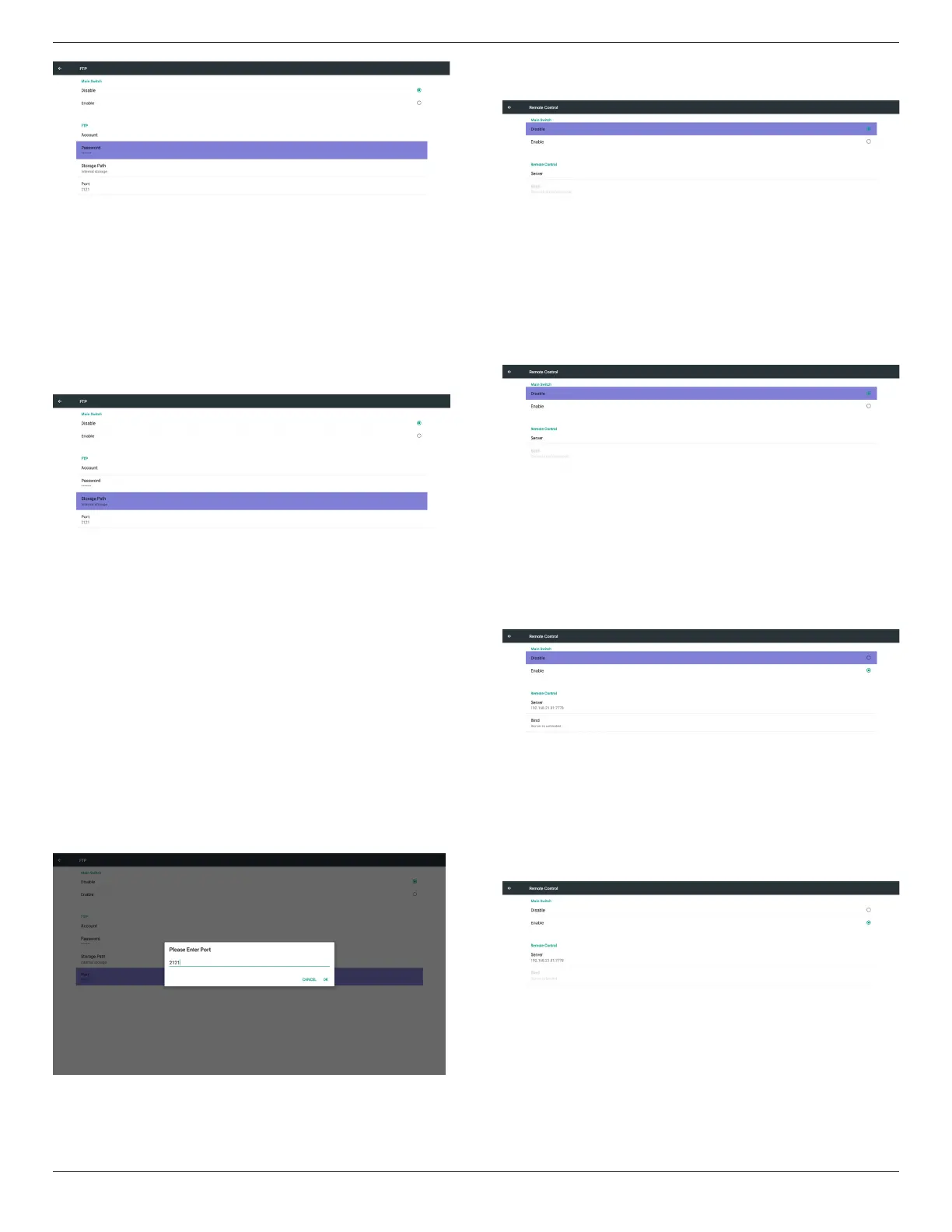
3)StoragePath
Showdefaultpath:Internalstorage
Note:
CanonlydisplayInternalstorage,cannotbemodied.(Onlyshow
path)
4)WillshowServerisunbindedifRemotecontrolserverfeedback
unbindedstatus.
5)Port
SetupFTPportnumber.Default:2121
Note:
Inputlimitation
(1)Length:Max5characters
(2)Range:1024~65535
(3)Format:Number0-9
(4)Unavailableport:5000
(5)Theportnumbermustmorethan1024
3. RemoteControl
ViaEnable/DisabletoControlRemoteControlOn/Off
UsercaninputServeraddress.Ifserverdoesnotregistered,itwillask
userforPINcode.
Bindstatus:
(1)Willshownetworkisdisconnectedifnotyetconnectstonetwork.
(2)WillshowServerisdisconnectedifnetworkconnectedbut
remotecontrolserverdisconnected.
(3)WillshowServerisunbindedifRemotecontrolserverfeedback
unbindedstatus.
(4)WillshowServerisbindedifSeverbindedsuccessfully.
(5)WillshowErrorPINcodeifinputincorrectPINcode.




 To Next Page