49BDL5057P
46
PIP position
SelectthepositionofthesubpictureinthePIP(Picture-in-Picture)
mode,{Bottom-Right}/{Bottom-Left}/{Top-Right}/{Top-Left}/{Center}/
{Custom}.
PIPposition/Customfeature:
Left/Right{0-10}:adjustPIPwindowsfromLefttoRightcorner.
Up/Down{0-10}:adjustPIPwindowsfromUptobottomofscreen.
Size{0-10}:adjustPIPwindowsize.
WhenPIPsubwindowmovingtotheborderofscreen,corresponding
settingofpostion/sizewillbexedandcannotadjust.
PIP change
ExchangeMainandPIP / PBP / Quick swapinputsignal.
PIP source
Selecttheinputsignalforthesubpicture.
PIP audio
SelecttheaudiosourceintheSubmode.
•{Main}-Selectaudiofromthemainpicture
•{Sub}-Selectaudiofromthesubpicture.
PIP reset
ResetallsettingsinthePIPmenutofactorypresetvalues.
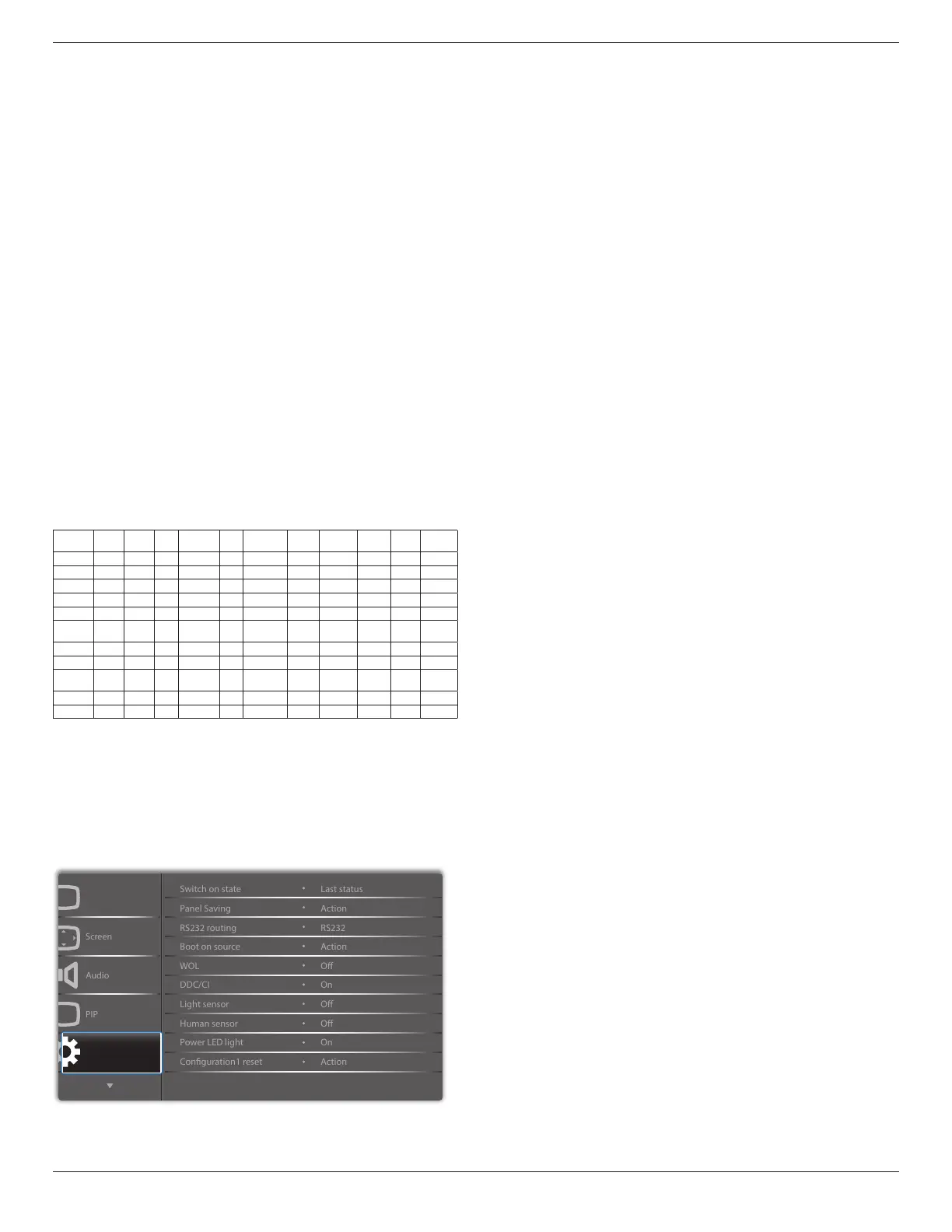
• ThePIPfunctionisavailableonlyforcertainsignalsource
combinationsasshowninthetablebelow.
HDMI1 HDMI2 DVI DisplayPort VGA MediaPlayer Browser SmartCMS
PDF
Reader
Custom CardOPS
HDMI1
O X X O O X X X X X X
HDMI2
X O X O O X X X X X X
DVI
X X O O O* X X X X X X
DisplayPort
O O O O O O O O O O O
VGA
O O O* O O O O O O O O
Media
Player
X X X O O O X X X X X
Browser
X X X O O X O X X X X
SmartCMS
X X X O O X X O X X X
PDF
Reader
X X X O O X X X O X X
Custom
X X X O O X X X X O X
CardOPS
X X X O O X X X X X O
(O:PIPfunctionavailable,X:PIPfunctionunavailable)
• TheavailabilityofthePIPfunctionwillalsodependontheresolution
oftheinputsignalbeingused.
Note:Touchfunctionisonlyforsinglefullscreen.Multiplescreentouch
eventwillbeincorrectcorresponding.
6.2.5. Configuration1 menu
P
Picture
Conguration 1
Switch on state
Selectthedisplaystatususedforthenexttimeyouconnectthepower
cord.
• {Power off}-Thedisplaywillremainoffwhenthepowercordis
connectedtoawalloutlet.
• {Forced on}-Thedisplaywillturnonwhenthepowercordis
connectedtoawalloutlet.
• {Last status}-Thedisplaywillreturntothepreviouspowerstatus
(on/off/standby)whenremovingandreplacingthepowercord.
Panel saving
Choosetoenablethepanelsavingfunctionsandthusreducetheriskof
“imagepersistence”or“ghost-imaging”.
• {Brightness}-Select{On}andtheimagebrightnesswillbereduced
toanappropriatelevel.TheBrightnesssettinginthePicturemenu
willbeunavailablewhenselected.
• {Pixel shift}-Selectthetimeinterval({Auto} / {10 ~ 900}Seconds/
{Off})forthedisplaytoslightlyexpandtheimagesizeandshift
thepositionofpixelsinfourdirections(up,down,left,orright).
ActivatingPixelShiftwilldisableHPosition,VPositionandZoom
ModeintheScreenMenu.
RS232 routing
Selectthenetworkcontrolport.
Choosefrom:{RS232}/{CardOPSRS232 (OPS model only)} / {LAN
-> RS232}.
Boot on source
Choosetoselectsourcewhenbootup.
Input:selectinputsourcewhenbootup.
Playlist:selectplaylistindexforMediaplayer,Browser,PDFplayer.
0:noplaylist.SameasswitchsourcefromOSD.1~7:playlistnumber.
WOL
ChoosetoturnonoroffthewakeonLANfunction.
Choosefrom:{Off}/{On}
DDC/CI
ChoosetoturnonorofftheDDC/CIcommunicationfunction.(*VGA
supportonly)
Select{On}fornormaluse.
Light sensor (require Philips accessory CRD41 External
Sensor Box)
Choosetoturnonoroffbacklightadjustmentaccordingtoenvironment
brightness.
Choosefrom:{Off}/{On}
Human sensor (require Philips accessory CRD41 External
Sensor Box)
TheHumansensorcandetectifpeopleapproachthedisplayornot.
Thedisplaywillturnoffbacklightifdetectnothinginsettingtime.
Thedisplaywillbacktobacklightonwhenpeopleapproachit.
Theoptionsare:
• {Off}(Default),{10Min.},{20Min.},{30Min.},{40Min.},{50Min.},{60
Min.}
Power LED light
ChoosetosetpowerindicateLEDonoroff.
Choose{On}fornormaluse.
Conguration1 reset
ResetallsettingsinConguration1menutothefactorypresetvalues.




 To Next Page