75BDL3151T
17
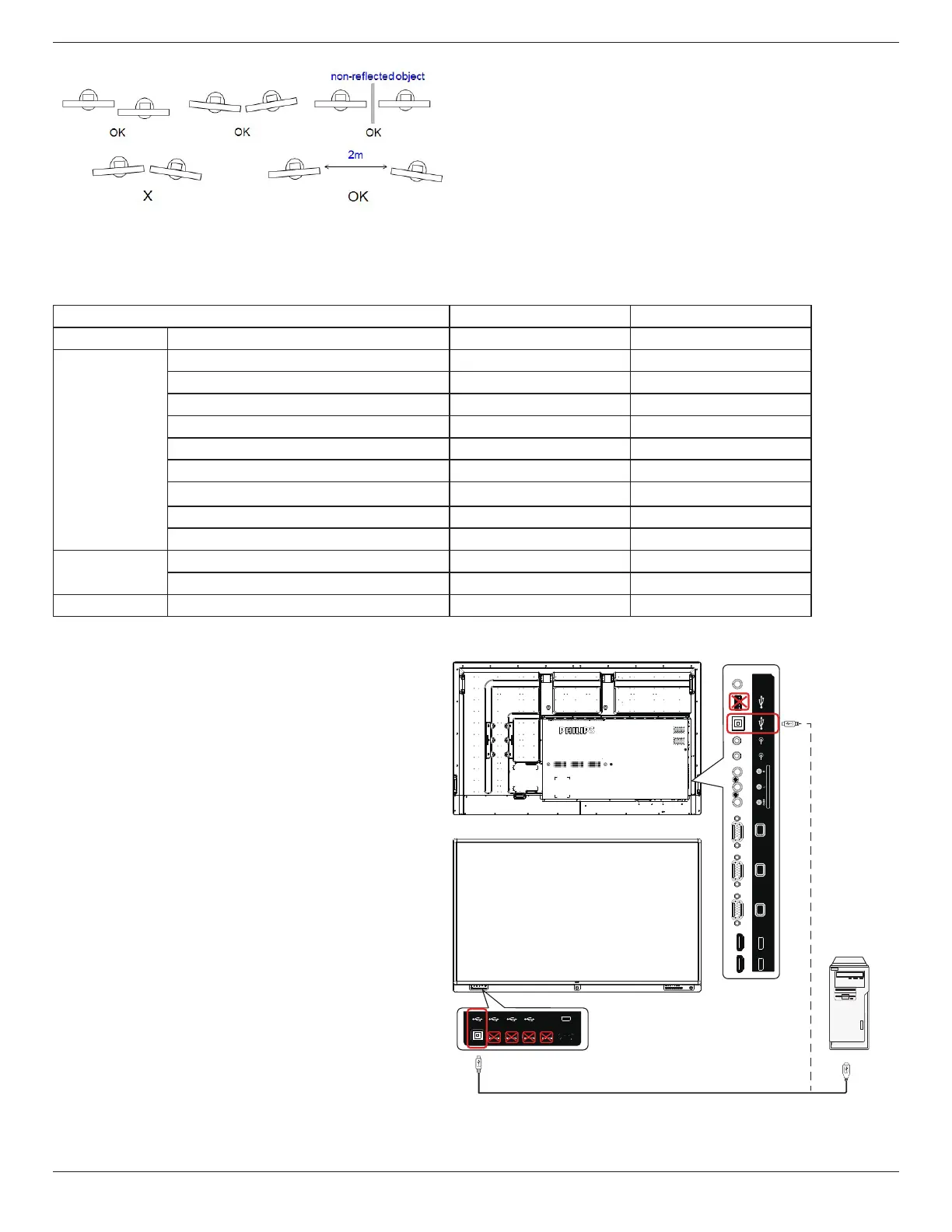
Fig.Touchscreensinterfering
TheTouchscreendoesnotrequireadevicedriverbeinstalledonthehostcomputerforWindowsOS,ForWindows7andWindows8,itis
recommendedthatthestandardMicrosoftWindowControlPanelcalibrationisused.
OS
Single Touch Multi_Touch
Ubuntu Ubuntu14.10
N/A ≤10
Windows
Windows7HomeBasic
1 N/A
Windows7HomePremium
1 N/A
Windows7Ultimate
N/A ≤10
Windows7Professional
N/A ≤10
Windows8/8.1
N/A ≤10
Windows10TechnicalPreview
N/A
≤10
Windows10Home
1 N/A
Windows10Pro
N/A ≤10
Windows10Education
N/A ≤10
MacOSX
MacOSX10.10
1
N/A
MacOSX10.11
1 N/A
Android Android4.0+
N/A ≤10
1. WehighlyrecommendusingthelatestServicePackwithall
Windows7OS.
2. DigitizerinputtoWindowsreferstotouchdigitizeras
opposedtopendigitizerintabletPCs.
3. SetasdefaultbyMicrosoft.
4. TouchcannotworkifTPMUSBcableplugintoUSBI/F.
USB USB USB USB
5V/2A
HDMI1 IN
VGA1 IN
HDMI3 IN HDMI4 IN
VGA2 IN VGA OUT
AUDIO1 IN AUDIO2 IN
USB
SPDIF
OUT
AV INPUT
USB
PC




 To Next Page