75BDL3151T
34
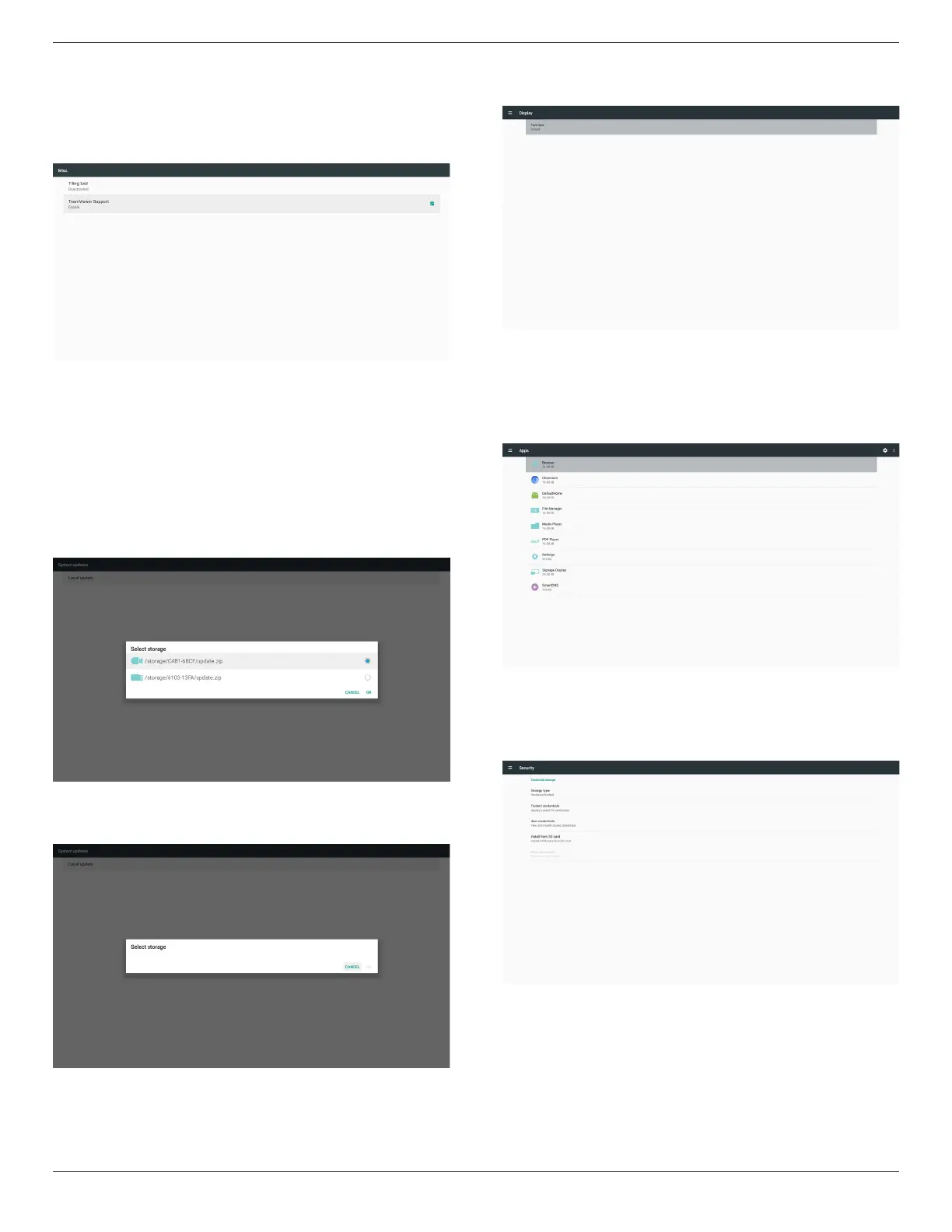
5.4.6. Misc.
5.4.6.1 Tiling tool (not support)
5.4.6.2 TeamViewer Support
Enable/DisableTeamViewersupport.
5.4.7. System update
1. Localupdate
(1)Willautomaticallysearchupdate.zipinUSBorSDcard.Iffoundwill
beshownupinlistforuserselection.
Note
a.OnlysupportAndroidFullimage.
b.Filenameshouldbeupdate.zip
c.Theleshouldbelocatedinrootofstorage.
(2)Afterselectingupdate.ziple,systemwillrestartandstartupdating.
(3)Ifupdate.zipisnotfound.Thedialogis“nocontent”.(OKbuttonwill
begrayed.)
5.5. Display
Usercanmodifythefontsize,canchoose:Small/Normal/Large/Huge
5.6. Apps
Displayapplicationsinformation.
Note
(1)UseroptionskeyonRCUtoshowsettingoption.
5.7. Security
(1)Credentialstorage
Controlpanelofcerticates










 To Next Page